
Script running in toolkit but fails in Illustartor
I have a script that loops through items on the page, then depending if they are a textFrame or a pathItem calls a seperate function. All seems to work well whilst I'm in the ExtendScript Toolkit environment, but when I put the script into illustrator and run it directly I get the following error. Can anyone tell me what I'm doing wrong
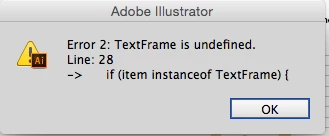
It seems to be refering to the code 'if (item instanceof TextFrame) {'
for (var i = doc.pageItems.length -1; i > -1; i--) {
var item=doc.pageItems;
if (item instanceof TextFrame) {
changeText(item)
}
if (item instanceof PathItem) {
changePath(item)
}
}
function changeText(item) {
item.textRange.characterAttributes.figureStyle=FigureStyleType.TABULAR
item.textRange.characterAttributes.fillColor=spotBlack;
item.textRange.characterAttributes.ligature.true
}
function changePath(item) {
if (Math.round(item.strokeColor.cyan) == crowbarBlack.cyan &&
Math.round(item.strokeColor.magenta)== crowbarBlack.magenta &&
Math.round(item.strokeColor.yellow) == crowbarBlack.yellow &&
Math.round(item.strokeColor.black) == crowbarBlack.black) {
item.strokeColor=spotBlack;
}
if (Math.round(item.fillColor.cyan) == crowbarBlack.cyan &&
Math.round(item.fillColor.magenta)== crowbarBlack.magenta &&
Math.round(item.fillColor.yellow) == crowbarBlack.yellow &&
Math.round(item.fillColor.black) == crowbarBlack.black) {
item.fillColor=spotBlack;
}
}


 AdChoices