


- Home
- Illustrator
- Discussions
- Re: Sharp angles with pen and puppet warp?
- Re: Sharp angles with pen and puppet warp?

Copy link to clipboard
Copied
This is more two questions in one, but both are for similar reasons.
First off, is there a way to do more sharp angles with the puppet warp? To use an L shape as an example, let's say I want to make it into a 45 degree angle with the puppet warp, how would I setup the pins to do that whilst minimizing curve?
Second is more of a quality of life sort of thing with the pen tool, but if I'm making a path with the pen tool, how would I go about removing the blue-dot-thing so I can make a sharp angle after making a curved path? I usually just place the anchor point, select the covert tool, remove the front dot-thing, and then continue with the path. There's a faster and more convenient way of doing this, right?


 1 Correct answer


gatlinv51409754 schrieb
Would the pen tool work?
I'm not talking about the brush tool at all, just about brushes.
How to work with brushes in Illustrator
You can assign them to paths drawn with the pen tool as well.


Explore related tutorials & articles
 13
Replies
13
13
Replies
13


Copy link to clipboard
Copied
As for the second question, after you click and drag to create a curve just stay in the Pen tool, click again on the just-created point at the end of the curve, then click where you want the next point. The two points will be connected by a straight line segment.
I'll take a look at the first question and get back to you if I find an answer.
Peter
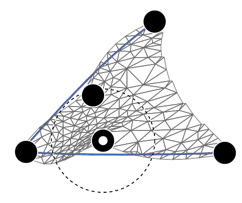
Okay, assuming this is what you're after, just place pins at the extremities and the vertex, move a pin to 45°, then select each pin and rotate its circle until you get the results you want.
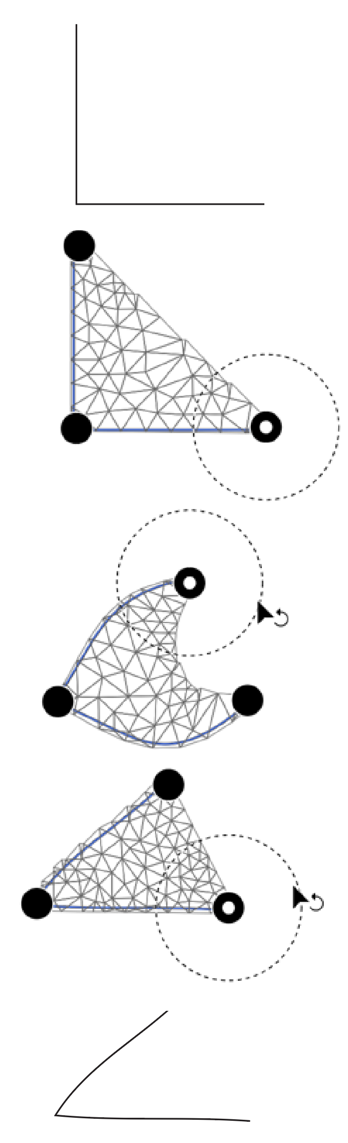
You might find you need to add additional pins to fine-tune:
Copy link to clipboard
Copied
You're on the right track with the puppet warp, but to be more specific, I'm referring to something like this...
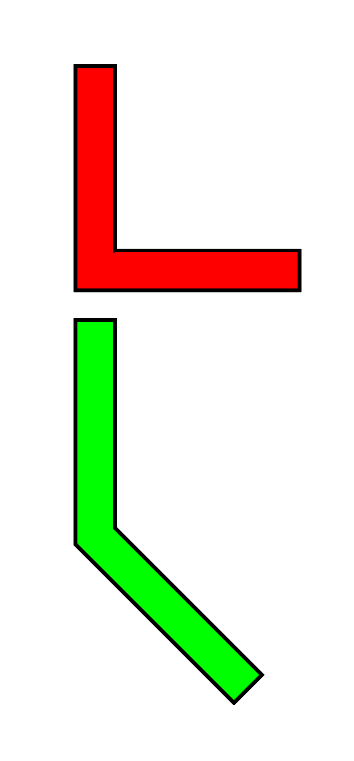
Basically, if I wanted to make the red shape as identical to the green shape as possible using only the puppet warp tool, what's the best way to approach this and how would I fine tune it?
Copy link to clipboard
Copied
The puppet warp will always make your shapes round.
Is there anything wrong with using a brush?
Or multiple strokes on a path?
Copy link to clipboard
Copied
It's more for the quality of life since making arms for my characters is easily the most annoying part
Copy link to clipboard
Copied
gatlinv51409754 schrieb
It's more for the quality of life since making arms for my characters is easily the most annoying part
Try out art brushes for arms.
Copy link to clipboard
Copied
Would the pen tool work?
Copy link to clipboard
Copied
gatlinv51409754 schrieb
Would the pen tool work?
I'm not talking about the brush tool at all, just about brushes.
How to work with brushes in Illustrator
You can assign them to paths drawn with the pen tool as well.
Copy link to clipboard
Copied
Oh, I understand. I'll look into it

Copy link to clipboard
Copied
pen tool, ..make a sharp angle after making a curved path?
Click on the anchor, you have just made, to break it ?
or before you release the mouse, hold down Alt (option) and reposition the forward handle

Copy link to clipboard
Copied
I have a similar question. In After Effects, the Puppet Tool has something called "starch" that you can add to the mesh to make it less bendy. Is there something similar in Illustrator?
Copy link to clipboard
Copied
Copy link to clipboard
Copied
It "stiffens" the mesh so that when you move one of the puppet pins, the area in between the pins stays stiffer.
Copy link to clipboard
Copied


Find more inspiration, events, and resources on the new Adobe Community
Explore Now
 AdChoices