Exit
  • Global community
    • Language:
      • Deutsch
      • English
      • Español
      • Français
      • Português
  • 日本語コミュニティ
  • 한국 커뮤니티
0

Smart Guides in Illustrator not showing [when using Grid]

Explorer ,
Oct 12, 2020 Oct 12, 2020

Mac Illustrator 2020


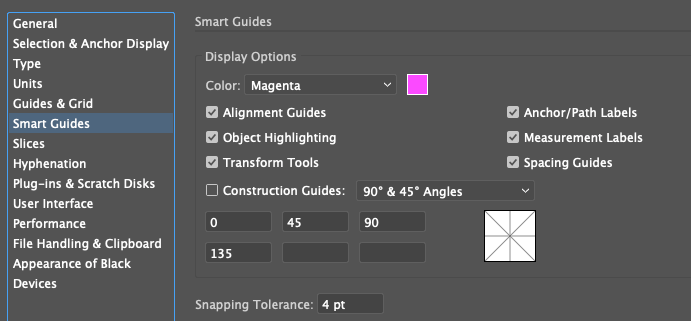
Turned on Smart Guides with CMD + U with these settings

settings.png


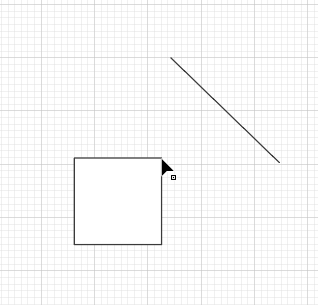
Was expecting to see the word 'anchor' or 'path' when hovering over the object, but am seeing none.

How can I fix this ?


smart_guides_not_showing.png

1.9K
Translate
Report
Community guidelines
Be kind and respectful, give credit to the original source of content, and search for duplicates before posting. Learn more
community guidelines

correct answers 1 Correct answer

Explorer , Oct 12, 2020 Oct 12, 2020

Just figured it works only when Snap to Grid is turned off. 

Translate
Adobe
Explorer ,
Oct 12, 2020 Oct 12, 2020

Just figured it works only when Snap to Grid is turned off. 

Translate
Report
Community guidelines
Be kind and respectful, give credit to the original source of content, and search for duplicates before posting. Learn more
community guidelines
Explorer ,
Oct 20, 2020 Oct 20, 2020

Is this how its supposed to work on Illustrator 2020 (mac) ??

Translate
Report
Community guidelines
Be kind and respectful, give credit to the original source of content, and search for duplicates before posting. Learn more
community guidelines
Community Expert ,
Nov 15, 2020 Nov 15, 2020

"Is this how its supposed to work on Illustrator 2020 (mac) ??"


It's always worked like this. Smart guides only work when Snap to Grid is off.


~ Jane

Translate
Report
Community guidelines
Be kind and respectful, give credit to the original source of content, and search for duplicates before posting. Learn more
community guidelines
New Here ,
Dec 09, 2021 Dec 09, 2021

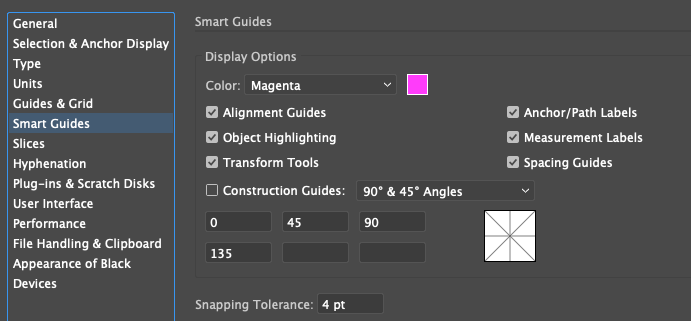
I'm using a Mac, and after trying all the classics without any results, I realized that the snapping tolerance was set at 0. After changing the snapping tolerance to 4 I had smart guides working as expected.


I hope this helps!

Translate
Report
Community guidelines
Be kind and respectful, give credit to the original source of content, and search for duplicates before posting. Learn more
community guidelines
New Here ,
Dec 09, 2021 Dec 09, 2021

By the way, you can set up the snapping tolerance down to work and the smart guides will work as well.

Translate
Report
Community guidelines
Be kind and respectful, give credit to the original source of content, and search for duplicates before posting. Learn more
community guidelines
Community Beginner ,
May 23, 2022 May 23, 2022
LATEST

THANK YOU for posting this! My smart guides randomly stopped working. I went through all of my settings and didn't realize that this was reset to zero; no one else anywhere I had combed through mentiond this detail to get the smart guides working again.  You saved both my hairline and sanity with this detail.  

Translate
Report
Community guidelines
Be kind and respectful, give credit to the original source of content, and search for duplicates before posting. Learn more
community guidelines