


- Inicio
- Illustrator
- Hilos de conversación
- Re: Striped line down middle of lines - how get ri...
- Re: Striped line down middle of lines - how get ri...

Copiar vínculo al Portapapeles
Copiado
Hello:
I have lines which have a striped line down the middle. The line was originally green and I changed it to a gray. Now the gray line (not a rectangle or any other shape) has a green center.
I am all for ideas like finding a cream center in confections, but any time I use the pen tool to extend these lines, the green-within-gray-line is added, not just the gray I selected.
I tried to isolate it and change the opacity and other trick to minimize the effect, but I just need to rip it out somehow.

Any ideas as to what is going on with these lines?
Any ideas as to how to correct without just deleting all such affected lines and redrawing?
Thank you!


 1 respuesta correcta


Here's a tutorial how to check it out: https://www.youtube.com/watch?v=YZooJyG2UT4


Examinar y buscar tutoriales y artículos relacionados
 8
réplicas
8
8
réplicas
8


Copiar vínculo al Portapapeles
Copiado
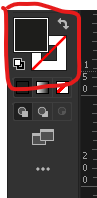
Looks like you have a green fill with grey stroke..? What does your fill and stroke panel look like..?
Copiar vínculo al Portapapeles
Copiado
No fill. That was one of the first things I checked. I also checked whether I could alter it using the "Draw Inside" feature, but no luck.

Copiar vínculo al Portapapeles
Copiado
Have a look at the Appearance panel, it could be another stroke added to the layer (select the layer to check that).
Copiar vínculo al Portapapeles
Copiado
I checked the Appearance panel and also selected the different layers on which was found these lines.
Unfortunately, I do not remember whether the Appearance panel showed me anything other than that the opacity would not work on these lines and some other ones.
I am still interested to know what people think here because I am afraid it will happen again, but I do have to admit that I decided to just delete all of the offnding lines and redraw them.
One thing that may or may not matter is that these lines were brought in from Rhino3D. They were green when they arrived and then had the green center after trying to change them to gray.
Copiar vínculo al Portapapeles
Copiado
If it actually was a stroke applied to a layer, then this couldn't have been imported from Rhino. That is just not possible.
But what is actually possible is that you or someone else followed some bad advice. There are still a lot of tutorials telling you to click ton the circle in the layer in the layers panel in order to select everything on the layer. But when you use that in order to apply strokes or fills to the object, that tip is a recipe for desaster.
Copiar vínculo al Portapapeles
Copiado
Here's a tutorial how to check it out: https://www.youtube.com/watch?v=YZooJyG2UT4

Copiar vínculo al Portapapeles
Copiado
Perfect! I understand now. Thank you.
Copiar vínculo al Portapapeles
Copiado
Glad this solved it for you.


Encuentra más inspiración, eventos y recursos en la nueva comunidad de Adobe
Explorar ahora
 AdChoices