Exit
  • Global community
    • Language:
      • Deutsch
      • English
      • Español
      • Français
      • Português
  • 日本語コミュニティ
  • 한국 커뮤니티
0

Transparency mode issues

Community Beginner ,
Oct 19, 2017 Oct 19, 2017

Hi,

I'm using Illustrator CC 2017

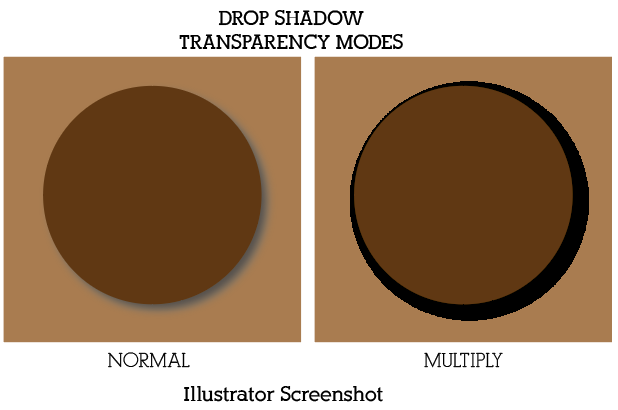
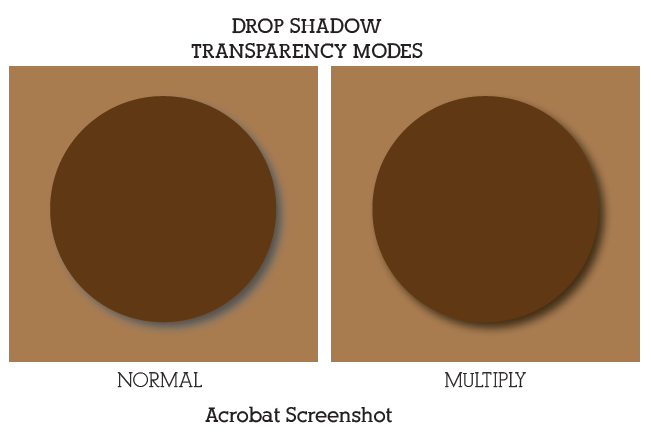
I'm unable to apply the transparency modes such as "multiply", "Darken" etc.., When I apply these modes, it will came as thick black stroke/shape.

If I apply drop shadow to a shape only normal transparency mode will work. instead of blur and fade, a thick black stroke in Multiply mode. Please help me to solve this issue.

362
Translate
Report
Community guidelines
Be kind and respectful, give credit to the original source of content, and search for duplicates before posting. Learn more
community guidelines

correct answers 1 Correct answer

Community Expert , Oct 20, 2017 Oct 20, 2017

Please try View > Preview on CPU

Translate
Adobe
Community Expert ,
Oct 19, 2017 Oct 19, 2017

Please show before and after.

You might also want to try and View > Preview on CPU.

Translate
Report
Community guidelines
Be kind and respectful, give credit to the original source of content, and search for duplicates before posting. Learn more
community guidelines
Community Beginner ,
Oct 20, 2017 Oct 20, 2017

Hi Monica

Please see below the same file snap shot in acrobat and illustrator. This issue only in Illustrator. When its open in adobe acrobat, its showing perfect.

Translate
Report
Community guidelines
Be kind and respectful, give credit to the original source of content, and search for duplicates before posting. Learn more
community guidelines
Community Expert ,
Oct 20, 2017 Oct 20, 2017

Please try View > Preview on CPU

Translate
Report
Community guidelines
Be kind and respectful, give credit to the original source of content, and search for duplicates before posting. Learn more
community guidelines
Community Beginner ,
Oct 20, 2017 Oct 20, 2017
LATEST

Got it. Thanks a ton!!!!

Translate
Report
Community guidelines
Be kind and respectful, give credit to the original source of content, and search for duplicates before posting. Learn more
community guidelines