
Participant
August 10, 2021
Answered

Unable to use drag Zoom in Illustrator

  • August 10, 2021
  • 5 replies
  • 20636 views
I want to use drag zoom in Illustrator, but I can't.

 Animated zoom is checked. 

When creating a canvas for the first time, drag zoom works without any problem.

But after creating a shape, it changed by scrubby zoom.

I've always used drag zoom when using other tools, so it's too inconvenient to work with. Anyone know why?
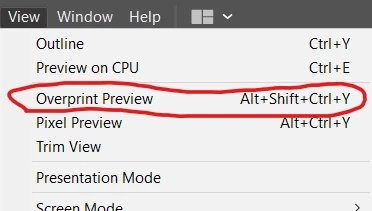
Correct answer David31854020cf33

Please Please Please check if you turn overprint preview on. somehow deactivating it fixes the issue for me. made an account solely to answer you

5 replies

David31854020cf33Correct answer
Participant
August 23, 2023

Please Please Please check if you turn overprint preview on. somehow deactivating it fixes the issue for me. made an account solely to answer you

Participant
December 14, 2023

And thank you so much for this, I for the first time logged in on adobe solely to thank you, Please read this!!! Thanks!!!

Anshul_Saini
Community Manager
Community Manager
December 28, 2023

Hello @MuhammadEssa @David31854020cf33,


Thank you for your feedback and for taking the time to share your experience. I'm glad to hear that the suggestion provided by David31854020cf33 was helpful in resolving the issue with drag zoom in Illustrator.


Regarding the drag zoom issue, using Overprint Preview in Illustrator activates CPU preview, which can disable GPU preview and affect features like drag zoom. The expected behavior is that drag zoom doesn't work in Overprint Preview. To resolve this, you can switch to Normal Preview, which will re-enable GPU preview and should allow drag zoom to function as usual. I hope this clarifies!


If you have any more questions or if there's anything else you'd like assistance with, feel free to let me know. I'm here to help!


Best regards,

Anshul Saini

진5C9AAuthor
Participant
August 20, 2021

I confuse scrubby zoom with original zoom. I thought scrubby zoom and original zoom were the same thing. Right now I'm just using the original Zoom. I'll edit the question later accurately. Thank you for kind replies!

Mike_Gondek10189183
Community Expert
Community Expert
August 10, 2021

If you want drag and drop zoom, then you want to UNCHECK animated zoom.

Anshul_Saini
Community Manager
Community Manager
August 10, 2021

Hi there,


Sorry about the trouble. I would request you to share a few more details like:

  • OS & version of Illustrator
  • When did this issue start happening?
  • Are there any recent changes made to your system? For example, any antivirus, system updates, or web extensions installed recently.
  • Does disabling animated zoom from Preferences (cmd/ ctrl + k > Performance > Uncheck Animated Zoom) helps to resolve the issue?


Looking forward to your resposne.


Thanks,
Anshul Saini

Participant
February 6, 2023

I've been having the same exact problem, and I've tried to check and uncheck the animated zoom box. The only thing that fixes is closing it and opening it again. It can be very frustrating. 


I have the most updated OS of illustrator, and I haven't changed anything on my PC that made this happen. This only recently started happening since the latest update. 

Anubhav M
Community Manager
Community Manager
February 6, 2023

Hello @Lia_Gonz,


Sorry to hear about this experience. I am assuming you are using a Windows PC. If yes, kindly try to update the GPU drivers (https://helpx.adobe.com/x-productkb/multi/update-graphics-driver.html), setting Graphics Performance for Illustrator to use High Performance (https://www.amd.com/en/support/kb/faq/gpu-110), and then relaunch Illustrator to check if it helps.


If the issue persists, kindly share some more information, like the exact version of the OS/Illustrator, System Configuration (CPU/GPU(s)/Memory/Display Monitor(s)), and a screen recording of the problem (https://community.adobe.com/t5/illustrator-discussions/screen-record-an-issue-on-windows-amp-macos-for-sharing/td-p/12967727), so that we can investigate this further.


Looking forward to your response.


Thanks,

Anubhav

John Mensinger
Community Expert
Community Expert
August 10, 2021

I never liked how people call it "scrubby" zoom, but I believe they say that when they're referring to animated zoom (I could be wrong). So, I suspect when you say "drag" zoom, you mean the other method; dragging out a marquee around the area you want zoomed. (Unfortunately 'drag zoom' would be a much more accurate slang term for animated zoom, so I may just have confused myself, even.)


Anyway, the language in your post is not entirely clear to me, but if I understand correctly, it sounds like you want Animated Zoom turned off.

Doug A Roberts
Community Expert
Community Expert
August 10, 2021

Photoshop got in first and called it Scrubby Zoom, so I think we're stuck with it.