Participating Frequently
January 12, 2022
해결됨

Ungroup objects back to their own layers - Illustrator

  • January 12, 2022
  • 4 답변들
  • 7864 조회
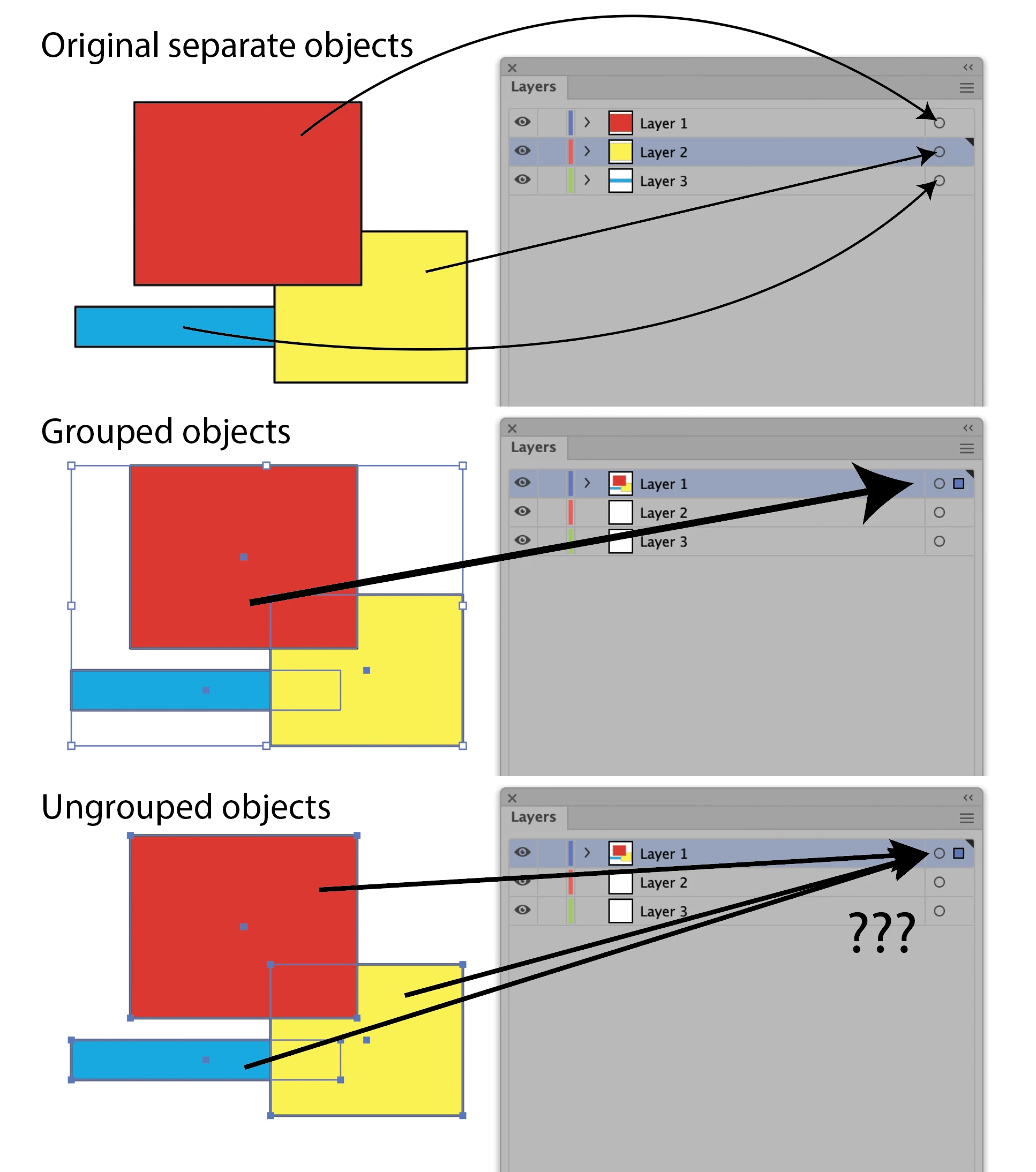
Hi all, is there a way for Illustrator to ungroup elements back to their original layers they came from? (like InDesign does). Ticking 'remember layers' doesn't solve it.
Currently, say that I have
Box A in layer 1
Box B in layer 2
Box C in layer 3

I group them, the group moves to layer 1. I ungroup, the separate boxes STAY in layer 1 (when they should move back to 1, 2, 3)
Is there a script or plug-in that will enable this function? It's very time consuming having to open up Layer 1, and manually drag the objects back to where they came from - not to mention the risk of making mistakes.
Please help.
 
Thank you 


최고의 답변: Sergey Osokin

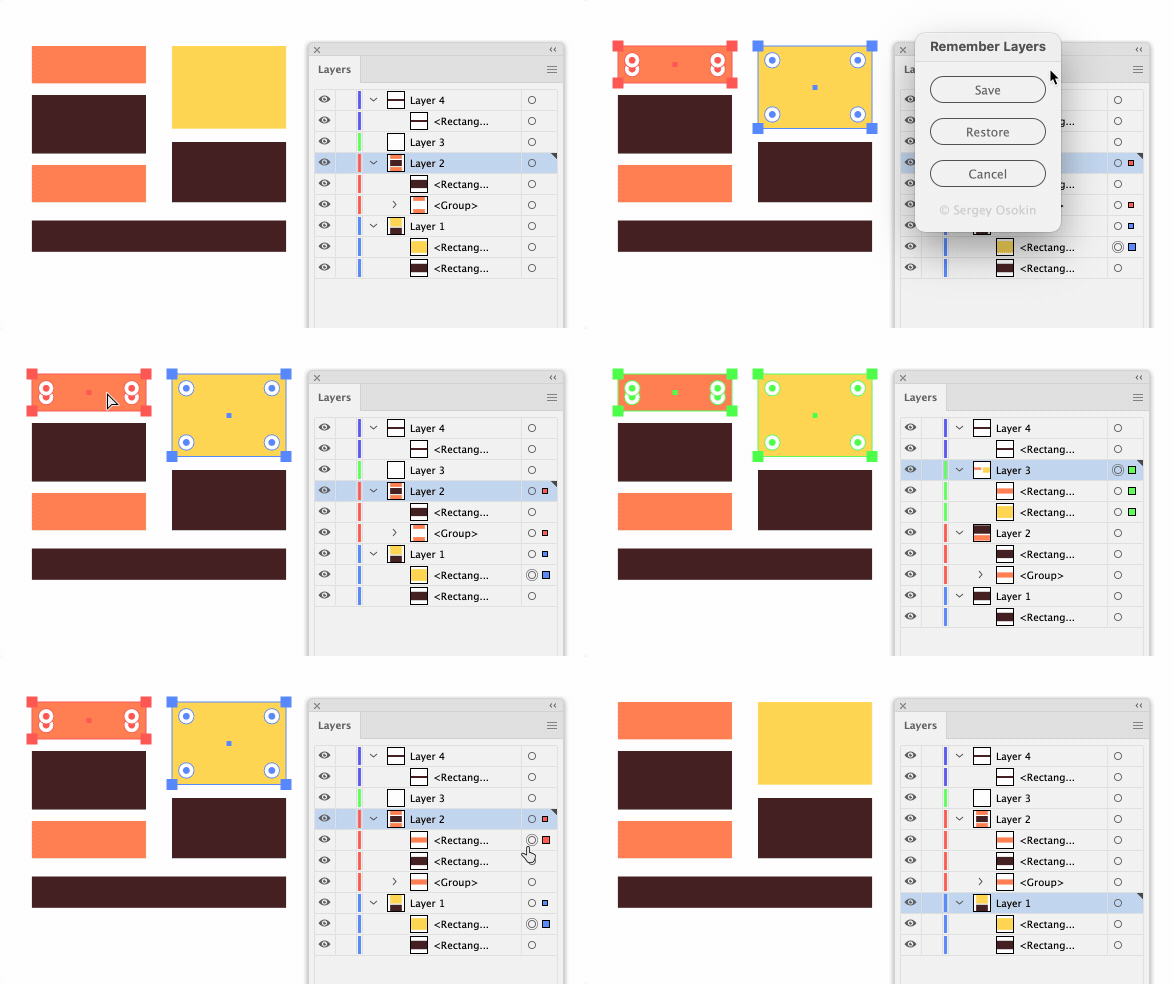
My solution requires repeated runs of the script, but it works. First save parent layers via object attribute, and restore on request.
 

/*
  RememberLayers.jsx for Adobe Illustrator
  Description:
  Saving and restoring selected items to their original layers.
  The order within the layers is not restored
  Author: Sergey Osokin, email: hi@sergosokin.ru
*/

//@target illustrator
app.preferences.setBooleanPreference('ShowExternalJSXWarning', false); // Fix drag and drop a .jsx file

function main() {
  if (!documents.length) return;
  if (selection.length == 0 || selection.typename == 'TextRange') return;

  var doc = activeDocument,
      docSel = selection,
      keyPref = 'origLayer=';

  // DIALOG
  var dialog = new Window('dialog', 'Remember Layers');
      dialog.preferredSize.width = 146;
      dialog.orientation = 'column';
      dialog.alignChildren = ['fill', 'center'];

  var saveBtn = dialog.add('button', undefined, 'Save');
  var restoreBtn = dialog.add('button', undefined, 'Restore');
  var cancel = dialog.add('button', undefined, 'Cancel', {name: 'cancel'});

  var copyright = dialog.add('statictext', undefined, '\u00A9 Sergey Osokin');
      copyright.justify = 'center';
      copyright.enabled = false;

  saveBtn.onClick = save;
  restoreBtn.onClick = restore;
  cancel.onClick = dialog.close;

  function save() {
    for (var i = 0, len = selection.length; i < len; i++) {
      var currItem = selection[i];
      removeNote(currItem, keyPref);
      currItem.note += keyPref + currItem.layer.name + ';';
    }
    dialog.close();
  }

  function restore() {
    var regexp = new RegExp(keyPref + '(.+)', 'g')
    for (var i = selection.length - 1; i >= 0; i--) {
      var currItem = selection[i],
          layerName = '';
      if (currItem.note.match(keyPref) !== null) {
        layerName = currItem.note.split(';')[0].replace(regexp, '$1');
        moveToLayer(currItem, layerName);
      }
      removeNote(currItem, keyPref);
    }
    dialog.close();
  }

  dialog.center();
  dialog.show();
}

// Remove keyword from Note in Attributes panel
function removeNote(item, key) {
  var regexp = new RegExp(key + '(.+);', 'g');
  item.note = item.note.replace(regexp, '');
}

// Move selected item to original Layer by name
function moveToLayer(item, name) {
  var origLayer;
  try {
    origLayer = activeDocument.layers.getByName(name);
    item.move(origLayer, ElementPlacement.PLACEATBEGINNING);
  } catch (e) {}
}

try {
  main()
} catch (e) {}


4 답변

Sergey Osokin
Inspiring
January 14, 2022

My solution requires repeated runs of the script, but it works. First save parent layers via object attribute, and restore on request.


/*
  RememberLayers.jsx for Adobe Illustrator
  Description:
  Saving and restoring selected items to their original layers.
  The order within the layers is not restored
  Author: Sergey Osokin, email: hi@sergosokin.ru
*/

//@target illustrator
app.preferences.setBooleanPreference('ShowExternalJSXWarning', false); // Fix drag and drop a .jsx file

function main() {
  if (!documents.length) return;
  if (selection.length == 0 || selection.typename == 'TextRange') return;

  var doc = activeDocument,
      docSel = selection,
      keyPref = 'origLayer=';

  // DIALOG
  var dialog = new Window('dialog', 'Remember Layers');
      dialog.preferredSize.width = 146;
      dialog.orientation = 'column';
      dialog.alignChildren = ['fill', 'center'];

  var saveBtn = dialog.add('button', undefined, 'Save');
  var restoreBtn = dialog.add('button', undefined, 'Restore');
  var cancel = dialog.add('button', undefined, 'Cancel', {name: 'cancel'});

  var copyright = dialog.add('statictext', undefined, '\u00A9 Sergey Osokin');
      copyright.justify = 'center';
      copyright.enabled = false;

  saveBtn.onClick = save;
  restoreBtn.onClick = restore;
  cancel.onClick = dialog.close;

  function save() {
    for (var i = 0, len = selection.length; i < len; i++) {
      var currItem = selection[i];
      removeNote(currItem, keyPref);
      currItem.note += keyPref + currItem.layer.name + ';';
    }
    dialog.close();
  }

  function restore() {
    var regexp = new RegExp(keyPref + '(.+)', 'g')
    for (var i = selection.length - 1; i >= 0; i--) {
      var currItem = selection[i],
          layerName = '';
      if (currItem.note.match(keyPref) !== null) {
        layerName = currItem.note.split(';')[0].replace(regexp, '$1');
        moveToLayer(currItem, layerName);
      }
      removeNote(currItem, keyPref);
    }
    dialog.close();
  }

  dialog.center();
  dialog.show();
}

// Remove keyword from Note in Attributes panel
function removeNote(item, key) {
  var regexp = new RegExp(key + '(.+);', 'g');
  item.note = item.note.replace(regexp, '');
}

// Move selected item to original Layer by name
function moveToLayer(item, name) {
  var origLayer;
  try {
    origLayer = activeDocument.layers.getByName(name);
    item.move(origLayer, ElementPlacement.PLACEATBEGINNING);
  } catch (e) {}
}

try {
  main()
} catch (e) {}

angelo von scallywag
Participant
June 30, 2025

thank you sergey, I'm going to use this everyday 😄

Inspiring
January 13, 2022

Hi danielem41796145, as our colleagues said there is no native feature. I don't know what your purpose is with this function, but yes, as you mentioned, it is possible to script it. Would you like me to try?


Best regards
maalin작성자
Participating Frequently
January 13, 2022

Hi Inacio, fantastic - if you can figure out a script it would be great! Thank you

Inspiring
January 13, 2022

Okay Daniel, tomorrow we will have one. Until then !

Best regards
Charu Rajput
Community Expert
Community Expert
January 12, 2022

Same, as per me as well it does not exist, unless if someone has workaround for that.

You can post your feature request at below link.

https://illustrator.uservoice.com/forums/333657-illustrator-desktop-feature-requests


Best regards
maalin작성자
Participating Frequently
January 12, 2022

Thank you, I'll submit.

Legend
January 12, 2022

As far as I know, Illustrator does not yet have this function. (Although InDesign does)

Can you do what you need to do with your multiple selected objects without grouping them?

maalin작성자
Participating Frequently
January 12, 2022

I can, workarounds as I've done thus far. Such feature would speed up the process, though.