


- Home
- Illustrator
- Discussions
- Re: Hi phxmartyaz, If I understand you correctly t...
- Re: Hi phxmartyaz, If I understand you correctly t...

Copy link to clipboard
Copied
I was shutting down Illustrator 2020 after a freeze and decided to open the submenu for Ill in the End Task window. This is the first time I've heard of this application and google is giving me just a couple mentions but no explanation of its function. Curiosity has gotten the best of me now, so I'm just wondering, does anyone know? Is it a 2020 addition? I don't have any real reason to find out, though if it has anything to do with my frequent crashes that might be useful to know. (In case anyone asks, these crashes have persisted for a couple months now and my CC version is up to date, though I do need to do a Windows update tonight.)

It's file location is C:\Program Files\Adobe\Adobe Illustrator 2020\Support Files\Contents\Windows
If anyone happens to know, cool!


 1 Correct answer

Hi all,
It is used for Background Save and Background Export. The new feature introduced in Illustrator 2020.
Check this link for more details about this feature: https://community.adobe.com/t5/illustrator/continue-to-work-on-your-projects-with-new-background-save-and-export/td-p/10724061
Thanks,
Om


Explore related tutorials & articles
 26
Replies
26
26
Replies
26

Copy link to clipboard
Copied
Nobody? Is anyone more code-savvy than me even curious enough to go digging?

Copy link to clipboard
Copied
I have the same question!! It's crazy that I can't find ANYTHING online about this..
Copy link to clipboard
Copied
Hi all,
It is used for Background Save and Background Export. The new feature introduced in Illustrator 2020.
Check this link for more details about this feature: https://community.adobe.com/t5/illustrator/continue-to-work-on-your-projects-with-new-background-sav...
Thanks,
Om

Copy link to clipboard
Copied
Okay, thanks. That may explain why, after AI hangs and has to be force-quit, it's impossible to restart it. I can see in MacOS Activity Monitor that AIRobin is still running and also is hung, and possibly that is keeping AI from being relaunched. But... even after force-quitting AIRobin, AI still won't start up again. Unfortunately there doesn't seem to be any way to regain control except a full power-off restart. It wouldn't be so bad except that I use AI every day, and this happens about every second day, so I lose a lot of time restarting to recover from AI hangs.


Copy link to clipboard
Copied
Hi,
Are you still having the AI freeze or crash?

Copy link to clipboard
Copied
I too am having the issue. Illustrator 2020 hangs up and I'm forced to shut it down. Seems the only way for it to come up again is to log out of CC and then back in and it hangs up again with no luck.
Copy link to clipboard
Copied
Hi phxmartyaz, and others having issues with your application,
Please check to find out if your security system is creating a block. If that is not the case you may follow the guidelines in my post at https://community.adobe.com/t5/photoshop/photoshop-freezing-at-99-when-saving-file/m-p/10828417#M293... at the post that starts "Hi everyone" to send a report to Adobe.
Regards
JG
Copy link to clipboard
Copied
I just uninstalled Illustrator and re-installed. What happens for me is when I click to run it, nothing happens yet I see in the Task Manager that it is on. Nothing shows up on the screen at all. When I would install an older version and open up a file created in a newer version, it would crash. This didn't happen to me last week and now it is. It makes no sense.
The only thing I have changed is that I did install a new 4k BenQ monitor. Can't imagine that would affect it.
Copy link to clipboard
Copied
Hi phxmartyaz,
If I understand you correctly to be saying the reinstalled application do not open, but appear to be running do the following checks:
Check to make sure you have adequate hard drive space.
Check to make sure there's no malware on your system (spyware, hackware, hookware, etc)
If those checks are ok, assuming nothing has gone wrong with you memory card, close out all websites.
Uninstall illustrator.
Close down your security and try installing illustrator again.
Remember to rearm your computer with its security immediately after you're done. If that works, add illustrator to allow access in security.
If it does not work send a report to Adobe with all detailed description, including additional information and utility as outlined in the link reference above.
Also check for the latest available updates for your OS.
Regards
JG
Copy link to clipboard
Copied
Check to make sure you have adequate hard drive space.
I have 2 TB of space. Plenty of space
Check to make sure there's no malware on your system (spyware, hackware, hookware, etc)
Zero malware as this is a new build and I've been using it for only one month.
If those checks are ok, assuming nothing has gone wrong with you memory card, close out all websites.
Done all this and still nothing.
Uninstall illustrator.
Did this too
Close down your security and try installing Illustrator again.
Did that. I even started in Safe Mode and it didn't work either.
If it does not work send a report to Adobe with all detailed descriptions, including additional information and utility as outlined in the link reference above.
I never get an error message because when I click it, nothing happens, yet in my Task Manager window, it shows that it is running (when it's not).

Copy link to clipboard
Copied
Hi,
some times is problem with windows, if you useing 2 video card - one integrated and other additional, windows cant manage correctly both, it's good to turn off integrated video card and illustrator works much better, i'll try and for me it's worked perfect


Copy link to clipboard
Copied
Tks, i thinked it virus :))

Copy link to clipboard
Copied
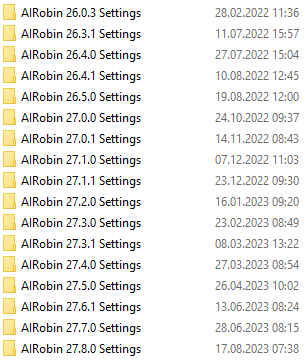
Sorry to be re-fueling this thread, but I have all these folders with different versions of the app.
Can these be safely removed, or will that affect the functioning of the software?


Copy link to clipboard
Copied
Hello @arnoenzo,
Thanks for reaching out. You may remove the folders for the older versions of Illustrator while keeping the ones you have installed. Feel free to reach out if you have more questions or need assistance. We'd be happy to help.
Thanks,
Anubhav

Copy link to clipboard
Copied
Lookig at this thread this is causing a real issue for us all and all the "suggestions" are the typical excuses to take the focus off the fact that this "feature" is a bug that is tanking us all.
Here's an idea - whie you are working on this buggy software & we are wasting time on this - please give us all a break in subsrupiton fees until this is fixed?
You are forcing us to use a product that is killing our workflows and it is clearly an Adobe issue.
Pease advise & pleae include some recognition that we are paying you & deserve compensation..

Copy link to clipboard
Copied
Then why is it still there when this feature is turned OFF?!

Copy link to clipboard
Copied
I have the same problem plus this:
If I have already closed the program and suspended my laptop, when I restart it and try to open Illustrator, it won't let me because: "another version of Illustrator is running on the back" -- then I find AiRobin2020.
It also says that when I try to save my files: "this file is already in use", and won't let me save it except "save as".

Copy link to clipboard
Copied
I'm having the a problem with it as well. Right now it's consuming 100.4% of my processor. I can't save my file after several times force quitting AI.

Copy link to clipboard
Copied
I use AI 2020 almost daily and it crashes every day hanging me up. I just found the AiRobin.exe problem and googled it. I've used AI for 21 years now and have never had so many problems as I do with AI 2020. I hope Adobe fixes the mess soon. I've started to go back to AI CC 2019.

Copy link to clipboard
Copied
I'm having the same issue.
I use Adobe Illustrator daily and run into this issue about half the days I use.
It's super frustrating, causing me to loose work/time.
Finally, I noticed the same AIRobin 2020 and googled, leading me here.
My issue is when I go to save, menu turns black. I basically have one chance to save before AI crashes and forced to Ctr/Alt/Delete to close, losing any unsaved work. This only happens in AI 2020. Never happened in prior versions.
Although I don't wish this issue on others... I'm glad to see I'm not the only one, and hoping enough people report so Adobe fixes this problem.
Copy link to clipboard
Copied
Yeah, this AIRobin thing has completely made AI unusable. On every file open or save, progress bar "processing" hangs and hangs, crashes, rinse/repeat. Rolled back to a older version... 20 minute tasks are taking 2 hours it's just not workable.

Copy link to clipboard
Copied
I'm having the same issue with AIRobin 2023. This is very frustrating. I used Illustrator everyday, but now I can't even get it loaded.
Copy link to clipboard
Copied
Hello @Justine5E5B,
Sorry to hear about this experience and for the late response. Would you mind trying the suggestions shared in this help article (https://helpx.adobe.com/illustrator/kb/fix-crash-on-launch-issues.html) and checking if it helps?
Also, kindly share the crash report by following the steps shared in this help article (https://helpx.adobe.com/illustrator/kb/crash-next-steps.html). While submitting the report, kindly use the same email account used here in the community so we can locate it quickly.
Looking forward to your response.
Thanks,
Anubhav

Copy link to clipboard
Copied
Hi I am struggling to stay calm. Since AIRobin has been added to AI it has been a continued nightmare using the Illustrator software. Frequent crashes extended opening squences and a massive use of memory. I have done all of the above but still am getting issues. I have turned off all other apps like calendar safari google photoshop but still get issues. The internal fan keeps kicking in and the activity monitor on my 2019 iMac is showing a red graph when both PS and AI and sometimes Bridge are open.......someting that never happened before. Sure I had a few blips but nowhere near as frequent as now and man I abused these apps lots of files open pushing AI to the limits. Good job I don't rely on it to provide my income....and yes I have enough harddrive space I have enough memory. And I send crash reports with cryptic remarks yet never get anybody contact me and I pay £50 per month....What can I do other than take up underwater crocheting?

-
- 1
- 2

Find more inspiration, events, and resources on the new Adobe Community
Explore Now
 AdChoices