


Participant
December 11, 2019
Répondu

What is AiRobin.exe?
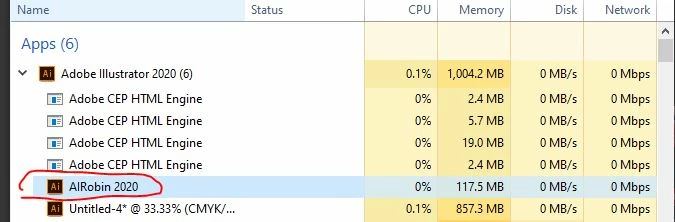

I was shutting down Illustrator 2020 after a freeze and decided to open the submenu for Ill in the End Task window. This is the first time I've heard of this application and google is giving me just a couple mentions but no explanation of its function. Curiosity has gotten the best of me now, so I'm just wondering, does anyone know? Is it a 2020 addition? I don't have any real reason to find out, though if it has anything to do with my frequent crashes that might be useful to know. (In case anyone asks, these crashes have persisted for a couple months now and my CC version is up to date, though I do need to do a Windows update tonight.)


It's file location is C:\Program Files\Adobe\Adobe Illustrator 2020\Support Files\Contents\Windows


If anyone happens to know, cool!

Meilleure réponse par Om Nath Jha

Hi all,


It is used for Background Save and Background Export. The new feature introduced in Illustrator 2020.


Check this link for more details about this feature: https://community.adobe.com/t5/illustrator/continue-to-work-on-your-projects-with-new-background-save-and-export/td-p/10724061


Thanks,

Om

5 commentaires

Participant
August 9, 2022

Yeah, this AIRobin thing has completely made AI unusable. On every file open or save, progress bar "processing" hangs and hangs, crashes, rinse/repeat.  Rolled back to a older version... 20 minute tasks are taking 2 hours it's just not workable.

Participant
November 3, 2022

I'm having the same issue with AIRobin 2023.  This is very frustrating.   I used Illustrator everyday, but now I can't even get it loaded.

Community Manager
November 30, 2022

Hello @Justine5E5B,


Sorry to hear about this experience and for the late response. Would you mind trying the suggestions shared in this help article (https://helpx.adobe.com/illustrator/kb/fix-crash-on-launch-issues.html) and checking if it helps?

Also, kindly share the crash report by following the steps shared in this help article (https://helpx.adobe.com/illustrator/kb/crash-next-steps.html). While submitting the report, kindly use the same email account used here in the community so we can locate it quickly.


Looking forward to your response.


Thanks,

Anubhav

Participant
June 27, 2020

I use AI 2020 almost daily and it crashes every day hanging me up. I just found the AiRobin.exe problem and googled it.  I've used AI for 21 years now and have never had so many problems as I do with AI 2020.  I hope Adobe fixes the mess soon. I've started to go back to AI CC 2019.

Participant
July 31, 2020

I'm having the same issue.
I use Adobe Illustrator daily and run into this issue about half the days I use.
It's super frustrating, causing me to loose work/time.

Finally, I noticed the same AIRobin 2020 and googled, leading me here.

My issue is when I go to save, menu turns black. I basically have one chance to save before AI crashes and forced to Ctr/Alt/Delete to close, losing any unsaved work. This only happens in AI 2020. Never happened in prior versions.

Although I don't wish this issue on others... I'm glad to see I'm not the only one, and hoping enough people report so Adobe fixes this problem.


Participant
March 14, 2020

I have the same problem plus this:
If  I have already closed the program and suspended my laptop, when I restart it and try to open Illustrator, it won't let me because: "another version of Illustrator is running on the back" -- then I find AiRobin2020.

It also says that when I try to save my files: "this file is already in use", and won't let me save it except "save as".

Participant
March 31, 2020

I'm having the a problem with it as well. Right now it's consuming 100.4% of my processor. I can't save my file after several times force quitting AI. 

Om Nath Jha
Om Nath JhaRéponse
Legend
December 19, 2019

Hi all,


It is used for Background Save and Background Export. The new feature introduced in Illustrator 2020.


Check this link for more details about this feature: https://community.adobe.com/t5/illustrator/continue-to-work-on-your-projects-with-new-background-save-and-export/td-p/10724061


Thanks,

Om

Participating Frequently
December 26, 2019

Okay, thanks. That may explain why, after AI hangs and has to be force-quit, it's impossible to restart it. I can see in MacOS Activity Monitor that AIRobin is still running and also is hung, and possibly that is keeping AI from being relaunched. But... even after force-quitting AIRobin, AI still won't start up again. Unfortunately there doesn't seem to be any way to regain control except a full power-off restart. It wouldn't be so bad except that I use AI every day, and this happens about every second day, so I lose a lot of time restarting to recover from AI hangs. 

jacquelingphoto2017
Community Expert
Community Expert
December 31, 2019

Hi, 

Are you still having the AI freeze or crash?


Participant
December 18, 2019

Nobody? Is anyone more code-savvy than me even curious enough to go digging?

alisham
Participant
December 18, 2019

I have the same question!! It's crazy that I can't find ANYTHING online about this..