Exit
  • Global community
    • Language:
      • Deutsch
      • English
      • Español
      • Français
      • Português
  • 日本語コミュニティ
  • 한국 커뮤니티
1

What is the default color profile that I should be using in Adobe Illustrator CC 25.2.1?

Community Beginner ,
Mar 23, 2021 Mar 23, 2021

I downloaded a vector file from the internet (yes, I know. This isn't good). It automatically opened in my Adobe Illustrator, displaying a muted blue, with this error message.
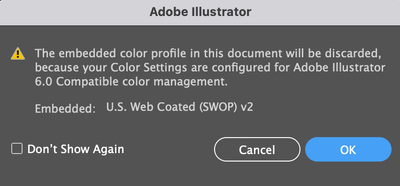


Screen Shot 2021-03-23 at 11.20.09 AM.png


Now, every vector file that I open has muted colors, due to this "Adobe Illustrator 6.0" default.


Question: How do I stop this weird muted color issue by happening? What do I reset my color profile to???

TOPICS
Bug , Import and export
782
Translate
Report
Community guidelines
Be kind and respectful, give credit to the original source of content, and search for duplicates before posting. Learn more
community guidelines

correct answers 1 Correct answer

Community Expert , Mar 23, 2021 Mar 23, 2021

This is a bug. Sofirst of all, please get rid of that setting. Try this: https://community.adobe.com/t5/illustrator/emulate-adobe-illustrator-6-0-bug-in-version-25-2-1/m-p/11904177#M268132


As to which profiles you need to set: depends on your workflows and where you're from.

If you're not printing in the US, then US Web Coated is a bad idea.


Translate
Adobe
Community Expert ,
Mar 23, 2021 Mar 23, 2021

This is a bug. Sofirst of all, please get rid of that setting. Try this: https://community.adobe.com/t5/illustrator/emulate-adobe-illustrator-6-0-bug-in-version-25-2-1/m-p/1...


As to which profiles you need to set: depends on your workflows and where you're from.

If you're not printing in the US, then US Web Coated is a bad idea.


Translate
Report
Community guidelines
Be kind and respectful, give credit to the original source of content, and search for duplicates before posting. Learn more
community guidelines
Community Expert ,
Mar 23, 2021 Mar 23, 2021
LATEST

Revert Photoshop (which is causing the problem) to the previous version 22.2.0

Then set you Edit > Color Settings... to a setting for your location.

Translate
Report
Community guidelines
Be kind and respectful, give credit to the original source of content, and search for duplicates before posting. Learn more
community guidelines

