
Inspiring
February 28, 2017
Question

Width Tool | Weird behavior on closed paths.

  • February 28, 2017
  • 5 replies
  • 4663 views

Hi,

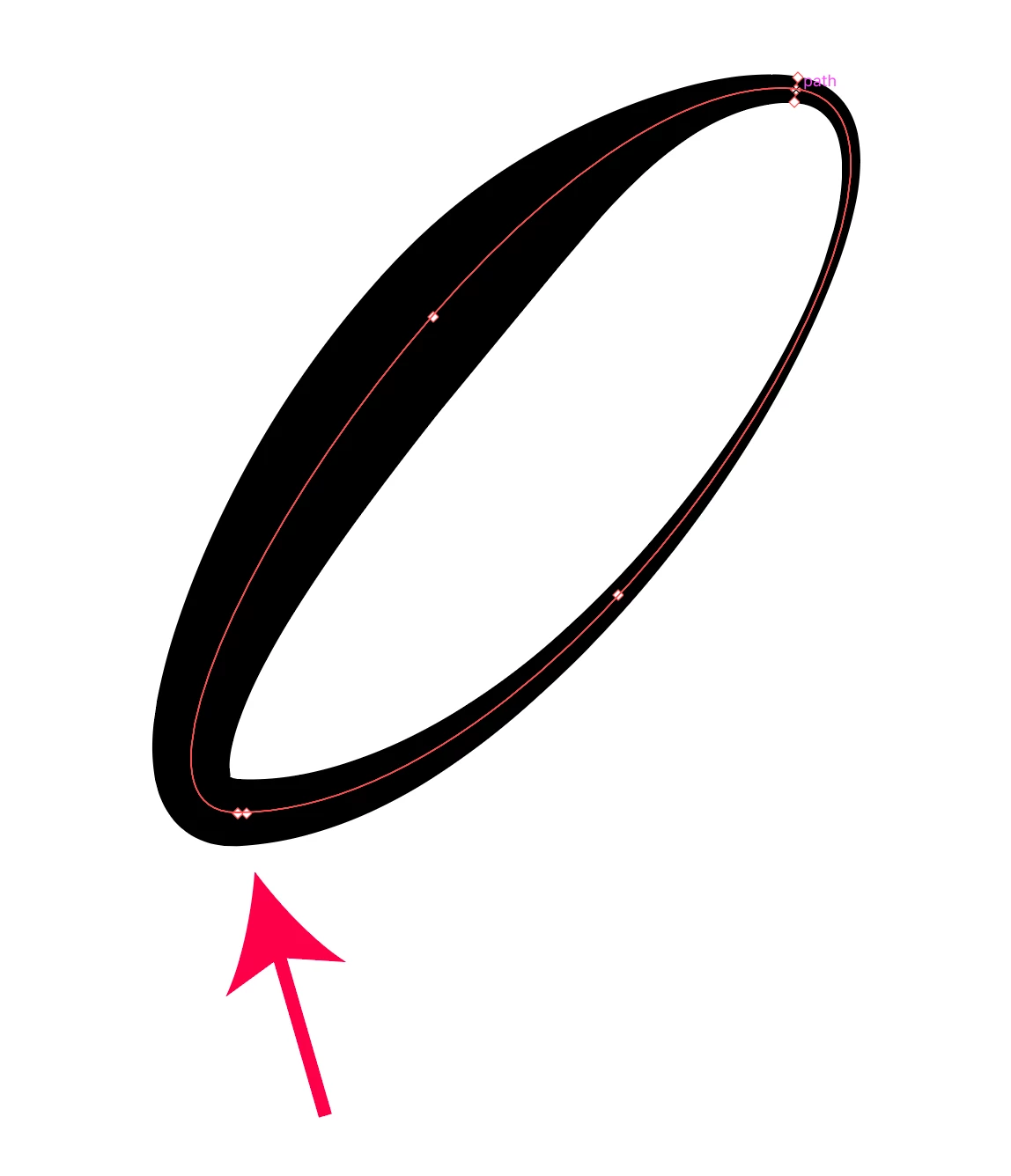
01_ Is it normal that the Width Tool forces width points on anchor points when working on a closed path? (I can't bypass the width points or even delete them on the anchor points!)

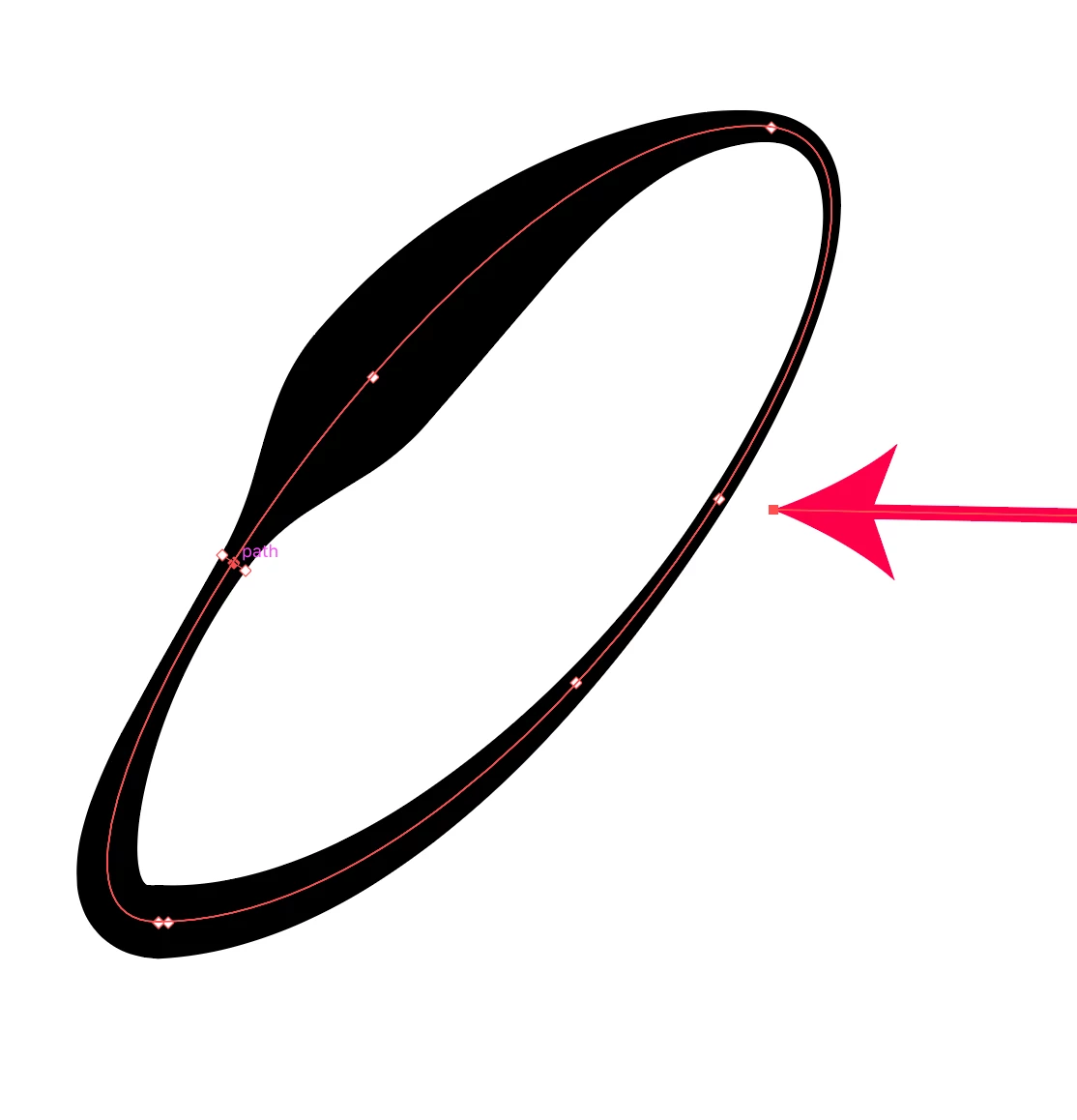
02_ Is it normal that the Width Tool adds random width points when I create some width points on a closed path?

When I added the one on top, a new width point appeared out of nowhere at the bottom.
When I added the one on the side, the width point on the right appeared.
Thanks everyone!

Chris.

    This topic has been closed for replies.

    5 replies

    kpochard
    Participant
    March 29, 2018

    I know this is an old thread, but I found it while working on something. My issue is that when I create a width point on one section of this letter, it creates a new width point on the bowl of the R, which I used 'exclude' to create. When this happens, both points are directly tied to one another, so adjusting the unwanted point is not an option. I cannot fix the new width point on the bowl without it affecting the width point I DID want on the leg!

    Monika Gause
    Community Expert
    Community Expert
    March 29, 2018

    This is a compound path, right?

    Please create a new thread.

    Jacob Bugge
    Community Expert
    Community Expert
    March 1, 2017

    Christian, all,

    I believe it may be time for a bug report/feature request.

    https://www.adobe.com/cfusion/mmform/index.cfm?name=wishform

    Inspiring
    March 2, 2017

    Done.

    Inspiring
    March 2, 2017

    Thank you!

    Monika Gause
    Community Expert
    Community Expert
    February 28, 2017

    Long time ago the documentation actually mentioned that sometimes Illustrator needs to add points in specific places automatically. Typically at corner points.

    Can you try if that point in your drawing maybe is the starting point?

    Add an arrowhead to find out.

    S_Gans
    Community Expert
    Community Expert
    February 28, 2017

    christianb5949572  wrote

    Hi,

    01_ Is it normal that the Width Tool forces width points on anchor points when working on a closed path? (I can't bypass the width points or even delete them on the anchor points!)

    02_ Is it normal that the Width Tool adds random width points when I create some width points on a closed path?

    When I added the one on top, a new width point appeared out of nowhere at the bottom.

    Hi. Looks like 01_ for me is that I'm not forced to add widths to anchor points, but when I do, I can move them and delete them, and I can change their widths.
    On 02_ it DID add a random opposite point when I created a width point in a random place.

    I'm on a Mac OS 10.10.5 with CC2017 Latest version. Hope this helps.

    Adobe Community Expert / Adobe Certified Instructor
    Sebastian Bleak
    Community Expert
    Community Expert
    February 28, 2017

    I had the same experience. Thanks for posting the video

    S_Gans
    Community Expert
    Community Expert
    February 28, 2017

    So, at least for me, it seems normal - at least with my setup, and since it's doing the same on yours, that seems to be the case. Funny - I'd just never noticed it before (or, I didn't find it affected my work significantly). If this is getting in your way, may I suggest putting in a bug report, or maybe a feature request (to alter it) at Feature Request/Bug Report Form

    Adobe Community Expert / Adobe Certified Instructor
    Mike_Gondek10189183
    Community Expert
    Community Expert
    February 28, 2017

    Switch to the hollow arrow tool,  the extra points should be gone. With the variable width tool selected you will see extra points, which is normal. Also prior to clicking the variable width tool you will see where the point is about to add when you cursor is within a distance of the object selected.

    So yes it is normal for extra points to be added opposite side usually if needed, but you only can access them when in the variable width tool, and not in the hollow arrow tool.

    For me on 2015.3 mac 10.10.5 I after switching to anchor point tool

    strange thing will happen in tights quarters, I drew in red the shape of the path

    GAMBOT
    Inspiring
    February 16, 2022

    I have the same issue. Any solution?

    Sincerely yours, GAMBOT.