


Exit
  • Global community
    • Language:
      • Deutsch
      • English
      • Español
      • Français
      • Português
  • 日本語コミュニティ
  • 한국 커뮤니티
8

Arabic font separation in [Illustrator] iPad

Community Beginner ,
Jan 01, 2021 Jan 01, 2021

Hello Guys,


I am using photoshop  Illustrator on iPad and the Arabic words are broken (every letter is separated).

oculd you tell me how to fix that?


["Photoshop" edited to say "Illustrator" by moderator as per OP's second post]
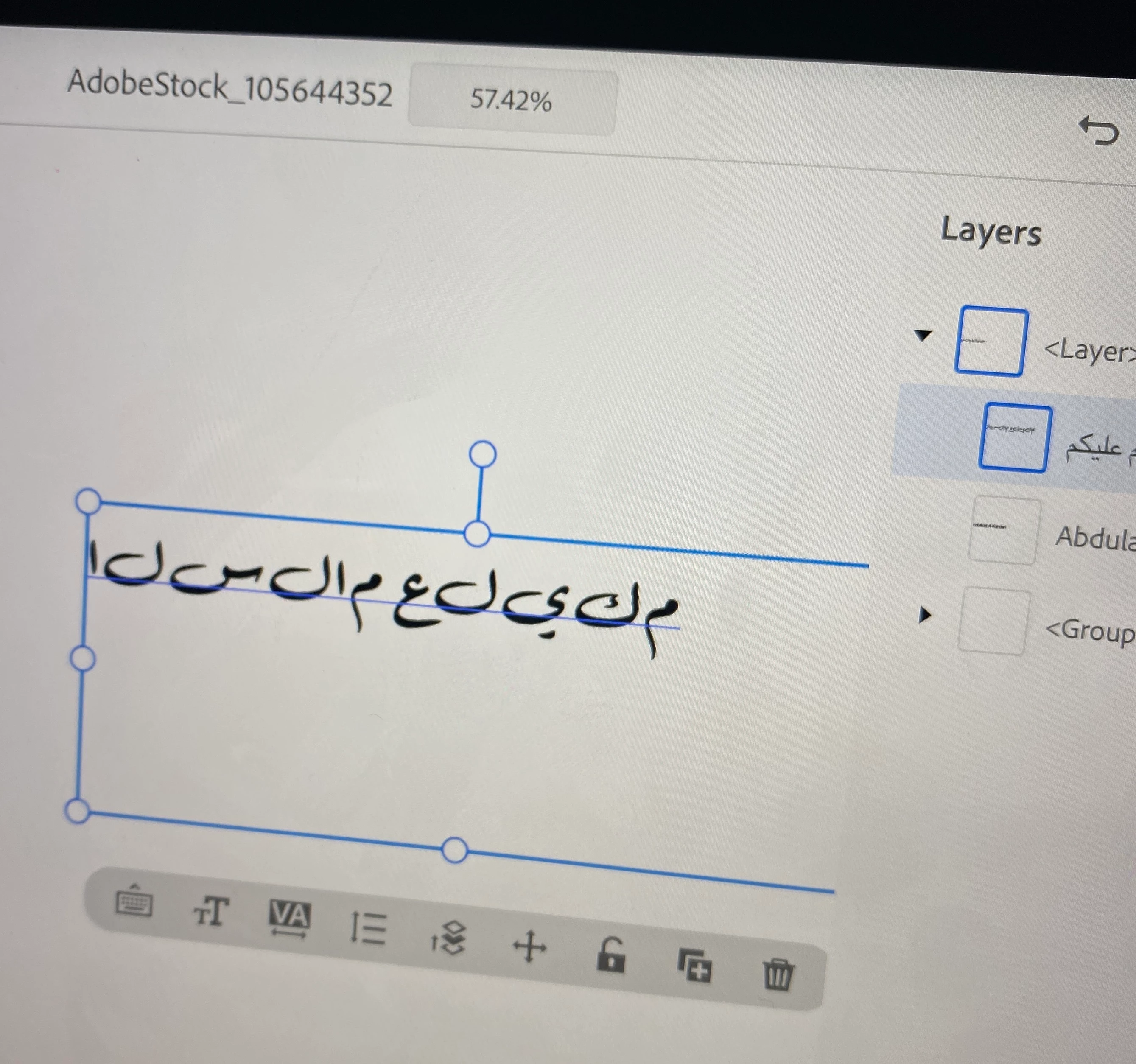
 

E6C8CDA3-48F6-46B6-8CB1-141683EEB3A0.jpeg

TOPICS
How to
8.7K
Translate
Report
Community guidelines
Be kind and respectful, give credit to the original source of content, and search for duplicates before posting. Learn more
community guidelines

correct answers 1 Correct answer

Community Expert , Jan 03, 2021 Jan 03, 2021

As I answered you on the Photoshop forum. It appears that Illustrator on the iPad doesn't support Arabic yet, at least from what I experienced. 

Please add your vote on this right-to-left topic as the Illustrator development team would listen to our request. 

Translate
Community Beginner ,
Jan 01, 2021 Jan 01, 2021

Sorry I meant illustrator for iPad.

Translate
Report
Community guidelines
Be kind and respectful, give credit to the original source of content, and search for duplicates before posting. Learn more
community guidelines
Community Expert ,
Jan 03, 2021 Jan 03, 2021

As I answered you on the Photoshop forum. It appears that Illustrator on the iPad doesn't support Arabic yet, at least from what I experienced. 

Please add your vote on this right-to-left topic as the Illustrator development team would listen to our request. 

Translate
Report
Community guidelines
Be kind and respectful, give credit to the original source of content, and search for duplicates before posting. Learn more
community guidelines
Community Beginner ,
Jan 01, 2021 Jan 01, 2021

Hello Guys,


I am using photoshop on ipad and the arabic words are broken (every letter is separated)

could you tell me how to fix that?


Translate
Report
Community guidelines
Be kind and respectful, give credit to the original source of content, and search for duplicates before posting. Learn more
community guidelines
New Here ,
Jan 10, 2024 Jan 10, 2024

I have resolved this issue, and it works perfectly. You need to copy/type and convert your Arabic text using this websites it is safe and works great.


https://www.arabic-keyboard.org/photoshop-arabic/

Translate
Report
Community guidelines
Be kind and respectful, give credit to the original source of content, and search for duplicates before posting. Learn more
community guidelines
Community Expert ,
Jan 10, 2024 Jan 10, 2024

Kindly provide more details, as my testing didn't work. My Arabic text showed separated and inverted after copying it from the website, then paste it into Illustrator on iPad.

Translate
Report
Community guidelines
Be kind and respectful, give credit to the original source of content, and search for duplicates before posting. Learn more
community guidelines
New Here ,
Jan 12, 2024 Jan 12, 2024

Here are the steps:

1- Type in the text in the first text box.

2- Click Copy button once.

3- Click Copy button again,


Clicking the copy button twice will copy the text in the correct fromat for non Arabic enabled application.


*If you copy once, it will not work.

Translate
Report
Community guidelines
Be kind and respectful, give credit to the original source of content, and search for duplicates before posting. Learn more
community guidelines
New Here ,
Mar 17, 2024 Mar 17, 2024

Hi bro

I have same problem 😵💫

If you solved it please share it with me.

Thanks you

Translate
Report
Community guidelines
Be kind and respectful, give credit to the original source of content, and search for duplicates before posting. Learn more
community guidelines
Community Expert ,
Mar 18, 2024 Mar 18, 2024

@Salem36140690xcol  schrieb:

Hi bro

I have same problem 😵💫

If you solved it please share it with me.

Thanks you


Illustrator on the iPad doesn't support Arabic type.

Translate
Report
Community guidelines
Be kind and respectful, give credit to the original source of content, and search for duplicates before posting. Learn more
community guidelines
New Here ,
Jun 01, 2024 Jun 01, 2024

Go to Eidt --> Preferences --> Type. Check this option "Show Indic Option" and press okay. Choose the text tool and type now. It should work.  

Translate
Report
Community guidelines
Be kind and respectful, give credit to the original source of content, and search for duplicates before posting. Learn more
community guidelines
Community Expert ,
Jun 01, 2024 Jun 01, 2024
LATEST

The discussion here is related to the iPad only, your answer is not relevant. 
Adobe Illustrator on the iPad doesn't support Arabic language yet. 

Translate
Report
Community guidelines
Be kind and respectful, give credit to the original source of content, and search for duplicates before posting. Learn more
community guidelines
