

Exit
  • Global community
    • Language:
      • Deutsch
      • English
      • Español
      • Français
      • Português
  • 日本語コミュニティ
  • 한국 커뮤니티
0

Can we change document (or artboard size) in illustrator for ipad like we can on desktop?

Participant ,
Sep 01, 2021 Sep 01, 2021

Can we change document (or artboard size) in illustrator for ipad like we can on desktop? If so.. How? If not...do you know if there are plans.. thanks!
14.1K
Translate
Report
Community guidelines
Be kind and respectful, give credit to the original source of content, and search for duplicates before posting. Learn more
community guidelines

correct answers 1 Correct answer

Community Expert , Sep 01, 2021 Sep 01, 2021

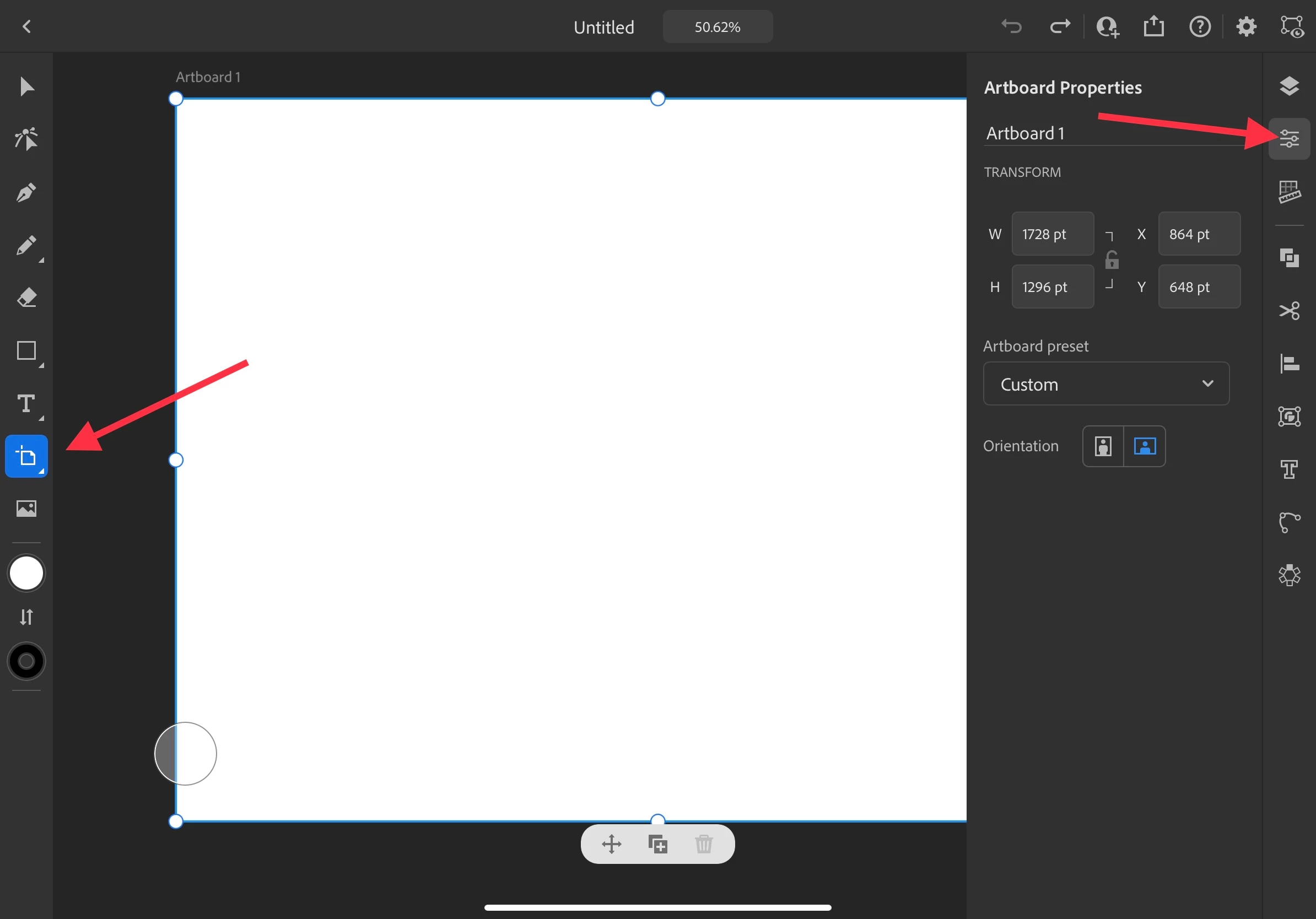
Choose the Artboard tool and then select the artboard. Open the Properties panel to change the size. App settings control the display of units. 


E811BB75-042E-46DC-9A42-F3209CC3888C.jpeg

Translate
Participant ,
Sep 01, 2021 Sep 01, 2021

NEVERMIND found it...but how do we set a specific dimension unstead of preset? if anyone knows..cheers!


This can be closed.

Translate
Report
Community guidelines
Be kind and respectful, give credit to the original source of content, and search for duplicates before posting. Learn more
community guidelines
Community Expert ,
Sep 01, 2021 Sep 01, 2021
LATEST

Choose the Artboard tool and then select the artboard. Open the Properties panel to change the size. App settings control the display of units. 


E811BB75-042E-46DC-9A42-F3209CC3888C.jpeg

Translate
Report
Community guidelines
Be kind and respectful, give credit to the original source of content, and search for duplicates before posting. Learn more
community guidelines