
Amir Mahdi Moslehi
Participant
June 10, 2021
Answered

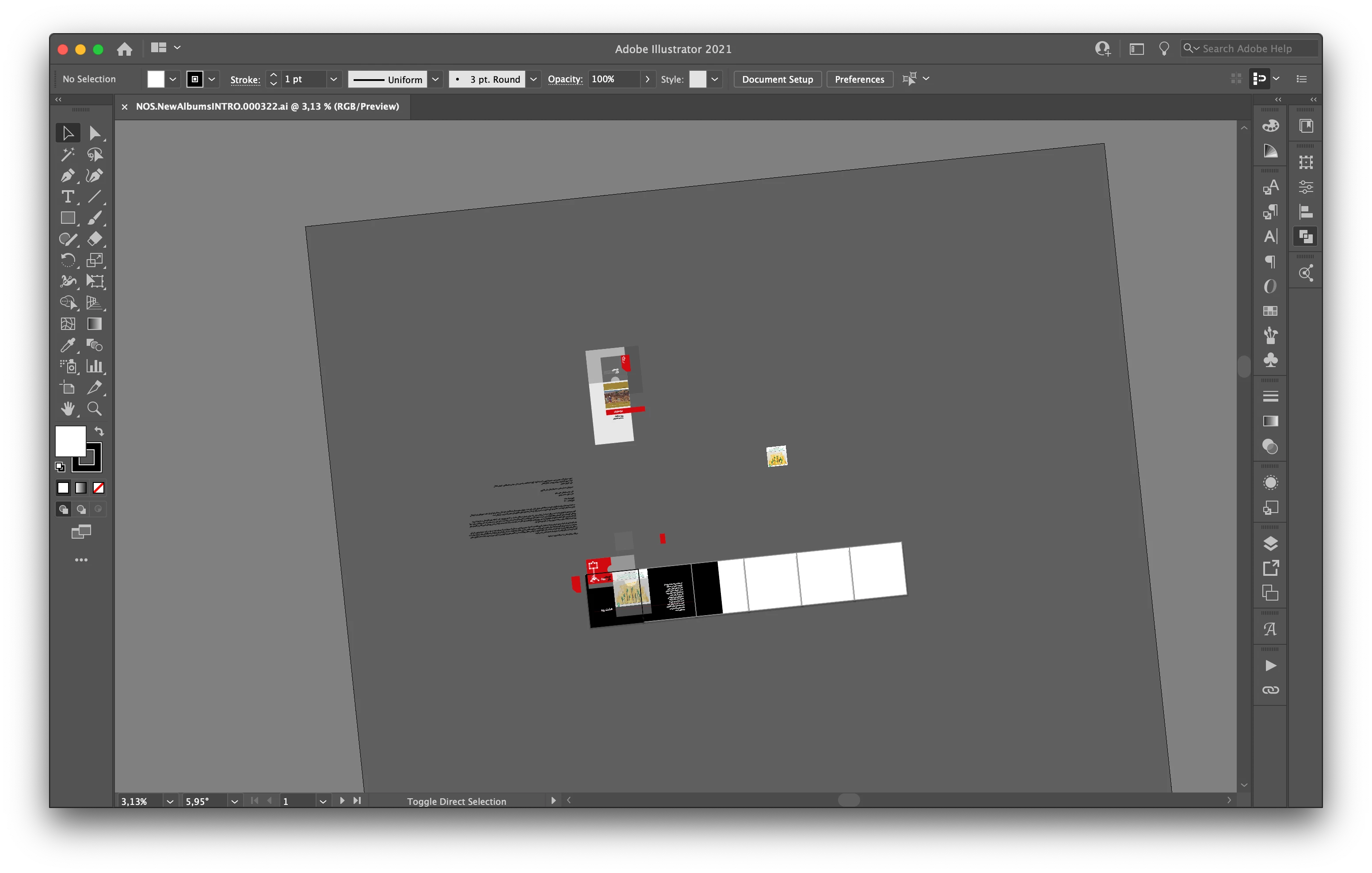
Artboard Rotation while using touchpad for zoom in Illustrator 25.3

  • June 10, 2021
  • 64 replies
  • 122650 views

Hi, recently I faced a new problem. When I use the trackpad for zoom-in/out the artboard keeps rotating. I don't know how can I fix this problem.

Correct answer joannem27208843

Hi I solved this problem by going to macbook System Preferences> Track Pad >Scroll and Zoom > Rotate and uncheck rotate with two fingers .


Hope this helps if there isn't already another solution that i have missed. 

Jo 


64 replies

Known Participant
July 21, 2022

Please give me an off button for this feature, it always happens when working on an intensive artboard or work file, mid-workflow.

Doug A Roberts
Community Expert
Community Expert
July 21, 2022

Please read the thread. A preference was created some time ago.

Troopster
Participant
May 27, 2022

Hello, I've seen the fix for Mac's, but has anyone found a solution for using Illustrator on Windows?

Doug A Roberts
Community Expert
Community Expert
May 27, 2022

The solution is the same on both platforms.

joannem27208843Correct answer
Participant
April 10, 2022

Hi I solved this problem by going to macbook System Preferences> Track Pad >Scroll and Zoom > Rotate and uncheck rotate with two fingers .


Hope this helps if there isn't already another solution that i have missed. 

Jo 


FoxCadet
Known Participant
April 12, 2022

I believe they've since made the rotation much less sensitive so an accidental gesture isn't quite an issue for me anymore.

Participant
November 2, 2021

Hi! I understand the good will behind this feature, however, I also find it really annoying when I'm trying to pan while selecting multiple items. I have never wished I could rotate my canvas in illustrator, and I would greatly appriecate an update to turn this feature off.


Honestly, I don't even use the rotate canvas option in Photoshop, but maybe I would if I did more digital painting. I always rotate the canvas in ProCreate on my iPad. Anyway, thanks!

Participant
October 20, 2021

Sometime I find myself thinking, "Does Adobe even test their software before releasing?" 


Illustrator is what, 30 years old? Still with every new release there are more bugs than features, consistantly, and there haven't been any new useful feature for years. 


The only reason I am updating at all since 2015 is for their self-imposed bugs to be fixed. 

Participant
October 18, 2021
FB_IMG_16213365682064332~2.jpg
Participant
October 14, 2021

I hate this feature more than I can possibly express.

Participant
October 7, 2021

Use Shift + H to use the rotating tool on your cursor and as you're rotating hold down shift in order to snap it back to 0°.

Participant
October 6, 2021

I thought about this a lot and decided that i dont use rotation for a.n.y.t.h.i.n.g. on my trackpad, its just not my workflow. 


That said, I turned off rotation in the System Preferences>Trackpad. Seems to have taken care of the rotation in AI too. 


hope it helps!!

Participant
September 16, 2021

Turn this #@%! "feature" off. 

So, SO annoying!

Monika Gause
Community Expert
Community Expert
September 16, 2021

Update Illustrator and then you can turn it off.

kajsa P
Participating Frequently
October 1, 2021

I´ve followed the discussion about this indcredibly annoying feature and at least I can say exactly what is causing my irritation since it is interfering with how I´ve been working in Illustrator for 2 decades. ( I´m NOT even  working with a trackpad anymore, a regular keyboard and YES I´ve tried turning the feature off in the latest version, 25.4.1, which doesn´t help with or without trackpad.)

If I have SHIFT pressed and select several objects or anchorpoints and at the same time want to use the handtool on my artboard selecting more objects or points ( pressing SPACE) I get the symbol for rotating canvas instead and accidently rotate everything. If I let go of SHIFT and only press the SPACE bar my selection is intact, the hand tool appears and I can scroll in my artboard. That means I need to stop pressing the SHIFT everytime I need to scroll and I have to change my programmed behaviour, not so great in the world of UX.

THIS is what is causing my frustration and of course the fact that I will never use the rotate canvas feature. ( I DO understand it´s purpose though, but is it really necessary to incorporate it using the space bar?)