
How do I display Tamil fonts in Adobe CS6? Please help..
Hello
I am creating a document in Tamil. Normally I type in Google document. Then copy and paste in Word. It works perfectly.
Now I am creating a poster in Adobe illustrator. I did type in google and pasted in notepad. It works perfectly.
When I copy and past in Adobe Illustrator the font is not displaying correctly.
I need it urgently. Can any one help?
I did googling, and found the following. But I am unable to find similar settings in Adobe Illustrator CS6
Thanks Ellis home. The issue got solved. That David's message which you pasted above was really helpful.
In preferences-->Type-->Text Engine options I selected 'Middle Eastern', previousy it was 'East Asia', after that the Tamil letters are getting displayed correctly. Thanks a lot...

I have seen another post which says I need to enable show Indic option.
http://helpx.adobe.com/illustrator/using/indic-support.html
Unfortunately I do not have Indic option. My screen looks different
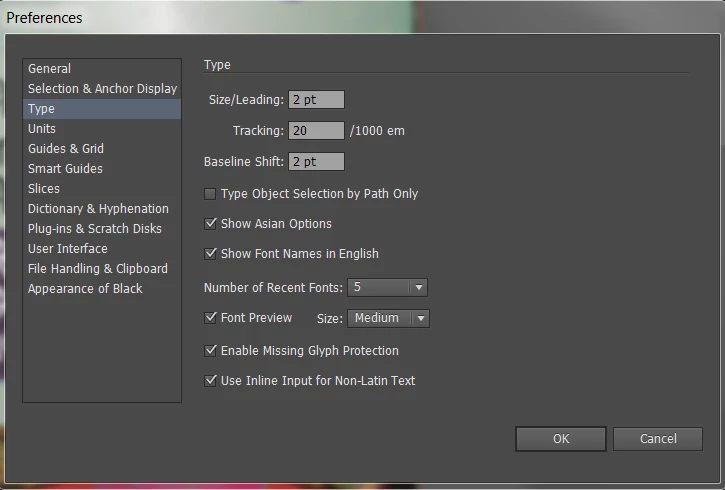
I have some tamil fount installed. When I tried to change the fount to tamil font, it does not work either.
I have another font called Latha. When I changed to Latha font the character displayed in Tamil but all spelling went wrong in Tamil.
Please help. Appreciate.
Thanks
Note; I am new to Adobe illustrator So if I made a silly mistake, my applogies.
 AdChoices