
Participant
June 8, 2021
Answered

IllustratorGc.jsx script error while launching Illustrator 25.3

  • June 8, 2021
  • 53 replies
  • 118215 views

Updated this morning to Illustrator 25.3 - as soon as the update was done this scripting error began appearing (every 30 seconds). .. Personally went back to 25.2.3 which has solved this issue. 
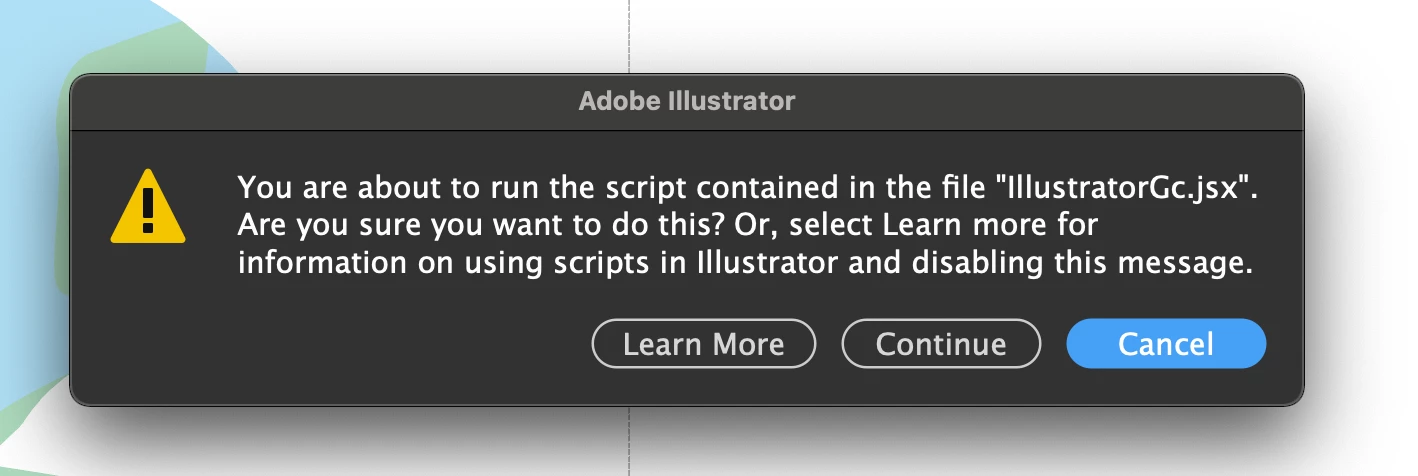


{Renamed by MOD}

Correct answer Srishti Bali

Hi all,


We hope the issue is resolved by now. If not, please update the logitech driver to latest version (9.40.75) and share your observations with us.


Regards,

Srishti

53 replies

Participant
August 26, 2025

still got the problem in 2025!

HARSHIKA_VERMA
Community Manager
Community Manager
August 26, 2025

Hi there, 


We are sorry for the frustration. Would you mind telling us the version of Illustrator installed on your machine? Please share the details of your operating system. Does that happen with all files or with a specific file?


Did you try the suggestion shared in the post?


We will try our best to help. 


Thanks,

Harshika

Srishti Bali
Community Manager
Srishti BaliCommunity ManagerCorrect answer
Community Manager
October 11, 2021

Hi all,


We hope the issue is resolved by now. If not, please update the logitech driver to latest version (9.40.75) and share your observations with us.


Regards,

Srishti

Participant
October 11, 2021

Not really for me.

I have a Mac mini M1 and now after updating Illustrator and Logitecth Option I have this error. 

Participant
October 6, 2021

For those that are not familiar with code, I have done that an Works (MACBOOK PRO):
1) Install a code editor like Visual studio Code (Free).
2) Type this:
app.preferences.setBooleanPreference("ShowExternalJSXWarning", false)

3) Save it on desktop as .jsx (write this at the end).
4) Go to illustrator and do that: File > Scripts > Other Scripts


Hopefully that helps!

Doug A Roberts
Community Expert
Community Expert
October 6, 2021

There is no need for a code editor. Just any software that can save plain text files.

Participant
September 24, 2021

Hi there,


One easy fix is to simply drag the dialogue box out of your visual workspace. This way you can still use the crown without the warning screen popping up every time you try to use it. However, you will have to close the warning box if you are trying to save or exit the program, as the program prioritizes the warning box over the main menu functions. 


P.S. the .jsx file did not eradicate the problem for me, so i have been using this method

Dennis_Z
Known Participant
September 24, 2021

This is so damn annoying, literally shouting at my computer here.

I'm glad the workaround helped with the javascript. 

Participant
September 6, 2021

Still having this issue on Illustrator 25.4.1

Participant
August 27, 2021

This is VERY annoying. I tried making my own JSX file to diable the popup as mentioned by rama_ai but it doesn't work.... I copy pasted exactly what was in the message: app.preferences.setBooleanPreference("ShowExternalJSXWarning", false);

But when I import the .jsx file Illustrator says there is a syntax error?

EndeavorGlobal
Participating Frequently
August 27, 2021

@hopeful_Raindrop5FB2 you may have ran into the same issue as I did with the typographer quotes. Try this instead:


app.preferences.setBooleanPreference("ShowExternalJSXWarning", false);


Also make sure to convert the text plain text before saving.

rama_ai11751598
Community Manager
Community Manager
August 25, 2021

We are investigating this issue and reached out to Logitech for permanent solution. Meanwhile users can try the below workaround.

Create a JSX file with the following content:


app.preferences.setBooleanPreference("ShowExternalJSXWarning", false);


Save the above JSX file. Now, go to File > Scripts > Other Script, and choose the newly saved jsx file.

This will suppress the warning dialog and run the script.

EndeavorGlobal
Participating Frequently
August 25, 2021

Hi Rama,


I just tried this and it did not work. I copy and pasted the content into a txt document and renamed the file to .jsx — am I doing something wrong? Below is the error message I receive after selecitng the .jsx file. I also have the latest version of LogiOptions, but still receive the script warning.

rama_ai11751598
Community Manager
Community Manager
August 25, 2021

@EndeavorGlobal Looks like quotes got replaced with typographer's quotes causing this error please use the below that contains correct quotes.


app.preferences.setBooleanPreference("ShowExternalJSXWarning", false);
Participant
August 23, 2021

Participant
August 23, 2021

Use a versao Beta do logitech, para mim resolveu o problema.

https://www.logitech.com/en-gb/software/logi-options-plus.html

soulforge
Participating Frequently
August 23, 2021

A menos que você tenha o teclado Kraft ... que atualmente não é compatível com a versão beta, o que para mim parece insano

-------------------------

Unless you have the Kraft keyboard ... which is not currently supported in beta, which to me seems insane

maFernanda-Rami
Participant
August 22, 2021

I also have the issue despite having updated everything. Waiting from a prompt solution from adobe

thanks

Participant
August 23, 2021

Use a versao Beta do logitech, para mim resolveu o problema.

https://www.logitech.com/en-gb/software/logi-options-plus.html