


- Home
- InDesign
- Discussions
- Re: 100% black is not being right for printing and...
- Re: 100% black is not being right for printing and...

Copy link to clipboard
Copied
I am facing a big problem about the 100% black is not being right for printing and coming out as 4 colours, from my InDesign document when I export it as a pdf. My swatch for the black text in Indesign is set at C=0 M=0 Y=0 and K=100, which seems not to work as100% BLACK after I have export it so pdf? Please can anybody help me, so I can get 100% black text in my PDF?
The only thing I want AFTER I export the pdf, is that the BLACK TEXT are 100% black, not a 4 colour rich black, in the exported pdf. I also have the same issue in Illustrator? So what is going on?
Thank you so muh!


 1 Correct answer
Hi everybody!!!
The problem was my Acrobat!!
I uninstalled it, and then I have reinstalled it and now it works!!!! See video: Loom | Free Screen & Video Recording Software
Thanks a lot everybody for your help!!!!

I don't know if this is a bug, but 2 others of my friends had the same problem. So I have to contact them and ask them to uninstall the Acrobat.
Again Thank you!!

 70
Replies
70
70
Replies
70

Copy link to clipboard
Copied
I am really confused now? Because everything was in CMYK in Indesign. So what happen when it is RGB in the Inspector in Adobe Acrobat?
But in the past, I have seen this yellow warning in Summary, but I don't know what this warning is? see printscreen https://prnt.sc/o8acqe


Copy link to clipboard
Copied
Whatever is happening seems to be a problem with your Acrobat. The PDF/X-4 preset doesn't allow conversions from CMYK to RGB.
You might try uninstalling and reinstalling AcrobatPro.
Here's a Dropbox link of your PDF renamed, which I'm seeing as DeviceCMYK. Are you seeing RGB when you inspect this file?
Copy link to clipboard
Copied
I have tested you file "TestAcrobat" but the text is in 4 colors with me in Seperation, and RGB in Inspection??
Copy link to clipboard
Copied
I have tested you file "TestAcrobat" but the text is in 4 colors with me in Seperation, and RGB in Inspection??
The problem seems to be with your Acrobat installation. Seems like it would be worth trashing your Acrobat prefs and if that doesn't work reinstalling. I think this is the path to the Acrobat DC prefs:
/Users/username/Library/Preferences/Adobe/Acrobat/DC
Copy link to clipboard
Copied
I think I have to uninstall Acrobat DC. And reinstall it again

Copy link to clipboard
Copied
Trash the preferences first, these may not be removed with an uninstall/reinstall.
Copy link to clipboard
Copied
And try trashing the caches folder also.
Caches:
/Users/username/Library/Caches/com.adobe.Acrobat.Pro
Prefs:
/Users/username/Library/Preferences/Adobe/Acrobat/DC
Correct answer by
haneadino
AUTHOR
Copy link to clipboard
Copied
Hi everybody!!!
The problem was my Acrobat!!
I uninstalled it, and then I have reinstalled it and now it works!!!! See video: Loom | Free Screen & Video Recording Software
Thanks a lot everybody for your help!!!!

I don't know if this is a bug, but 2 others of my friends had the same problem. So I have to contact them and ask them to uninstall the Acrobat.
Again Thank you!!

Copy link to clipboard
Copied
In the Export Settings in Output make sure that you CMYK Keep values is set. (Do it also in your Color Settings)

Copy link to clipboard
Copied
The default PDF/X-4 preset where the Color is set to No Color Conversion never converts a CMYK 0|0|0|100 black no matter what Color Settings are used.
If you choose a different color profile from the output intent, you'll see a separation preview in which the black seems to be rich black but it is not (see below, Acrobat XI at my place right now).

That seems to point to corrupt preferences or caches.
Not the strangest of things, isn't it? 
Copy link to clipboard
Copied
If you choose a different color profile from the output intent, you'll see a separation preview in which the black seems to be rich black but it is not (see below, Acrobat XI at my place right now).
That's because you have chosen a Simulation profile that conflicts with the Output Intent. The black hasn't actually changed, the Separation numbers are showing a simulated conversion from the ISO Coated Output Intent to FOGRA.
The reason I originally suggested the default PDF/X-4 preset is that it would normally be impossible for a black conversion to happen with the default settings (No Color Conversion). When you open a PDF/X-4 into Acrobat the Output Intent is used as the Simulation profile, so there is no conflict and the Separation numbers remain unchanged.
The OP has modified the PDF/X-4 preset by changing the Output Intent to SWOP, which isn't her document’s assigned profile. But even that shouldn't cause a black conversion, so trashing the preferences might be needed. Also saving as an IDML in case the document is corrupted.
Copy link to clipboard
Copied
Just an idea: What happens if you place the PDF inside another InDesign document and you then preview the separations in InDesign) not in Acrobat)?

Copy link to clipboard
Copied
You may have answered this already but I will ask anyway. What is the transparency blend space for this document in InDesign?
Copy link to clipboard
Copied
You may have answered this already but I will ask anyway. What is the transparency blend space for this document in InDesign?
Have you inspected the PDF the OP posted? When I inspect it, all of the color is DeviceCMYK, which is expected when the PDF/X-4 preset has the Destination set to Document CMYK.
Somehow haneadino is seeing the text as RGB in Acrobat. It is simply impossible for a CMYK [Black] object to get converted to RGB using the PDF/X-4 preset no matter what blend space is used. With X-4 transparency is never flattened, and RGB profiles are not available in the Color Conversion Destination list. If we are in fact looking at the same file, something seems to be wrong with her Acrobat installation.
Copy link to clipboard
Copied
 CMYK
CMYK
Copy link to clipboard
Copied
Also PDF/X-4 doesn't allow DeviceRGB—it requires that all RGB objects include an ICC profile.
Your capture in #38 is showing the text as DeviceRGB, so if you run Acobat‘s preflight using the Verify Compliance with PDF/X-4 Profile, it should fail.
Copy link to clipboard
Copied
Equally, though, Acrobat isn‘t involved in the making, and I have never heard of the object inspector getting confused this way (though some versions do give incorrect plate breakdown for separations). I suggest the original poster share the PDF file they are viewing which shows RGB in the inspector, and the exact Acrobat version number They are using. We may have some of this, but as I‘m on a train, much shared info isn’t available to me.
Copy link to clipboard
Copied
I suggest the original poster share the PDF file they are viewing which shows RGB in the inspector, and the exact Acrobat version number They are using. We may have some of this, but as I‘m on a train, much shared info isn’t available to me.
She already did that in #33. I see the text in the files she posted as all CMYK.
Also, the file she shared passes PDF/X-4 compliance in Acrobat's preflight. CMYK text converting to RGB should simply not be possible in a verified PDF/X-4.

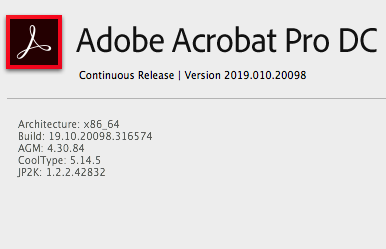
My Acrobat version running on OSX 10.13.6:
Copy link to clipboard
Copied
Here is my Acrobat version: https://prnt.sc/o8azy4
I also try to preflight as you did : https://prnt.sc/o8b1al and no problem found

Copy link to clipboard
Copied
Same problem here. Exporting to PDF changes greyscale JPG images into rich black in the PDF.
Solution: do not downsample the PDF export. Somwhow the downsamping algorythm does not understand a professional CMYK workflow anymore.
This is what you get if you let programmers with limited print production knowledge screw around with critical file integrity algorythms, I guess.
This makes me just so frustrated. I hate these tools more every week.
Copy link to clipboard
Copied
Same problem here. Exporting to PDF changes greyscale JPG images into rich black in the PDF....let programmers with limited print production knowledge screw around with critical file integrity algorythms,
Hi @Niet beschikbaar , There have been no changes with InDesign’s color management in the latest versions, and I can‘t replicate your problem.
Have you confirmed that the placed JPEG is in fact a Grayscale in Link Info, and are you exporting with either No Color Conversion or the Output Destination set to Document CMYK? Any of the default PDF/X presets would do that. Here I’m using InDesign CC2024 on MacOS Ventura, Exporting to PDF/X-4 with the Destination set to Document CMYK with the default Compression (the 678ppi image will be sampled down to 300ppi)

In the exported PDF the image is on the Black plate:


Find more inspiration, events, and resources on the new Adobe Community
Explore Now
 AdChoices