Participant
December 12, 2017
Answered

2 different colors print

  • December 12, 2017
  • 3 replies
  • 2173 views

I am having a huge issue with printing.  Some of my InDesign documents will print two different shades of the same color.  In fact, I will have one text box that has all the same attributes for text throughout, and the top line will print as it looks on my screen, and the bottom line will print with a slightly lighter, brighter shade of red.  The color difference is very noticeable.  Not all of my documents do this, even when I compare documents that were created from the same template.  I can't fathom how this is even happening -- can anyone help me??
This topic has been closed for replies.
Correct answer RSAmd

I apologize, our admin assistant didn't forward me the notification that anyone had replied to my post.  I changed the setting on our printer to "high quality" instead of what it was set to, and it seems to be better.  Still doesn't make sense to me why it would print 2 different colors, so to answer your questions:

InDesign, 2015.1 Release, 11.1.0.122 on Windows 10

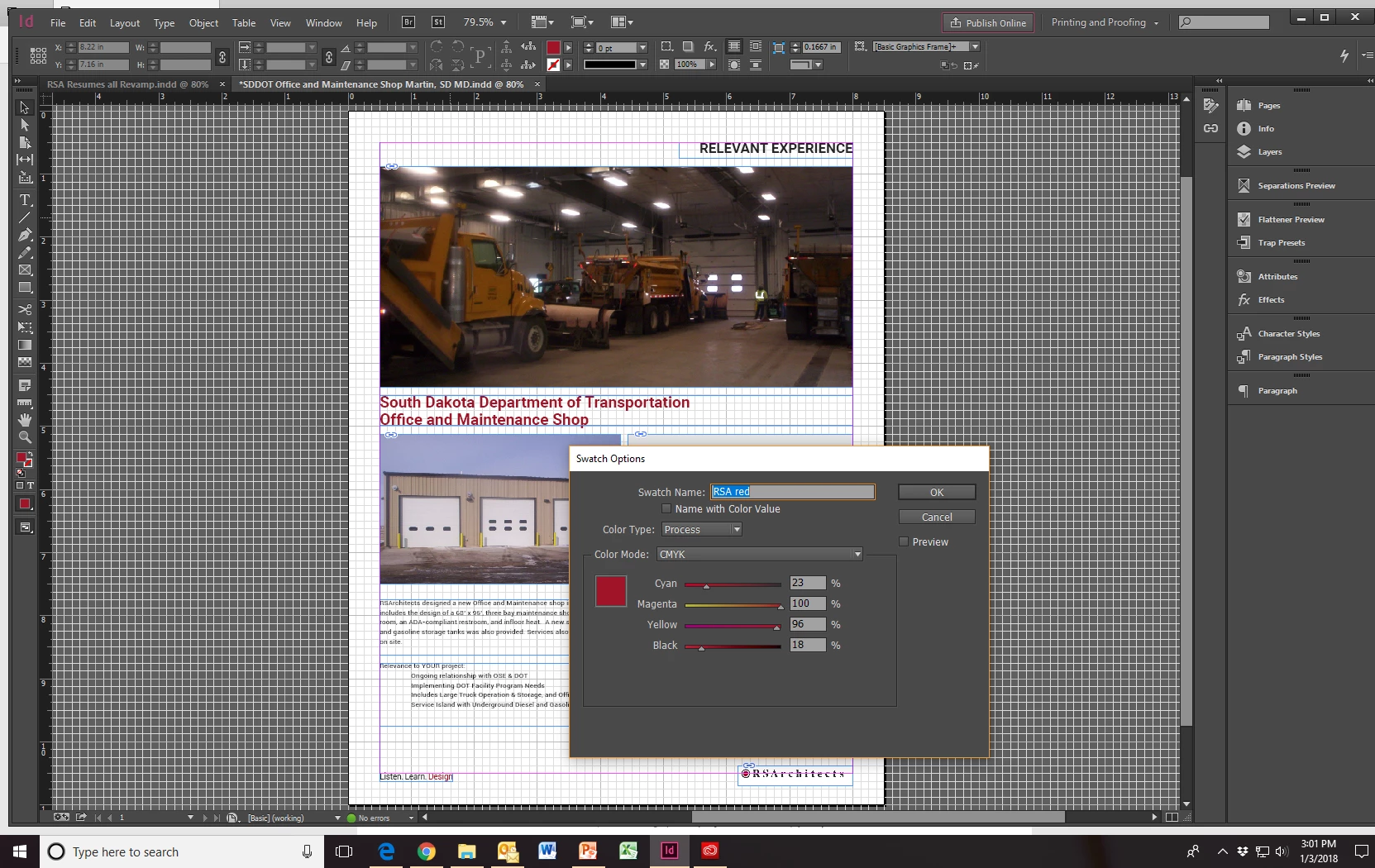
Screenshot of color and swatch panels:

And a picture of the printed page:

3 replies

Known Participant
August 30, 2023

I am having a similar issue between documents. I make "sets" that involve several documents together that need to match. I am finding that the colour between documents can vary greatly even when all the same settings are used, same colour swatches, everything. I have even taken one document and turned it into the second document, so that I know for a fact that all settings are the same, and I still get a colour variation, which means there is something going on with the assets I think. Does this make any sense?

Srishti Bali
Legend
December 23, 2017

Hi RSAmd,

Please update the discussion if the issue is resolved or if you have any further query.

Regards

Srishti

Bill Silbert
Community Expert
Community Expert
December 12, 2017

Can you post a screen shot of what you're getting along with screen shots of your color and swatch panels? Also, what version of InDesign are you using and what OS?

RSAmdAuthorCorrect answer
Participant
January 3, 2018

I apologize, our admin assistant didn't forward me the notification that anyone had replied to my post.  I changed the setting on our printer to "high quality" instead of what it was set to, and it seems to be better.  Still doesn't make sense to me why it would print 2 different colors, so to answer your questions:

InDesign, 2015.1 Release, 11.1.0.122 on Windows 10

Screenshot of color and swatch panels:

And a picture of the printed page:

Dov Isaacs
Legend
January 3, 2018

Is there transparency involved with any of the objects. Colors involved in transparency blending can change depending upon circumstances, blending modes, layering of content, etc.

          - Dov

- Dov Isaacs, former Adobe Principal Scientist (April 30, 1990 - May 30, 2021)