
2020 Adding Unwanted Paragraph Style Keyboard Shortcut
The company I work for has just upgraded from InDesign 2019 to 2020 (15.1.3). I'm running on an iMac with High Sierra (10.13.6). Some of our existing files have a paragraph style that has no keyboard shortcut when opened in 2019, but after opening in 2020 (either directly, or after exporting to IDML), the number 2 in the 10-key pad invokes the paragraph style. I like to use the 10-key pad to enter numbers, so you can imagine that would be a problem if typing a 2 changed all of my type to a different style. When checking the paragraph style, the space for the keyboard shortcut is blank in both 2019 and 2020, but if you place the cursor into the name field in 2020 and hit the Delete key, it removes the invisible shortcut and the number 2 in the 10-key pad goes back to just entering the 2 glyph.
What I'd like to know first is whether anyone else has seen a problem like this. Secondly, if anyone would care to try these files to see if you get the same results, I'm including a link to Dropbox. As to fixing any files we need to edit, I though about exporting the style after it's been fixed so that I could import it into another file, but I can't seem to find where Save Paragraph Styles has been moved to. Didn't it used to be in the fly-out of the styles window where Load Paragraph Styles can be found? Here's what I see there:
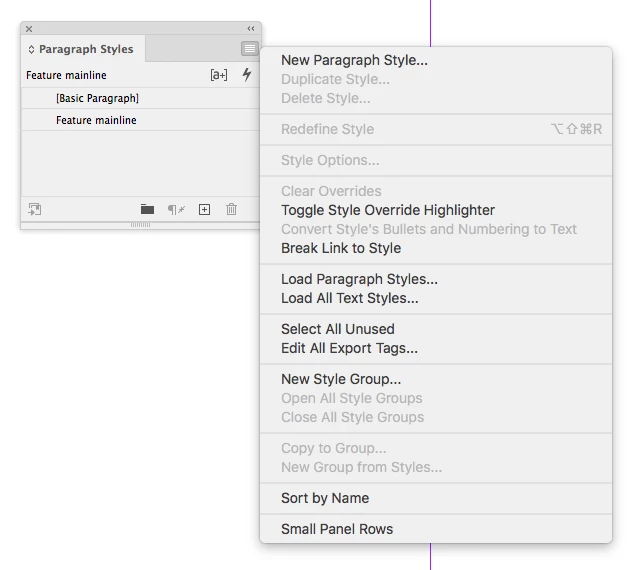
Anyway, thanks for anyone who decides to weigh in, and here's the link to Dropbox:
https://www.dropbox.com/sh/3b6let2x9eyqkbu/AADqVcK9OEwPLRSonIjcfPHFa?dl=0


 AdChoices