
Participating Frequently
December 12, 2024
Question

8 A6 pages (4 per side) on A4 sheet with imposition

  • December 12, 2024
  • 3 replies
  • 2936 views

Hello!   : )

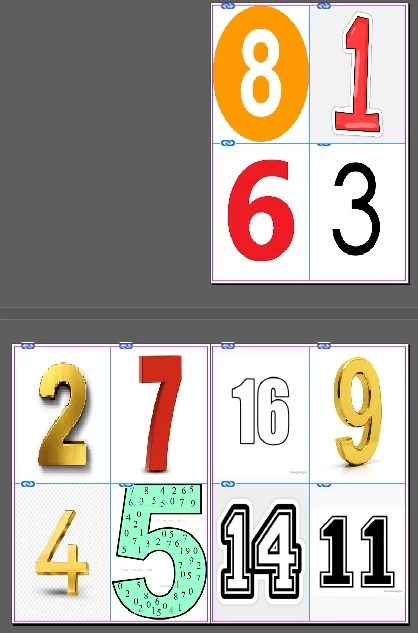
I really hope someone can help me, or redirect me in the right way.  I want to print a book with size A6 pages for my nepfew.  I'll use jpeg images for each individual page. I can do this by  placing 4 images manually on 1 page in a sertain way so they can be imposed with the next page, but is it possible to just add them all ( for example 150 jpegs )  consecutively and then the InDesign somehow make them all imposed?    Thanks!


3 replies

Peter Spier
Community Expert
Community Expert
December 13, 2024

Check out this old thread: https://community.adobe.com/t5/indesign-discussions/indesign-imposition-script/td-p/13302954

You might find waht you want there...

Alex_28DAuthor
Participating Frequently
December 13, 2024

 I couldn't find anything to help impose 4x4 A6 pages on one A4 sheet.  : (

Alex_28DAuthor
Participating Frequently
December 14, 2024

@Alex_28D


There are commercial solutions - but you can do it for free - I've already described the steps:

https://community.adobe.com/t5/indesign-discussions/8-a6-pages-4-per-side-on-a4-sheet-with-imposition/m-p/15038202#M601994


Thanks! I didn't see that post. But as you say " you need to prepare separate "imposition-xxxx.indd" file for each number of pages."  May be  a script could be created to execute this task as easy as the normal 2 page imposition. I certainly can't code it. : ) I'll continue doing it manually . I just thought  Adobe InDesign (and Acrobat) were capable to doing this.

Robert at ID-Tasker
Legend
December 13, 2024

@Alex_28D


How many pages do you have?


If 16 - then what you've done is wrong.


Alex_28DAuthor
Participating Frequently
December 13, 2024

The picture  is croped. There is one more page. And its done with 2 booklets with 8 pages each.  The new layout  is done with all 16 pages in 1 booklet. The idea is to print for example 10 booklets with 16  A6 pages and bind them together afterwards.  This is how it looks like now, but I have to repeat the manual positioning of the pages on each 16th


Robert at ID-Tasker
Legend
December 13, 2024

@Alex_28D


Looks like now your pairs of numbers are correct.


James Gifford—NitroPress
Legend
December 12, 2024

Doing imposition (as the process is formally called) or "booklet printing" is a little tricky, but InDesign combined with Acrobat Pro make it pretty straightforward.


First, though, you need to set your document up as single pages. Don't try to do the layout or imposition on document pages  — the software will handle that.


When you have your pages set up (at A6 size) and your content laid in, in linear page order, you should have a multiple of 8 pages so that every "booklet" page has content. Include a front and back cover layout as part of those pages.


Export those pages to PDF, again in linear order. (While InDesign has an inherent booklet printing feature, it's not as flexible or reliable — going through PDF and Acrobat is much preferred.)


In Acrobat Pro, use the Booklet printing option to impose your pages on any larger sheet size — I think this is limited to 2-up, with 4 pages on any one sheet, so you may need to use A5 paper to get 2-up A6 pages.


Ask away if any of that isn't clear or complete enough!

Alex_28DAuthor
Participating Frequently
December 12, 2024

Thank you very much, but this really  is a tricky thing to pull off ... I tried the Acrobat thing, but at the end, I have to use A5 size paper. My idea is to print on A4 paper and cut it afterwards.  I though someone else tried this 4x4 booklet on A4 with imposition, but I guess  it's not very common thing to do. I cant find any tutorial online.  Is it even possible to create such a contraption using InDesigh and Acrobat ? 

James Gifford—NitroPress
Legend
December 12, 2024

Well, I guess "tricky" is relative. What I suggest needs nothing more than the linear pages and the software does all the work, requiring no cut-down of the printed sheets.


The only alternative is for you to work with four A6 pages in your document, with a grid laid on each with guidelines, and impose the 16 pages images in correct order yourself. That's a bit tricky, as is cutting A6 pages down to 2-up pages with any accuracy. (FWIW, I've done lots of this kind of manual printing and assembly — bless my huge HP tabloid-page workhorse printer! — and somewhere it's going to take ingenuity and skill. I'd say letting the system print to A5 pages is the easiest route.