
Exit
  • Global community
    • Language:
      • Deutsch
      • English
      • Español
      • Français
      • Português
  • 日本語コミュニティ
  • 한국 커뮤니티
3

A script to loop a Mutiparagraph Style in indesign

Explorer ,
Jul 23, 2023 Jul 23, 2023

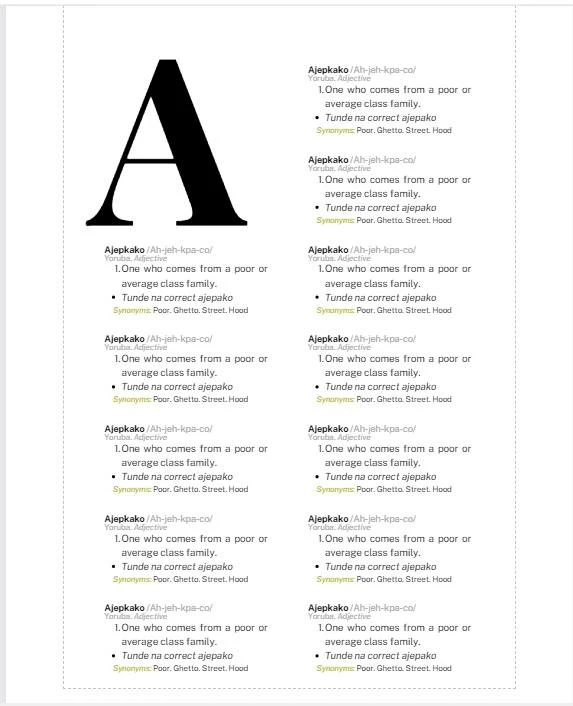
I am trying to work on a dictionary document. I have created Paragraph styled for each paragraph but I noticed indesign does not allow you to loop more than three multiparagraphs styles in canva. I wanted to know if there was a script for that. 
IMG-20230722-WA0001.jpg

I have created Paragraph styles that goes like this

1. 'Apply Style 1 to Line A'

2. Apply Style 2 to Line B

3. Apply Style 3 to Line C

4. Apply Style 4 to Line D

5. Apply Style 5 to Line E


Sometimes a word might have two meanings so:

6. Apply Style 1 to Line F

7. Apply Style 2 to Line G

7. Apply Style 6 to Line H


Is it possible to get a script for multiple paragraph styles like this.

TOPICS
How to , Scripting
231
Translate
Report
Community guidelines
Be kind and respectful, give credit to the original source of content, and search for duplicates before posting. Learn more
community guidelines
LEGEND ,
Jul 23, 2023 Jul 23, 2023

Not sure what do you mean? 

You can have as many ParaStyles defined in your document as you want. 

You can also use NextStyle option. 

If you've your data in a database - maybe you could use DataMerge?


As long as it doesn't require human decision - it can be fully scripted / automated - but even if user needs to make a decision at some point - the rest still can be scripted / automated. 


Translate
Report
Community guidelines
Be kind and respectful, give credit to the original source of content, and search for duplicates before posting. Learn more
community guidelines
Contributor ,
Jul 23, 2023 Jul 23, 2023
LATEST

Hi,

not exactly sure what you meant by 'loop more than three multiparagraphs styles in canva'.

Also not sure what are the paragraph structure for Lines F to H so can't offer a scripting solution.

If you wanted to go with the 'Next Style' method, you could create new paragraph styles for lines F to H, e.g. Style 6 that is based on Style 1 for line F, Style 7 that is based on Style 2 for line G and Style 8 for line H, and each paragraph style has a Next Style set to the next paragraph style (except the last paragraph style). You select each dictionary word paragraphs and right-click the paragraph style 'Style 1' to choose 'Apply Style 1, then Next Style'.

Translate
Report
Community guidelines
Be kind and respectful, give credit to the original source of content, and search for duplicates before posting. Learn more
community guidelines