MollyzMom
Known Participant
January 3, 2017
Answered

A Tale of 2 Artists and the lost color names

  • January 3, 2017
  • 6 replies
  • 3897 views

2 artists work on a project. One has Id from circa 2012 and the other has current version. Artist with ancient Id is cranking out indd files with the following colors:

Red = Red 032 U

Orange = Orange 021 C

Yellow = Yellow U

Green = Hexachrome Green C

Blue = Process Cyan C

Purple = pantone 253 C

Violet = Violet U

Artist with updated Id has no clue what these are or where to find them and needs to match.

Thoughts?​

This topic has been closed for replies.
Correct answer rob day

So, are you in fact saying there is a way I can instruct Artist 1 on how to share her swatches to my computer WITHOUT her having to send me a large amount of old files that I would have to download and open copy one by one each of her colors?

Yes, swatches are user defined and are not part of the application. You can also access color libraries which are similar to plugins but are also not hardwired into the application. The Pantone libraries have to be updated separately from the application like any plugin.

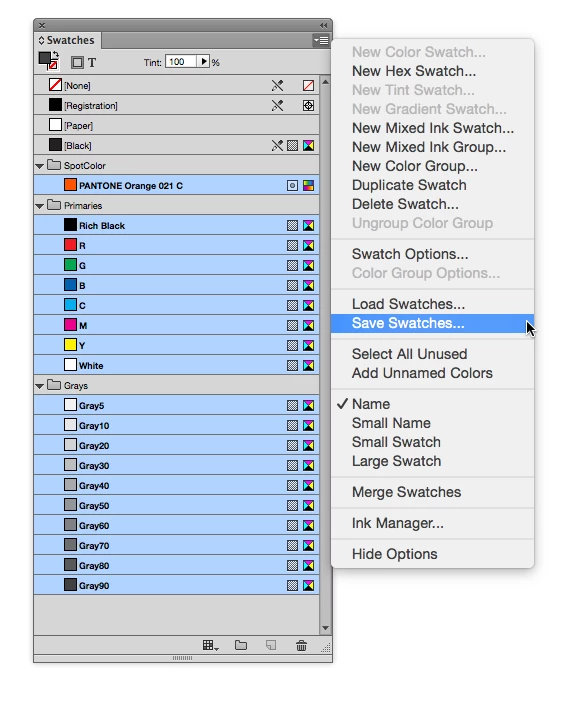
Artist 1 can export any number of swatches via the Save Swatches... dialog and you can load them via Load Swatches... Here I'm showing my Swatches panel with no documents open. Every document I create starts with these swatches. I can add or delete swatches as needed once the document is created and the new swatches list will be specific to that document:
You can also drag and drop swatches between documents.

Get Artist 1 to gather the colors into one document and save them out to an .ASE file. If you close all documents and load that .ASE file, the swatches will be added to your default swatches list.

6 replies

bnyhoff
Participating Frequently
January 3, 2017

The colors with the U behind them are from the uncoated library. The colors on the right should all be prefaced with PANTONE.

MollyzMom
MollyzMomAuthor
Known Participant
January 3, 2017

Thanks, but this I already knew.

bnyhoff
Participating Frequently
January 3, 2017

How is the document printing. CMYK or CMYK with spot colors. All of the Pantone Id's are in any of the Pantone coated libraries.

MollyzMom
MollyzMomAuthor
Known Participant
January 3, 2017

Well, no, apparently not all the colors are listed there. Like I said, the other artist used an older version of Id to make some of the booklets. Then I was brought in to help because if a time /due date issue. So I was given this list of color names that she has been using, and I was told to continue to use these same colors (to keep the look of the series consistent) as I made more booklets. But in the current version of Id which I am using, most of these names cannot be found under ANY of the "add swatches" lists of colors to choose from.  So what I am asking is, how am I to make sure I'm using the same colors she used? And the dummy books she's already done have printed just fine, so that isn't the issue. The client is perfectly happy with how the dummy books came out at first printing. She wants mine to match, but how am I to match them when those color names are obsolete now?

BobLevine
Community Expert
Community Expert
January 3, 2017

Load the swatches from the other file. From the swatches panel menu choose load swatches and navigate to the INDD file.

Danny Whitehead.
Legend
January 3, 2017

As has been said, you need to communicate better with the other artists, and decide exactly what swatches you ought to use. That should be based first on foremost on how these will be printed, and unless you're printing in a weird and wonderful mix of Pantone Solid inks and the obsolete Hexachrome inks, sometimes on coated stock and sometimes on uncoated, you're going to have to rethink it. That's not to mention the potential pitfalls of collaborating with someone using different versions of InDesign.

So, what is your printing method?

Are 'Red', 'Orange' etc the name of the swatches in the files you've received? If so, what colour mode are they? Spot? CMYK? RGB?

MollyzMom
MollyzMomAuthor
Known Participant
January 4, 2017

Thanks for your comment, Danny. I appreciate your advice but at this point your comment is just not helpful in answering the original question. But I do appreciate your interest. As I have stated in reply to others' comments in this thread, the printing is not an issue at this point. Artist 1 has already submitted dummy books to the client who has in turn had them printed. Both client and publisher are pleased with the work that has been submitted thus far. there remains a large amiunt of work still to be done, and do I was brought in to help. So I need to make sure my work matches the previous work done by Artist 1.

vinny38
Legend
January 3, 2017

Hi

In addition to what has been said before, I suggest you save the "clean" swatch in order to share the .ASE file with all users.

See Create, manage, and import swatches in InDesign (Save swatches for use in other documents)

regards

Vinny

btw... Happy new year community

MollyzMom
MollyzMomAuthor
Known Participant
January 4, 2017

Thanks, Vinny! This is helpful.

rob day
Community Expert
Community Expert
January 3, 2017
Artist with updated Id has no clue what these are or where to find them and needs to match.

With the exception of [Black], [Registration], and [Paper], swatches are user defined and are not part of the application.

A user can define an application wide swatch, which will be available when any new document is created, by defining the swatch with no documents open. If there are documents open, a new swatch is specific to the frontmost document and is saved only with that document.

If you want to share selected swatches, you can use Save and Load from the Swatches panel flyout menu.

InDesign also ships with a selection of process and spot color libraries (i.e. PANTONE+ Solid Coated), which can be accessed via the Color Mode dropdown menu when you choose New Swatch from the flyout.

MollyzMom
MollyzMomAuthor
Known Participant
January 4, 2017

Rob, there is some very helpful information in your reply, and I thank you for this. I would love to be able to define aoplication wide swatches so that I can use them for all future documents I will be working on throug this project.

But that's the problem: and that is the question I have: how can I get those exact same swatches from Artist 1? She has sent me an email with a list of names and told me to look in the Pantone Coated menu. I have looked and they are just not there. She even took a screen shot from her computer to prove she was looking right at "hexacheome green" (e.g.) and so I sent her my own screen shot right back, proving that on MY computer ( latest Id version) hexachrome green is NOT there. She is also puzzled, and so we assume the difference must be that she has an older version of Id.

So, are you in fact saying there is a way I can instruct Artist 1 on how to share her swatches to my computer WITHOUT her having to send me a large amount of old files that I would have to download and open copy one by one each of her colors? And how would I do this in such a way to make said swatches  available application wide since I would have to have her files open?

Thanks so much. So far yours is the closest comment to actually being an answer to

my question rather than a flippant remark   !

rob day
Community Expert
rob dayCommunity ExpertCorrect answer
Community Expert
January 4, 2017

So, are you in fact saying there is a way I can instruct Artist 1 on how to share her swatches to my computer WITHOUT her having to send me a large amount of old files that I would have to download and open copy one by one each of her colors?

Yes, swatches are user defined and are not part of the application. You can also access color libraries which are similar to plugins but are also not hardwired into the application. The Pantone libraries have to be updated separately from the application like any plugin.

Artist 1 can export any number of swatches via the Save Swatches... dialog and you can load them via Load Swatches... Here I'm showing my Swatches panel with no documents open. Every document I create starts with these swatches. I can add or delete swatches as needed once the document is created and the new swatches list will be specific to that document:

You can also drag and drop swatches between documents.

Get Artist 1 to gather the colors into one document and save them out to an .ASE file. If you close all documents and load that .ASE file, the swatches will be added to your default swatches list.

BobLevine
Community Expert
Community Expert
January 3, 2017

I have no idea what you’re talking about. Please explain what the problem is.

MollyzMom
MollyzMomAuthor
Known Participant
January 3, 2017

I.e. when I pull out "add swatch" menu and look for these colors, I cannot find them, at least not under these names.

So, how can I make my work (colored booklet covers) match hers when Id 2017 does not have the same colors to choose from?

Derek Cross
Community Expert
Community Expert
January 3, 2017

no, not there.


You need to get together and sort your colours out. For example you seem to have selected a bizarre collection which includes colours for coated and uncoated stock, spot colours, CMYK colours and hexachrome colours. Also note, these will probably display differently on each of your monitors.