

Bhaskar Arumugam
Known Participant
July 27, 2019
Question

Achieve shape with paragraph shading/border/rule?

  • July 27, 2019
  • 4 replies
  • 3242 views

Hi there,

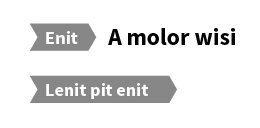
Is there any way to have the below design/shape with using paragraph style options like shading / border / rule (and without actually drawing it)?

Please note that the shape has to be extended based on the text.
Any help on this would be very much appreciated.

This topic has been closed for replies.

4 replies

Jongware
Community Expert
Community Expert
July 28, 2019

bha$kar  wrote

Any help on this would be very much appreciated.

I think this has sufficiently been answered. Do one of these two answers work for you? If not, further explanation may be needed.

Bhaskar Arumugam
Known Participant
July 29, 2019

Thanks everyone (especially Barb and Colin) for your answers and responses. I can use Colin's solution but still I need further help on this. By following Colin's solution, I can have a shape for the entire paragraph but there are cases where after the shape with text there could be additional regular text (please refer the first portion of the picture that I have shared earlier and given below for immediate reference). Can this be done too?

Thanks again for all your help on this.

Community Expert
July 29, 2019

If you put the text into a table - and set the margins to 0 all around.

2 Cells.

Cell1 will have the paragraph effect, and cell 2 will have the normal text applied.

Colin Flashman
Community Expert
Community Expert
July 28, 2019

I was able to do it with a combination of paragraph shading, bullets and numbering and the right glyph to use at the front:

make a paragraph style that contains paragraph shading as follows, making sure the corner size/shape are set for the top and bottom right, but not the top and bottom left:

then apply bullets and numbering. I'm using a right-facing triangle from Wingdings 3.

the character style "big triangle" has also been set to match the height of the shading and pointiness of the arrow on the right side of the text.

Feel free to adjust this to your liking so it works with your design.

If the answer wasn't in my post, perhaps it might be on my blog at colecandoo!
Frans v.d. Geest
Community Expert
Community Expert
July 28, 2019

Yes, the tricks and workarounds. But ‘simply’ with a paragraph rule, border or fill it is still: no ;-)

Legend
July 28, 2019

Is there any way to have the below design/shape with using paragraph style options like shading / border / rule (and without actually drawing it)?

Please note that the shape has to be extended based on the text.

I think Colin's answer meets the criteria of "using paragraph style options" perfectly.

~Barb


The two solutions are ingenious. Very clever.  

P.

Barb Binder
Community Expert
Community Expert
July 27, 2019

Hi bha$kar:

How about something like this?

I used paragraph rule above, positioned behind the text (this can be saved as a paragraph style and re-used):

And then added anchored frames on either side, with the anchor position relative to the anchor marker.

If this works for you, I would set one up, then just copy, paste and edit the content for the others.

~Barb

~Barb at Rocky Mountain Training
jane-e
Community Expert
Community Expert
July 29, 2019

This would make a great article for InDesign Magazine, including the variations!

Steve Werner
Community Expert
Community Expert
July 29, 2019

Absolutely a good idea, Jane!

Frans v.d. Geest
Community Expert
Community Expert
July 27, 2019

No.