Inspiring
November 13, 2023
Answered

Actual ppi in indesign different from ppi in photoshop

  • November 13, 2023
  • 2 replies
  • 5059 views

Hello,


I'm struggling to understand what is happening here. I have an image that I got from the client. When I open it on photoshop, it tells me it's a 300 ppi resolution picture. When I place the same image for layout in InDesign, it says actual ppi 180 in the links panel. Why is this happening?


Any explanation would be greatly appreciated. Thank you in advance.

This topic has been closed for replies.
Correct answer Parvathi24881399xiqs

I have tried all of the above. The files i place in indesign are jpegs or tiffs only. Not raw files. Please see this scrrenshot of my bottom left screen and the image>image size screen
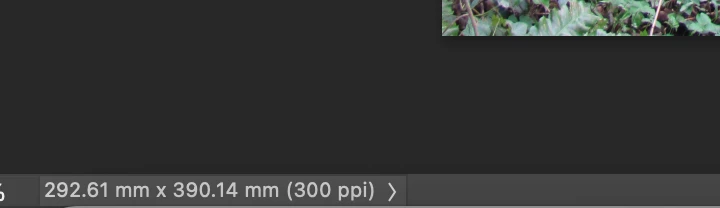
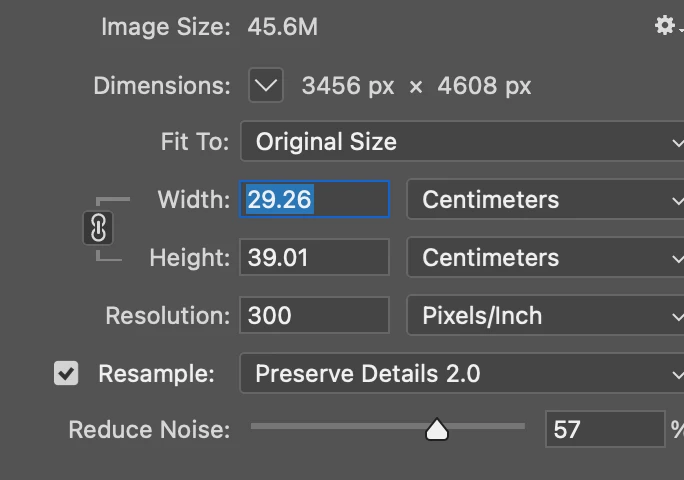
  

. I've opened the image on photoshop via, PS>open>image name. It still shows as 300ppi. But the original image on my Mac preview, bridge , indesign everywhere is only 180. 


Do i conclude now that this is a glitch?


Oh My God. I just figured. So my Camera raw setting file handling was set to open all supported jpegs. So any photo i opened on PS, first opened with Camera raw. I just turned that off to Disable Jpeg and HEIC support. Now the image opens directly in PS first and it shows the correct resolution. So basically all i had to do was disable jpeg support in camera raw. 


I feel so silly and apologies for causing this concern. Thank you to one and all who've helped me work on this today. I really am grateful for all the support the community provides!

2 replies

James Gifford—NitroPress
Legend
November 13, 2023

ID works with two PPI values — the native (and frankly arbitrary) value set in an image file, and the "effective" PPI as it's placed in InDesign. Frans touched on this, but if you have a file that is 1200x1200 pixels, and its (completely arbitrary) PPI is set to 300, then most apps will work with it at a nominal 100% size of 4 inches by 4 inches.


When placed in ID, if it's 4 inches square, both the file and "effective" PPI should be 300. However, if you place it at any other size within the layout, the effective PPI will change. At 5 inches by 5 inches, the file PPI (did I say that was an irrelevant value?) will still be 300, but ID wil be managing the image as if it is 300 * 4 / 5, or 275ppi. That's how ID will see the image for all output, rescaling, etc.


This 72ppi image is sized way down, resulting in a much higher effective PPI. See?


Now, if you're really "not scaling the image in InDesign," then its width and height in that panel should be exactly the "actual" image size, of pixels * file PPI. I suspect you will find a size difference there.

Inspiring
November 13, 2023

  See the dimensions are exactly the same. I've not donw anything, just opened the same image in photoshop and indesign. I understand the difference between actual and effective ppi. But please see my screenshots. Even with the dimensions being the same and placing the file at 100%in indesign, the photoshop resolution is 300 while the indesign one is 180.

James Gifford—NitroPress
Legend
November 13, 2023

I've also set my images to open on Camera raw first in PS, see it shows as 300 in camera raw also. But 180 in bridge and indesign 


I am mystified. Have you tried this in a completely fresh, new document? Just to see if it's some stuck setting in the ones you're working with?


And it may be yet another case for resetting your preferences.


But other than some bug at that level... I'm flummoxed.


I would still like to see what the raw file setting is, outside of any interpretation by an Adobe or other app.

Frans v.d. Geest
Community Expert
Community Expert
November 13, 2023

Photoshop shows you the resolution at 100% of the image. Lets say your image is 10 x 10 cm and has a resolution of 300 ppi. When you place that file in InDesign and you scale it to 200%, so 20 x 20 cm, the actual resolution is 300/2= 150 ppi

Inspiring
November 13, 2023

The problem is that I'm not scaling in indesign. I'm placing at the actual size in indesign as well. My best guess is that the original image supplied by the client is actually 180 only. My photoshop setting is such that any document opens at 300 ppi. So maybe that is why the same image shows 300 ppi when i open it in photoshop, but it shows the actual resolution which is 180 in indesign as well as bridge. 


So i'm currently opening every image in photoshop, resizing it to 300 and saving it again. 😞


But thank you so much for you reply. I really appreciate it.


Inspiring
November 13, 2023

P.S. I maybe wrong, but this is what I've found through trying different experiments for the last hour. Please let me know if you think this is probable.