
Participating Frequently
September 19, 2017
Answered

Add a shape and use it as text

  • September 19, 2017
  • 3 replies
  • 637 views

Hi all,

I like to add a shape (looks like a 'tick' ( √ ) but is actually a small shape made in Illustrator) and use it as a font type.

Of course I can copy and paste this shape in texts and tabels, but now I want it to behave like font type, so I can find '√' and replace it with my own shape.
Who can help me out? Thank you in advance! Tynke !
    This topic has been closed for replies.
    Correct answer winterm

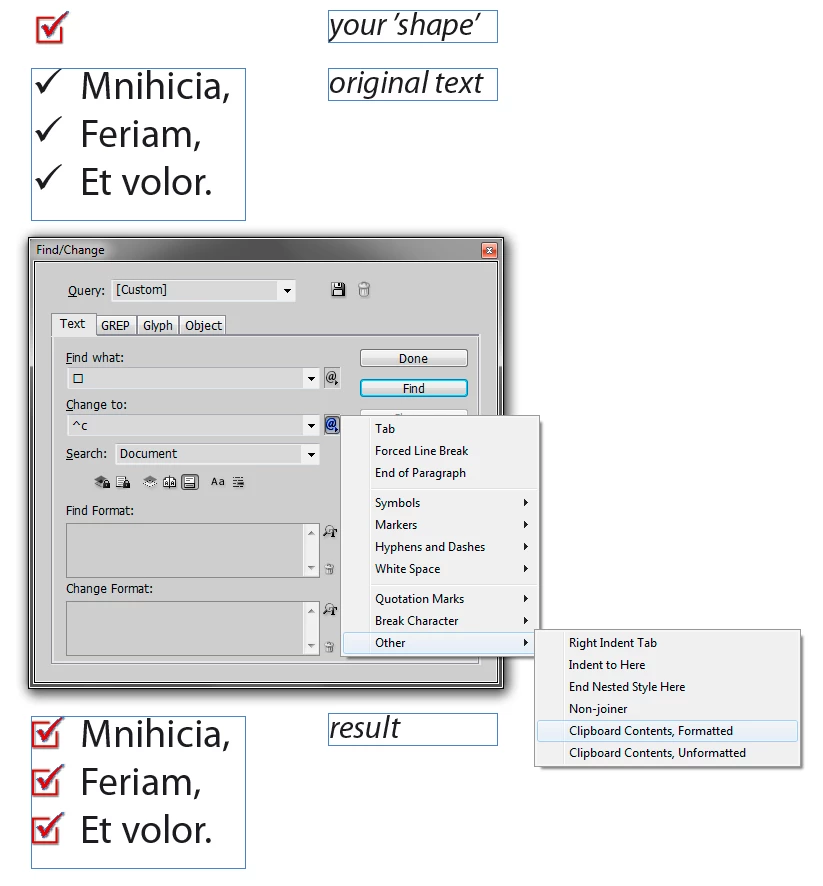
    And here's vinny's approach illustrated.

    Maybe it should be highlighted, with IndyFont you'll get a 'true' glyph, while via F/C - inline graphic.

    3 replies

    winterm
    wintermCorrect answer
    Legend
    September 19, 2017

    And here's vinny's approach illustrated.

    Maybe it should be highlighted, with IndyFont you'll get a 'true' glyph, while via F/C - inline graphic.

    tynkeAuthor
    Participating Frequently
    September 19, 2017

    Thank you, Winterm, it was even more easy than I thought!

    vinny38
    Legend
    September 19, 2017

    Hi

    You can use Indiscripts :: IndyFont to convert it into a font.

    Alternatively, you could select and copy your graphic and then run a Find/Replace using Grep.

    Search for √, and replace by ~c (Replace with clipboard contents)

    tynkeAuthor
    Participating Frequently
    September 19, 2017

    Thanks Vinny, too :-)

    BobLevine
    Community Expert
    Community Expert
    September 19, 2017

    http://www.indiscripts.com/category/projects/IndyFont

    tynkeAuthor
    Participating Frequently
    September 19, 2017

    Thank you Bob, it was very helpful!