dublove
Legend
July 29, 2024
Answered

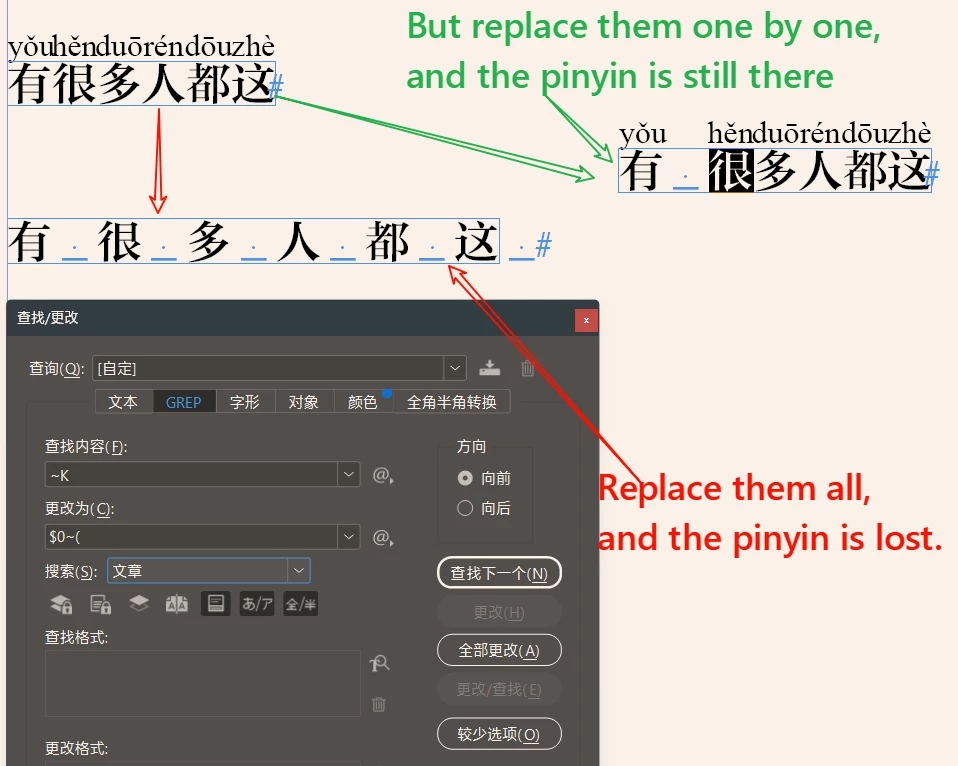
Add a space after the Chinese character, if you replace it all once, the pinyin is lost.How to solve

  • July 29, 2024
  • 1 reply
  • 332 views

Add a space after the Chinese character, if you replace it all once, the pinyin is lost.

But you're replacing them one by one, and the pinyin is still there.
How to solve it?


Thank you~


This topic has been closed for replies.
Correct answer m1b

Hi @dublove, I couldn't solve this in the normal way (someone else might do better!). But I wrote this script that seems to work. - Mark

/**
 * Adds "Ideographic Space" between selected characters.
 * @author m1b
 * @discussion https://community.adobe.com/t5/indesign-discussions/add-a-space-after-the-chinese-character-if-you-replace-it-all-once-the-pinyin-is-lost-how-to-solve/m-p/14765771
 */
function main() {

    app.findGrepPreferences = NothingEnum.NOTHING;
    app.changeGrepPreferences = NothingEnum.NOTHING;
    app.findGrepPreferences.findWhat = '~K(?!~()';

    var doc = app.activeDocument,
        textFrames = getTextFrames(doc.selection);

    for (var i = textFrames.length - 1, found; i >= 0; i--) {

        found = textFrames[i].findGrep();

        for (var j = found.length - 1; j >= 0; j--)
            found[j].insertionPoints[-1].contents = '\u3000';

    }

};
app.doScript(main, ScriptLanguage.JAVASCRIPT, undefined, UndoModes.ENTIRE_SCRIPT, 'Add Ideographic Spaces');

/**
 * Returns any text frames found in given `items`.
 * @author m1b
 * @version 2022-02-02
 * @param {DOM item} items - a DOM item or items to search in, eg. doc.selection.
 * @returns {Array<TextFrame>}
 */
function getTextFrames(items) {

    if (undefined == items)
        return [];

    var found = [];

    if (!items.hasOwnProperty('0'))
        items = [items];

    for (var i = 0, item; i < items.length; i++) {

        item = items[i];

        if (
            // item is a table
            'TextFrame' === item.constructor.name
        )
            found.push(item);

        else if (
            // item contains textFrames
            item.hasOwnProperty('textFrames')
            && item.textFrames.length > 0
        )
            found = found.concat(getTextFrames(item.textFrames));


        else if (
            // is contained by textFrame(s)
            item.hasOwnProperty('parentTextFrames')
            && item.parentTextFrames.length > 0
        )
            found = found.concat(getTextFrames(item.parentTextFrames));


        else if (
            // is in a story, which may contain textFrames
            item.hasOwnProperty('parentStory')
        )
            found = found.concat(getTextFrames([item.parentStory]));


        else if (
            // contains page items, which may be textFrames
            item.hasOwnProperty('pageItems')
            && item.pageItems.length > 0
        )
            found = found.concat(getTextFrames(item.pageItems));


        else if (
            // has a parent which might be a textFrame
            item.hasOwnProperty('parent')
            && item.parent.constructor.name != 'Document'
        )
            found = found.concat(getTextFrames([item.parent]));

    }

    return found;

};


1 reply

m1b
Community Expert
m1bCommunity ExpertCorrect answer
Community Expert
July 29, 2024

Hi @dublove, I couldn't solve this in the normal way (someone else might do better!). But I wrote this script that seems to work. - Mark

/**
 * Adds "Ideographic Space" between selected characters.
 * @author m1b
 * @discussion https://community.adobe.com/t5/indesign-discussions/add-a-space-after-the-chinese-character-if-you-replace-it-all-once-the-pinyin-is-lost-how-to-solve/m-p/14765771
 */
function main() {

    app.findGrepPreferences = NothingEnum.NOTHING;
    app.changeGrepPreferences = NothingEnum.NOTHING;
    app.findGrepPreferences.findWhat = '~K(?!~()';

    var doc = app.activeDocument,
        textFrames = getTextFrames(doc.selection);

    for (var i = textFrames.length - 1, found; i >= 0; i--) {

        found = textFrames[i].findGrep();

        for (var j = found.length - 1; j >= 0; j--)
            found[j].insertionPoints[-1].contents = '\u3000';

    }

};
app.doScript(main, ScriptLanguage.JAVASCRIPT, undefined, UndoModes.ENTIRE_SCRIPT, 'Add Ideographic Spaces');

/**
 * Returns any text frames found in given `items`.
 * @author m1b
 * @version 2022-02-02
 * @param {DOM item} items - a DOM item or items to search in, eg. doc.selection.
 * @returns {Array<TextFrame>}
 */
function getTextFrames(items) {

    if (undefined == items)
        return [];

    var found = [];

    if (!items.hasOwnProperty('0'))
        items = [items];

    for (var i = 0, item; i < items.length; i++) {

        item = items[i];

        if (
            // item is a table
            'TextFrame' === item.constructor.name
        )
            found.push(item);

        else if (
            // item contains textFrames
            item.hasOwnProperty('textFrames')
            && item.textFrames.length > 0
        )
            found = found.concat(getTextFrames(item.textFrames));


        else if (
            // is contained by textFrame(s)
            item.hasOwnProperty('parentTextFrames')
            && item.parentTextFrames.length > 0
        )
            found = found.concat(getTextFrames(item.parentTextFrames));


        else if (
            // is in a story, which may contain textFrames
            item.hasOwnProperty('parentStory')
        )
            found = found.concat(getTextFrames([item.parentStory]));


        else if (
            // contains page items, which may be textFrames
            item.hasOwnProperty('pageItems')
            && item.pageItems.length > 0
        )
            found = found.concat(getTextFrames(item.pageItems));


        else if (
            // has a parent which might be a textFrame
            item.hasOwnProperty('parent')
            && item.parent.constructor.name != 'Document'
        )
            found = found.concat(getTextFrames([item.parent]));

    }

    return found;

};
dublove
dubloveAuthor
Legend
July 29, 2024

This could also be ......
Shocker.
Just a question, I want to change to smaller half spaces, where do I change?
Thanks.

I seem to have found it.


 found[j].insertionPoints[-1].contents = '\u0020';


m1b
Community Expert
Community Expert
July 29, 2024

Yes that's it. You can put any text in that string. '\u0020' (normal space) is the same as ' '.