
Inspiring
August 3, 2023
Answered

Add brackets to paragraphs and tables in selected text

  • August 3, 2023
  • 1 reply
  • 2059 views

Hi

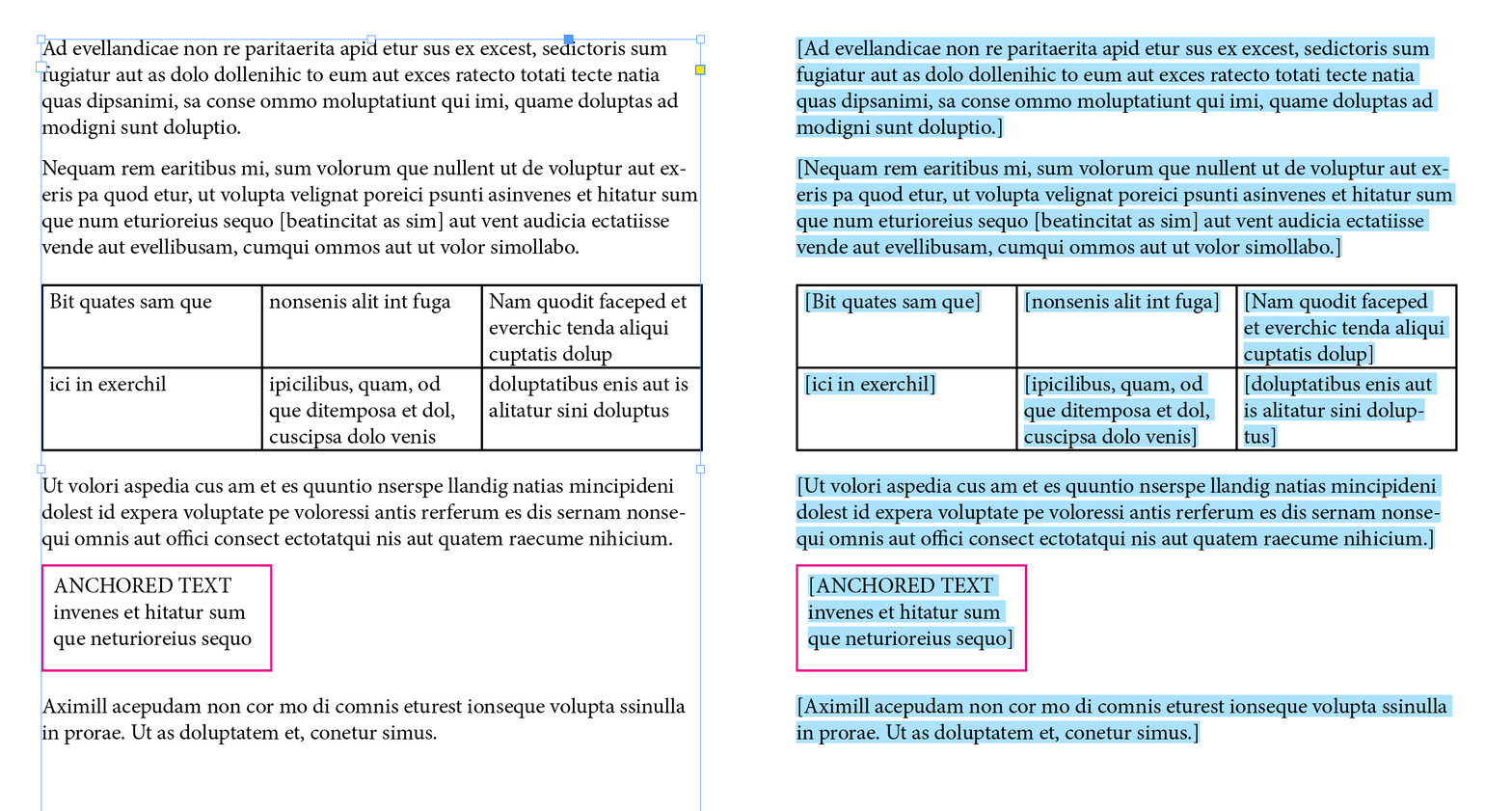
What I’m trying to achieve is to select some text and for the script to put square brackets at either end of the paragraph which can be picked up by a GREP style in the paragraph style that will highlight the text. If I select text that contains a table I would like it to highlight the text in the table. If the paragraph is empty I would like it to do nothing. For the most part it works fine, but when I select text where the last paragraph of the selection is either empty or contains a table it throws an error saying the object is invalid, I presume because it can’t find a table. But why then would it work if it’s not the final paragraph? Please can anyone help? I have cut my script to the basics and I’ve included a screenshot of what I’m trying to achieve.

var sel = app.selection[0];
var rgEmpty = /^\s*$/

if (sel.constructor.name == "Text") {
    if (sel.paragraphs.length > 1) {
        for (var p = 0; p < sel.paragraphs.length; p++) {
            if (sel.paragraphs[p].tables.length > 0) {
                for (var q = 0; q < sel.paragraphs[p].tables.length; q++) {
                    var cellParas = sel.paragraphs[p].tables[q].cells
                    for (var r = 0; r < cellParas.length; r++) {
                        for (var s = 0; s < cellParas[r].paragraphs.length; s++) {
                            sqTextInParas(cellParas[r].paragraphs[s], s, cellParas[r].paragraphs.length - 1)
                        }
                    }
                }
            } else {
                    var endOfStory = sel.paragraphs[p].parentStory.paragraphs[-1]
                    var selectedPara = sel.paragraphs[p]
                    sqTextInParas(sel.paragraphs[p], selectedPara, endOfStory)
            }
        }
    }
}

function sqTextInParas(selection, thisPara, endOfStory,) {
    if (!rgEmpty.test(selection.contents)) {
        if (thisPara == endOfStory) {
            selection.insertionPoints[-1].contents = ']';
        } else {
            selection.insertionPoints[-2].contents = ']';
        }
        selection.insertionPoints[0].contents = '[';
    }
}
This topic has been closed for replies.
Correct answer m1b

Hi @Alex25077296wbvx, I've written a script to do what you ask—it's basically the same as yours but in my own style. And, as you requested, I've included code showing how to get the paragraphs from a table. (Also from anchored text frames.) Hope that helps.


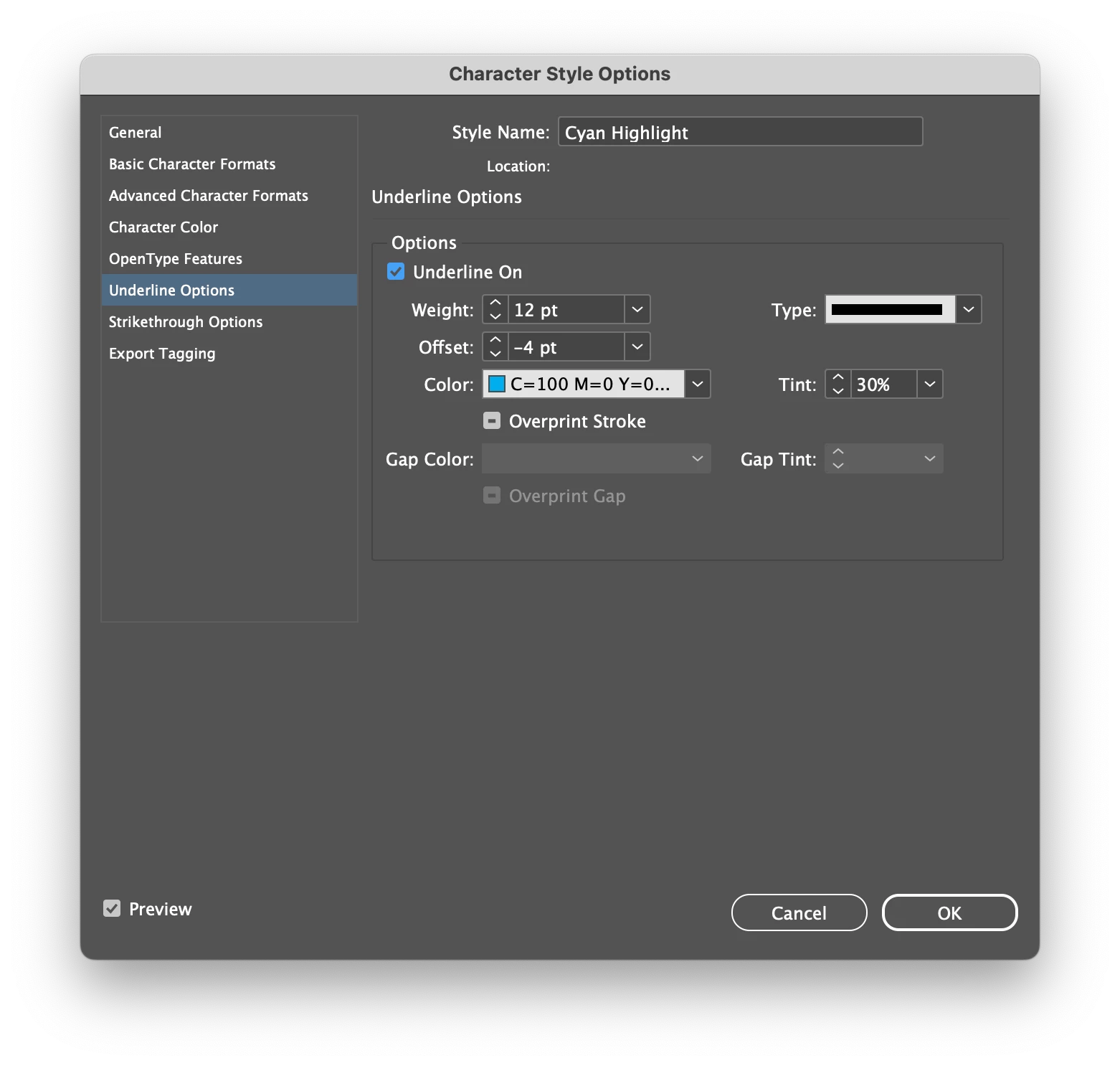
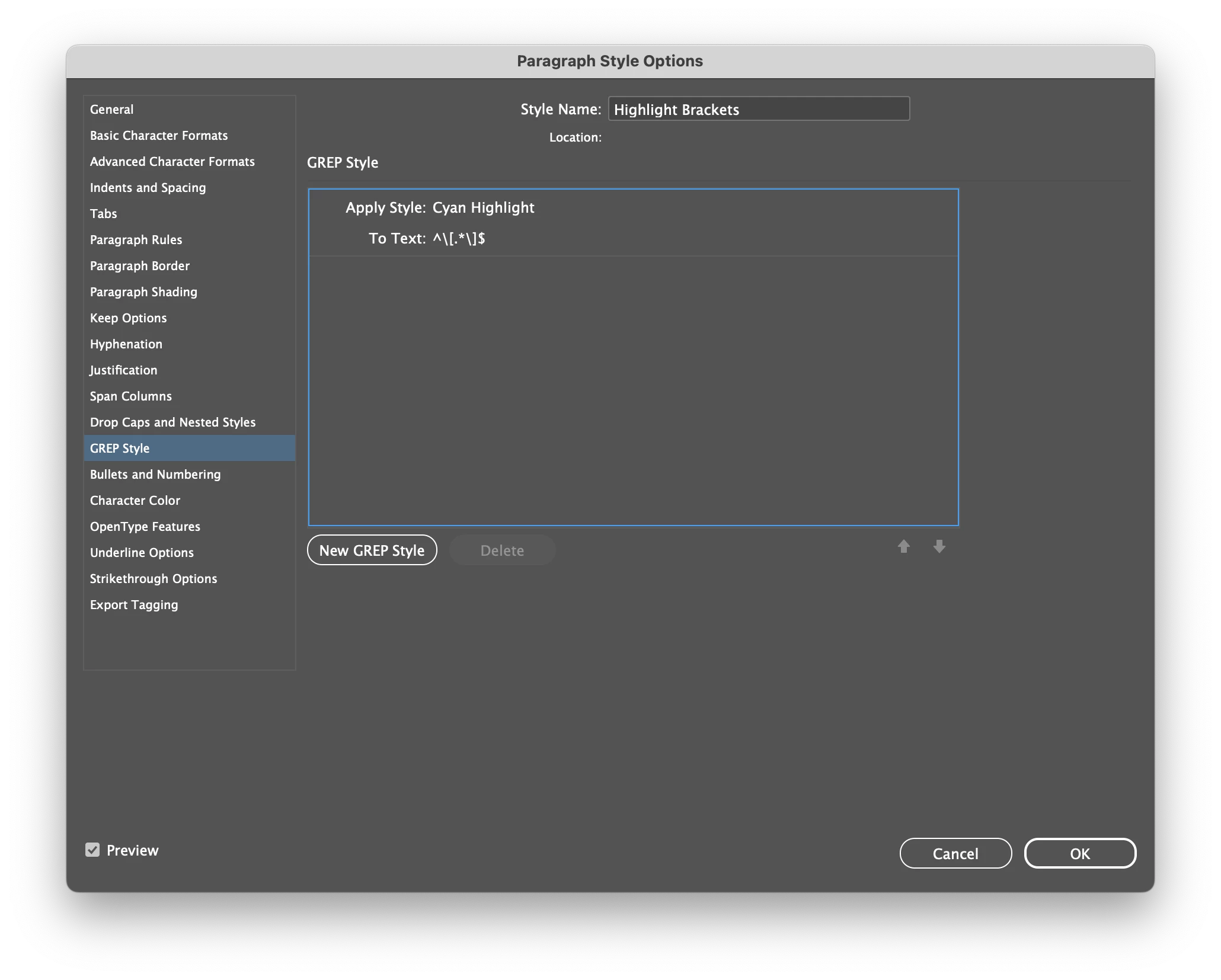
Note: I've used  thick underline to do the highlighting, which means that you can't use underline for any bracketed text. Another approach would be to set the paragraph's shading instead but that gives a slightly different effect.


See the attached demo.indd file. It shows how I used the grep style and the character style using underlining.

- Mark


/**
 * Adds square brackets to the selected paragraphs.
 * @author m1b
 * @discussion https://community.adobe.com/t5/indesign-discussions/add-brackets-to-paragraphs-and-tables-in-selected-text/m-p/13984097
 */
function main() {

    var doc = app.activeDocument,
        text = doc.selection[0],
        hasCarriageReturn = /\r$/,
        empty = /(^\s*\r?$|\u0016|\uFFFC)/;

    if (
        !text
        || !text.hasOwnProperty('texts')
        || text.texts.length == 0
    ) {
        alert('Please select some text and try again.');
        return;
    }

    // get paragraphs from selection
    var paragraphs = text.texts.everyItem().paragraphs.everyItem().getElements();

    // get paragraphs from tables in selection
    if (text.tables.length > 0)
        paragraphs = paragraphs.concat(text.tables.everyItem().cells.everyItem().paragraphs.everyItem().getElements());

    // get paragraphs from achored text frames in selection
    if (text.textFrames.length > 0)
        paragraphs = paragraphs.concat(text.textFrames.everyItem().texts.everyItem().paragraphs.everyItem().getElements());

    for (var i = paragraphs.length - 1; i >= 0; i--) {

        if (
            empty.test(paragraphs[i].contents)
            || paragraphs[i].contents.replace(/[\s\r]+/g,'').length < 2
        )
            continue;

        var last = hasCarriageReturn.test(paragraphs[i].characters[-1].contents) ? -2 : -1;

        // add the brackets
        paragraphs[i].insertionPoints[last].contents += ']';
        paragraphs[i].insertionPoints[0].contents = '[';

    }

} // end main
app.doScript(main, ScriptLanguage.JAVASCRIPT, undefined, UndoModes.ENTIRE_SCRIPT, 'Add Paragraph Brackets');

Edit 2023-08-05: added further check for "empty" paragraphs.


1 reply

m1b
Community Expert
m1bCommunity ExpertCorrect answer
Community Expert
August 4, 2023

Hi @Alex25077296wbvx, I've written a script to do what you ask—it's basically the same as yours but in my own style. And, as you requested, I've included code showing how to get the paragraphs from a table. (Also from anchored text frames.) Hope that helps.


Note: I've used  thick underline to do the highlighting, which means that you can't use underline for any bracketed text. Another approach would be to set the paragraph's shading instead but that gives a slightly different effect.


See the attached demo.indd file. It shows how I used the grep style and the character style using underlining.

- Mark


/**
 * Adds square brackets to the selected paragraphs.
 * @author m1b
 * @discussion https://community.adobe.com/t5/indesign-discussions/add-brackets-to-paragraphs-and-tables-in-selected-text/m-p/13984097
 */
function main() {

    var doc = app.activeDocument,
        text = doc.selection[0],
        hasCarriageReturn = /\r$/,
        empty = /(^\s*\r?$|\u0016|\uFFFC)/;

    if (
        !text
        || !text.hasOwnProperty('texts')
        || text.texts.length == 0
    ) {
        alert('Please select some text and try again.');
        return;
    }

    // get paragraphs from selection
    var paragraphs = text.texts.everyItem().paragraphs.everyItem().getElements();

    // get paragraphs from tables in selection
    if (text.tables.length > 0)
        paragraphs = paragraphs.concat(text.tables.everyItem().cells.everyItem().paragraphs.everyItem().getElements());

    // get paragraphs from achored text frames in selection
    if (text.textFrames.length > 0)
        paragraphs = paragraphs.concat(text.textFrames.everyItem().texts.everyItem().paragraphs.everyItem().getElements());

    for (var i = paragraphs.length - 1; i >= 0; i--) {

        if (
            empty.test(paragraphs[i].contents)
            || paragraphs[i].contents.replace(/[\s\r]+/g,'').length < 2
        )
            continue;

        var last = hasCarriageReturn.test(paragraphs[i].characters[-1].contents) ? -2 : -1;

        // add the brackets
        paragraphs[i].insertionPoints[last].contents += ']';
        paragraphs[i].insertionPoints[0].contents = '[';

    }

} // end main
app.doScript(main, ScriptLanguage.JAVASCRIPT, undefined, UndoModes.ENTIRE_SCRIPT, 'Add Paragraph Brackets');

Edit 2023-08-05: added further check for "empty" paragraphs.


Inspiring
August 4, 2023

That is amazing, I can’t thank you enough, that was very kind of you and my problem is now solved, thank you so much

Alex

m1b
Community Expert
Community Expert
August 6, 2023

Mark 

Once again thank you so much, that has fixed the problem, I really appreciate you taking the trouble to help me with this.

Alex


Glad it was useful. 🙂