Exit
  • Global community
    • Language:
      • Deutsch
      • English
      • Español
      • Français
      • Português
  • 日本語コミュニティ
  • 한국 커뮤니티
0

Add XML Elements with the attributes using Find pallete

Contributor ,
Aug 08, 2017 Aug 08, 2017

Hi,

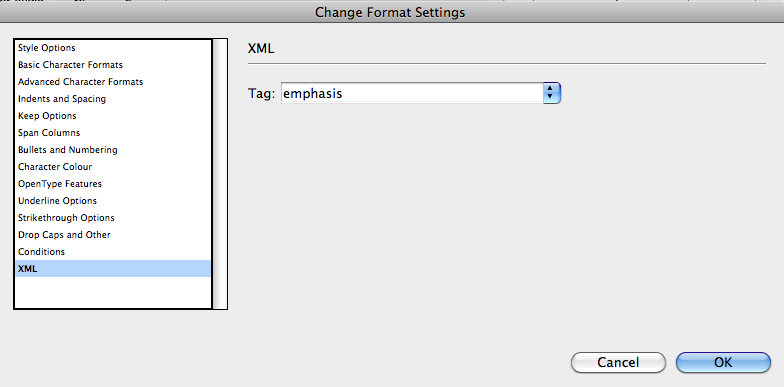
     We can add XML Elements using Find and Replace palette.  Can we add with attribute name and values while adding the xml elements?? If not can capture the element which added using changeText for each occurrence to add attributes??

     Screen shot 2017-08-08 at 5.17.14 PM.png

app.findTextPreferences = app.changeTextPreferences = NothingEnum.nothing;;                        

app.findTextPreferences.appliedCharacterStyle = "emph";

app.changeTextPreferences.appliedCharacterStyle = "emph";

app.changeTextPreferences.markupTag = "emphasis";          // Add xml Tag

var res1 = app.activeDocuemnt.findText();

if(res1.length > 0)

{

     app.activeDocument.changeText()

}

- Sudha K

TOPICS
Scripting
698
Translate
Report
Community guidelines
Be kind and respectful, give credit to the original source of content, and search for duplicates before posting. Learn more
community guidelines

correct answers 1 Correct answer

Enthusiast , Aug 09, 2017 Aug 09, 2017

Try this,

var doc = app.activeDocument;

app.findTextPreferences = app.changeTextPreferences = null;

app.findTextPreferences.findWhat = "emph";

app.changeTextPreferences.markupTag = "emph";

var res1 = doc.findText();

if(res1.length > 0)

{

        for(var i=0;i<res1.length;i++)

        {

                res1.changeText();

                res1.findText()[0].insertionPoints[0].associatedXMLElements[0].xmlAttributes.add("name","value");

            }

    }

app.findTextPreferences = app.changeTextPreferences = nul

...
Translate
Contributor ,
Aug 08, 2017 Aug 08, 2017

Can anyone help me...

Translate
Report
Community guidelines
Be kind and respectful, give credit to the original source of content, and search for duplicates before posting. Learn more
community guidelines
Enthusiast ,
Aug 09, 2017 Aug 09, 2017

Try this,

var doc = app.activeDocument;

app.findTextPreferences = app.changeTextPreferences = null;

app.findTextPreferences.findWhat = "emph";

app.changeTextPreferences.markupTag = "emph";

var res1 = doc.findText();

if(res1.length > 0)

{

        for(var i=0;i<res1.length;i++)

        {

                res1.changeText();

                res1.findText()[0].insertionPoints[0].associatedXMLElements[0].xmlAttributes.add("name","value");

            }

    }

app.findTextPreferences = app.changeTextPreferences = null;

Regards,

Chinna

Translate
Report
Community guidelines
Be kind and respectful, give credit to the original source of content, and search for duplicates before posting. Learn more
community guidelines
Contributor ,
Aug 09, 2017 Aug 09, 2017
LATEST

Hi,

          Thank you... Its working...

          when i am finding contents ' (single quote) in find palette sometimes its returing ' (quote as symbol) but in sometimes its retuning STRAIGHT_SINGLE_QUOTE.  How to find this character in document?

     When quote is with other characters its returning contents correctly (as symbol) but when it comes alone and sometimes its returning STRAIGHT_SINGLE_QUOTE or corresponding number for quote. I am assigning selection contents to find. How can i find the single and double quote when find using selection contents?

        app.findTextPreferences = app.changeTextPreferences = null;

        app.findTextPreferences.appliedCharacterStyle = cstyle;

        app.findTextPreferences.findWhat = sel.contents;

        app.changeTextPreferences.appliedCharacterStyle = cstyle;

        app.changeTextPreferences.markupTag = tagName;


        var res1 = sel.findText();


        if(res1.length > 0)

        {

            for(var rCnt1 = 0; rCnt1 < res1.length; rCnt1++)

            {

               var cResult = res1[rCnt1];

               cResult.changeText();

                cResult.findText()[0].insertionPoints[0].associatedXMLElements[0].xmlAttributes.add('name','value');

            }

       }

     app.findTextPreferences = app.changeTextPreferences = null;

Translate
Report
Community guidelines
Be kind and respectful, give credit to the original source of content, and search for duplicates before posting. Learn more
community guidelines