


- Home
- InDesign
- Discussions
- Re: Adding Highlight to script Or Grep Style?
- Re: Adding Highlight to script Or Grep Style?

Copy link to clipboard
Copied
Hi
Is it possible to Add a hightlight to a script? Basically what i want it to do is Highlight text and the tricky part is that the text changes sizes depending on the size of file we're working on. Say i want to automatically highlight this "FOR PROFESSIONAL USE ONLY" the way we do it now is Make a underline the like this in the underline options menu: Say my font size is 8, Leading 9.6 (These will always change).
Weight: = 9.6
Offset: = -8*.33
Color = Yellow
That is the way we do it now. Can it be scripted or Grep style even that will automatically do this for certain Lines of text only? And no matter the size of font calculate what it needs to so whether its 2pt, 10pt 100pt etc... it will Highlight the specified text correctly?
hopefully this is possible..
Thank you


 1 Correct answer

The below one is a better.
I removes a bug and also if no "what" is provided to the highlight function and there's no entry in the find what of the find text panel and some text is selected then that text will be highlighted.
An idea in the script is that a keyboard short cut can be applied for it and it will get it's info from the find text panel.
So for the meantime change the correct answer to this one 
...// Highlight function by Trevor
// http://creative-scripts.com
// Custom Scripts for Adobe InDes

 42
Replies
42
42
Replies
42

Copy link to clipboard
Copied
use
highlight('\\d+-\\d+'); \\ you need to escape the escape, also extra brackets are not needed here so don't use them.
highlight('the word', app.activeDocument.swatches[4]); // you had to many 'quotes' in your expression

Copy link to clipboard
Copied
Hi,
The following greps are not working in script, but it's working by manual grep of find option.
highlight('-[\l\u]+');
highlight('(?<= \d)[\l\u]+\>');
please advice,

by
hasvi


Copy link to clipboard
Copied
You need to escape the backslashes:
highlight('-[\\l\\u]+');
highlight('(?<= \\d)[\\l\\u]+\\>');
Copy link to clipboard
Copied
Hi Peter,
I am trying to find straight double quote and straight single quote in my text because both are not allowed as per guideline. Here, it works while using the below greps for straight double quote, but not able to find straight single quote text. I tried with two different grep option in my script but its not workout for me. (Because we are using the same straight quote to define the grep properties in the brackets, it may be reason).
highlight('^"'); -- finding well
highlight('^''); -- not finding and showing error in my script
any advice please.
by
hasvi
Copy link to clipboard
Copied
> highlight('^''); -- not finding and showing error in my script
Use highlight ("^'") -- double quote / caret / single quote / double quote.
P.
Copy link to clipboard
Copied
Hi,
It is not running for grep changes as in below:
highlight('\\d+-\\d+'); \\ you need to escape the escape, also extra brackets are not needed here so don't use them.
I think we should add grep style in the code, because we added only for text that is:
app.findTextPreferences.findWhat = what;
(NOT: app.findGrepPreferences.findWhat = what;)
Please advice.
by
hasvi
Copy link to clipboard
Copied
Yep the original code was pasted 2+ years ago, one would have to change all the app.text.... stuff to app.grep.... stuff in order for it to handle greps.
Copy link to clipboard
Copied
thanks...!!!!!
by
hasvi
Copy link to clipboard
Copied
Hi Kahrel, thanks and it works fine.
I am new learner of indesign script, so is there any guide to know about script writing?
Anyhow, thanks for your timing help.
by
hasvi
Copy link to clipboard
Copied
See the first part of the list here: Scripting and GREP resources
P.
Copy link to clipboard
Copied
Hi Peter, thanks for your swift reply.
by
hasvi
Copy link to clipboard
Copied
Hi Peter,
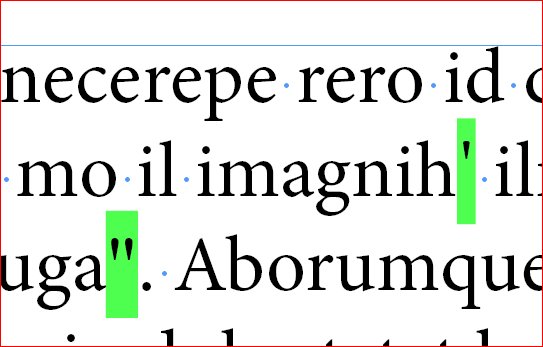
thanks for your reply, but I want to find exactly only the straight single/double quote. While using this highlight ("^'") its finding all quotes.
by
hasvi
Copy link to clipboard
Copied
Go to the GREP tab of the Find/Change dialog. Click the @ at the 'Find what:' field. Select 'Quotation Marks', then select 'Double straight quotation marks'. Now in the 'Find what:' field you see what you want to look for. Do the same with the single straight quatation mark.
P.
Copy link to clipboard
Copied
Hi Peter,
Did you mean this, but its finding all.
But I want only straight quotes not curly quote because our client will reject files if it has straight quotes.

by
hasvi
Copy link to clipboard
Copied
No. You selected 'Any single quotation mark' from the list. You should take 'Straight single quotation mark'.
Copy link to clipboard
Copied
Yes, I selected but its searing all quotes including curly. I want to search only straight quote.
by
hasvi
Copy link to clipboard
Copied
You did not select either of the straight single or straight double quotation marks. If you had, you'd have seen that they would have been entered as ~' and ~"
Copy link to clipboard
Copied
Hi Peter,
Although, I selected from text it shows as in my screen shot. But I added the same grep in my script as below:
highlight('^"');
highlight("^'");
Now only I find it, that's my script is not working. But the same script I am using regularly to find the unwanted characters its suddenly stopped working...I am just blinking why this happened (this is new type of problem scripts not running)
Anyway, thanks for your swift reply.
by
hasvi

-
- 1
- 2

Get ready! An upgraded Adobe Community experience is coming in January.
Learn more
 AdChoices