
Ben Lockwood
Inspiring
February 21, 2023
Answered

Adjacent table cells with different border strokes.

  • February 21, 2023
  • 3 replies
  • 3536 views

I'm attempting to create a Punnett's Square using tables. A 2x2 grid with labels along two edges, like this:
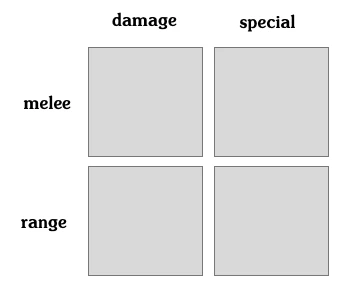
My plan was to create a 3x3 table with two cell styles. The outer cells for the labels would use a style with no border; while the inner 2x2 grid would use a style with a border on all sides.


For some reason, however, the resulting table looks like this:
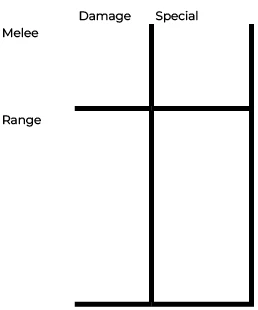


It seems to me that the cells without any border have a higher priority than the cells with one. Does anyone know how this priority is determined, and if it can be changed?

This topic has been closed for replies.
Correct answer James Gifford—NitroPress

That would certainly get the job done, though it'd be copy/paste heavy since there's no way to set text frame styles. And if anything about the style needed to change I'd be in real trouble if I had a lot of Punnett's Squares.


If you need the precise/elegant visuals, and if there aren't too many iterations of this construct, building it from graphic and text frame elements, using all appropriate styles, and then grouping the elements... might be a better option. A little tricky to edit each iteration, but it need not be impossible, and other than the visual aspect, you aren't really using any features of tables.


Worth a little tinkering, maybe — again, if what you can achieve with tables doesn't quite get where you want to go.


(And, ah, wrong game. Was just curious.)


3 replies

Robert at ID-Tasker
Legend
February 22, 2023

Does it have to be a table? 😉 


Ben Lockwood
Inspiring
February 22, 2023

Being a table does make it work better with screen readers (i.e., the software will automatically read "2nd Row, Damage Column: [contents]") But so long as a solution is reasonably accessible I can work with it.

What've you got in mind?

Robert at ID-Tasker
Legend
February 22, 2023

Group of 4x TextFrames? 


Or TextFrames inside Cells? 


Scott Falkner
Community Expert
Community Expert
February 21, 2023

Try adding an extra row and column between the cells you want to have a border.

Ben Lockwood
Inspiring
February 21, 2023

You're probably correct that this is the best solution for achieving the desired visual. Sadly, it would have bad interactions with accessibility software, such as screen readers. A visually impaired person would need to listen to "Row 3 Cell 1: no data, Row 3 Cell 2: no data, Row 3 Cell 3: no data" etc. 

Ben Lockwood
Inspiring
February 22, 2023

Seems good enough, especially as you can pack all those styles into one Table Style.


It's always frustrating when you can't do something in one platform that's so easy on another (Word, CSS, etc.). I used to be able to identify the tool used to lay out a publication by which tricky but easy features they used — it was one click in App A, all but impossible in App B, and so forth. ID tables have a lot of features but a few annoying limitations.


Gotta ask... what game are you using this for?


It is frustrating. You'll get no argument from me 🙂


This is for a 'zine being put together by some RPG bloggers, each contributing essays around some central theme. The essay this is for is about using Punnett's squares to quickly generate a varried groups of monsters.

James Gifford—NitroPress
Legend
February 21, 2023

Tables can be a little fussy to work with, but I managed to do it with manual styling. Turn off all borders, grab lower four cells, apply background, apply thick white borders, done. Add text and adjust each set's cell positions.

I then created three quick styles (top row, side column, squares) by cloning the relevant cells (grab cells, define style) that seemed to apply properly to a new, raw table.


This might be more difficult to do by defining styles from scratch because, as you note, those are applied according to a hierarchy that might mess up the layout.


Note that you'd also want to define paragraph styles for each cell style.


Does that help?


Ben Lockwood
Inspiring
February 21, 2023

I also opted to go with three styles for expediencey's sake. It will do the job for now, but it also makes editing more complicated. My hope for a better long term solution is that the hierarchy can be altered (or at least understood and worked around).


Thanks for your help, James. I hadn't considered white borders and shading. That's an attractive look.

James Gifford—NitroPress
Legend
February 21, 2023

Well, ID is highly styles-driven, and each variation requires a different style. Other than the method used to get to a defined style (from scratch, or by creating and then cloning an element), I don't know any other way to achieve what you're after.


What would you like/prefer/hope to accomplish for this layout, if not using multiple style definitions? You can then group them into a single Table style — I just did, and it clones the layout perfectly. If that's not an ideal solution, try to clue me as to what might be.


Just to spell it out:

  • Create table with one header row.
  • Grab all, borders off.
  • Grab lower cells, set background and thick white borders. (You can use any background shading you like, of course, and for the label rows.)
  • Enter text in top and side cells.
  • Create text styles for each (top and side)
  • Grab top cells, create TOP cell style
  • Grab left cells, create SIDE cell style
  • Grab lower cells, create SQUARES cell style.
  • Create new Table style
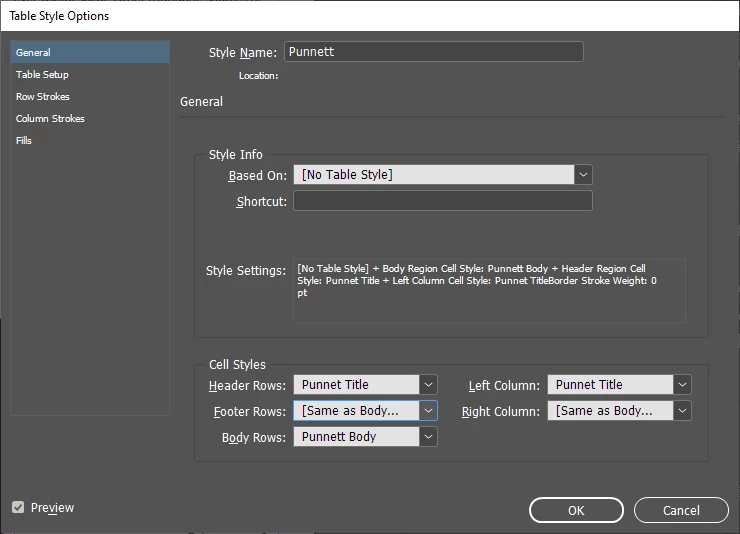
  • Assign cell styles to header row, left column and body.


That table style should now clone the layout perfectly. And that's how it's done in ID, so... 🙂