_AWID_
Inspiring
October 8, 2025
Answered

Adjusting rows and tabs in an index using a script

  • October 8, 2025
  • 1 reply
  • 233 views

Hi.

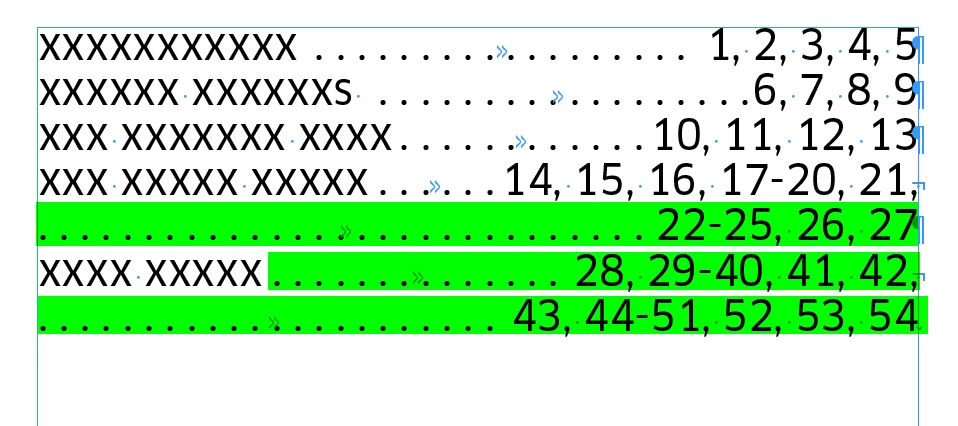
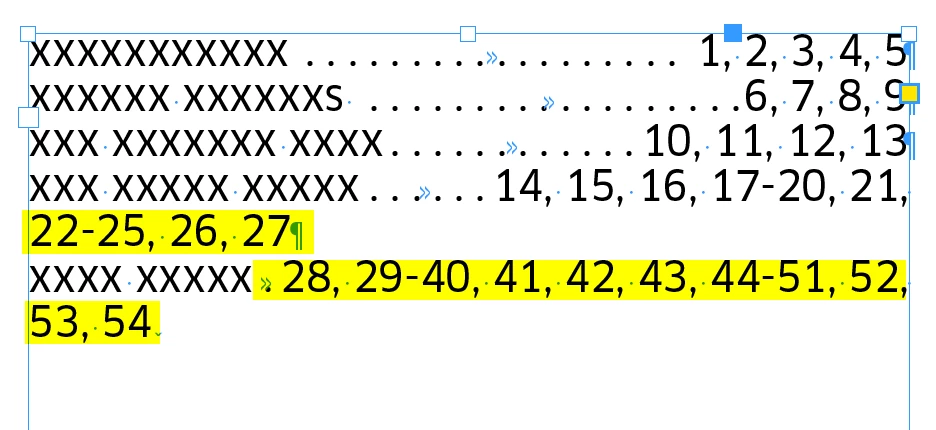
I´d like to spruce up an index by adjusting overcrowded rows.

Before:

After:


The column is 55 mm wide and after each text there is a tab stop (right aligned, at 55 mm) with the period as a filler character. 

I want gaps of no more than three points (or a specified distance) between text and page numbers. A line break is inserted at the end of the line. A tab is inserted at the beginning of the next line. If there are more page numbers for a term (more than two lines in a paragraph), the same procedure is applied.


My idea was to "do something" with regular expressions, but I have no idea how to check, capture, and move the page numbers.

Correct answer m1b

@_AWID_ you are on the right track with "doing something" with regular expressions—they are definitely going to do some heavy lifting here!


I've written a script that should do what you describe, and hopefully it will help you with your own scripting.

- Mark


/**
 * @file Fix Index Lines.js
 * 
 * @author m1b
 * @version 2025-10-08
 * @discussion https://community.adobe.com/t5/indesign-discussions/adjusting-rows-and-tabs-in-an-index-using-a-script/m-p/15538412
 */
function main() {

    var doc = app.activeDocument;
    var text = doc.selection[0];

    if ('function' !== typeof text.findGrep)
        return alert('Please select some text and try again.');

    app.findGrepPreferences = NothingEnum.NOTHING;
    app.findGrepPreferences.findWhat = '~y\\K[\\d, -]+';

    var found = text.findGrep();
    var delim = /([\s,]+)/g;


    for (var i = found.length - 1, refText, refs, half, pos; i >= 0; i--) {

        refText = found[i];

        if (refText.lines.length < 2)
            // already one line
            continue;

        half = Math.ceil(refText.contents.length / 2);
        refs = refText.contents.split(delim);
        pos = 0;

        // find the position at or after the halfway point
        for (var j = 1; j < refs.length && pos < half; j = j + 2)
            pos += refs[j - 1].length + refs[j].length;

        refText.insertionPoints.item(pos).contents = SpecialCharacters.RIGHT_INDENT_TAB;
        refText.insertionPoints.item(pos).contents = SpecialCharacters.FORCED_LINE_BREAK;

    }

};
app.doScript(main, ScriptLanguage.JAVASCRIPT, undefined, UndoModes.ENTIRE_SCRIPT, 'Fix Index Lines');


Notes:

(a) I'm searching using Indesign's native findGrep, using this grep, which you may have to adjust to suit your document: 

~y\K[\d, -]+

which means

~y         = match a right indent tab
\K         = reset (ignore what we matched
             so far and keep going)
[\d, -]+   = match one or more of any combo
             of digit, comma, space or hyphen

* oh, and to make things a little more complex, because Text.findGrep() takes a String, not a RegExp, we need to escape the backslashes (with a backslash!) so that's why you are seeing double!


(b) I'm using a RegExp with a capture group as the String.split parameter, which means that the resulting array will include the matched delimiter text as separate elements in the array, so a string split into 3 pieces will actually have 5 elements. That's why I jump by 2 in the "j" loop.


1 reply

m1b
Community Expert
m1bCommunity ExpertCorrect answer
Community Expert
October 8, 2025

@_AWID_ you are on the right track with "doing something" with regular expressions—they are definitely going to do some heavy lifting here!


I've written a script that should do what you describe, and hopefully it will help you with your own scripting.

- Mark


/**
 * @file Fix Index Lines.js
 * 
 * @author m1b
 * @version 2025-10-08
 * @discussion https://community.adobe.com/t5/indesign-discussions/adjusting-rows-and-tabs-in-an-index-using-a-script/m-p/15538412
 */
function main() {

    var doc = app.activeDocument;
    var text = doc.selection[0];

    if ('function' !== typeof text.findGrep)
        return alert('Please select some text and try again.');

    app.findGrepPreferences = NothingEnum.NOTHING;
    app.findGrepPreferences.findWhat = '~y\\K[\\d, -]+';

    var found = text.findGrep();
    var delim = /([\s,]+)/g;


    for (var i = found.length - 1, refText, refs, half, pos; i >= 0; i--) {

        refText = found[i];

        if (refText.lines.length < 2)
            // already one line
            continue;

        half = Math.ceil(refText.contents.length / 2);
        refs = refText.contents.split(delim);
        pos = 0;

        // find the position at or after the halfway point
        for (var j = 1; j < refs.length && pos < half; j = j + 2)
            pos += refs[j - 1].length + refs[j].length;

        refText.insertionPoints.item(pos).contents = SpecialCharacters.RIGHT_INDENT_TAB;
        refText.insertionPoints.item(pos).contents = SpecialCharacters.FORCED_LINE_BREAK;

    }

};
app.doScript(main, ScriptLanguage.JAVASCRIPT, undefined, UndoModes.ENTIRE_SCRIPT, 'Fix Index Lines');


Notes:

(a) I'm searching using Indesign's native findGrep, using this grep, which you may have to adjust to suit your document: 

~y\K[\d, -]+

which means

~y         = match a right indent tab
\K         = reset (ignore what we matched
             so far and keep going)
[\d, -]+   = match one or more of any combo
             of digit, comma, space or hyphen

* oh, and to make things a little more complex, because Text.findGrep() takes a String, not a RegExp, we need to escape the backslashes (with a backslash!) so that's why you are seeing double!


(b) I'm using a RegExp with a capture group as the String.split parameter, which means that the resulting array will include the matched delimiter text as separate elements in the array, so a string split into 3 pieces will actually have 5 elements. That's why I jump by 2 in the "j" loop.
_AWID_
_AWID_Author
Inspiring
October 8, 2025

Hi Mark,

Thanks for that. Good explanation. I'll try to follow the script. It might take a while. 🙂


m1b
Community Expert
Community Expert
October 8, 2025

No problem, it is a lot to take in. I've added a note about the grep pattern I used for the initial search. Note that I used Indesign's findGrep to start, which gave me Text objects, and later used a javascript RegExp to do the string splitting. They are different flavours of regular expressions, but are 95% the same.


Good luck!