
Celull0yd
Inspiring
March 3, 2020
Answered

Adobe Font Issue

  • March 3, 2020
  • 3 replies
  • 4523 views

I've acitvated several fonts from Adobe Fonts and used them in a monthly magazine. When I preflight, I get this error in the preflight palette:
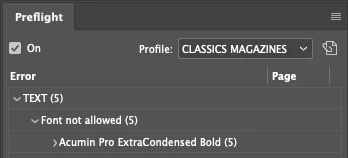


Has anyone else run into this problem? It seems to allow me to create a PDF for printing but I don't know why I get the error.


Thanks,

Lloyd

Correct answer Celull0yd

Folks,


Thanks for the replies. I understand that the fonts from Adobe TypeKit can't be downloaded or packaged. I also had "Protected Fonts" checked in my preflight profile, so I guess that's just a warning in case you're going to try to download or package the font. Because we create and send out PDFs to printers, I just unchecked it in my profile...problem gone!


Lloyd

3 replies

Legend
March 3, 2020

" it won't let me package it to send to a printer."

That has nothing to do with the error you are seeing. Fonts activated through Adobe fonts cannot be downlaoed to your machine, and they are not packaged with a file. Since anyone who wants to open this file would have to have a subscription, they would be able to activate them on their own.

To dig into the preflight error, open up the Fonts Not Allowed tab in your preflight profile, and see what types of fonts are selected. 

Celull0yd
Celull0ydAuthorCorrect answer
Inspiring
March 3, 2020

Folks,


Thanks for the replies. I understand that the fonts from Adobe TypeKit can't be downloaded or packaged. I also had "Protected Fonts" checked in my preflight profile, so I guess that's just a warning in case you're going to try to download or package the font. Because we create and send out PDFs to printers, I just unchecked it in my profile...problem gone!


Lloyd

rob day
Community Expert
Community Expert
March 3, 2020

I think it‘s worth noting that the Adobe Font Acumin Pro is not the same as Acumin Variable Concept.otf font that gets installed into InDesign’s required fonts folder and is not protected:


The path to Acumin Pro Thin is Activated from Adobe Fonts


But the path toAcumin Variable Concept is the InDesign required fonts folder, and you should be able to package this version


You get the variable font sliders with the concept version


But not with the Adobe Font version

Derek Cross
Community Expert
Community Expert
March 3, 2020

Dov posted this a couple of days ago, it might be relevant:

I have “played with” a number of these fonts both from Adobe and elsewhere and believe that there are tremendous possibilities once there is clear end-to-end workflow support for OpenType Variable fonts.


You can use those fonts now in real print work, but be advised that the variable fonts supplied with Adobe applications at this point are pretty much duplicated in the standard font offerings from Adobe. Plus, the current “concept fonts” are not full fonts in terms of glyph complements and are subject to change significantly by the time they are released as somthing other than “concept” fonts. For example, Minion Pro, Myriad Pro, and Acumin all have many more glyphs and OpenType features that their current “concept” brethren. Furthermore, you can't do any manipulation of the text in Acrobat after the fact.


As I previously said I would treat the “Variable Fonts” in Illustrator and Photoshop and now InDesign to be experimental/exploratory.


- Dov Isaacs, Principal Scientist, Adobe
BobLevine
Community Expert
Community Expert
March 3, 2020

That's obviously a custom profile so without knowing what the profile doesn't allow there's no way for us to even begin to guess.

Celull0yd
Celull0ydAuthor
Inspiring
March 3, 2020

Bob,


Correct. I created several profiles for different types of jobs. In this profile, I checked "Fonts not Allowed" but that still doesn't tell me WHY Acumin isn't "allowed." It's from TypeKit, so it can be used when creating a PDF for the printer but it won't let me package it to send to a printer. I was just wondering why that error exists. 🙂


Lloyd

BobLevine
Community Expert
Community Expert
March 3, 2020
You cannot package those fonts. The assumption is that anyone getting the file would have a CC subscription and would have access to them the same way you do.