
jenn_whitehead
Participating Frequently
June 22, 2018
Question

Adobe InDesign CC 2018 has stopped working

  • June 22, 2018
  • 2 replies
  • 3923 views

Computer is running Windows 10, 64 bit.

When we try to open InDesign from the start menu/desktop/taskbar it comes up and says "Adobe InDesign CC 2018 has stopped working". Have done a repair on InDesign, and get the same results. Did a full uninstall of all Adobe Creative Suite programs, restarted, and reinstalled, but still getting the same issue. If we open Adobe Create Cloud, and open the program from there, it works fine. If we right click the .exe file and run as Admin it also seems to work (this is not an option for the user as the system is restricted by the company. I just happen to have an one time override). The user would rather be able to just click on the program icon on the desktop and open the program. User also stated that if she navigates to the file, right clicks and does "Open With" it also works.

Did see other posts of others having the same issue. Was there a solution to this?

I have a screen shot of the even viewer as well (attached), if that might help someone determine what the issue is, and what we need to do to correct it.

Thank you for your time and support.
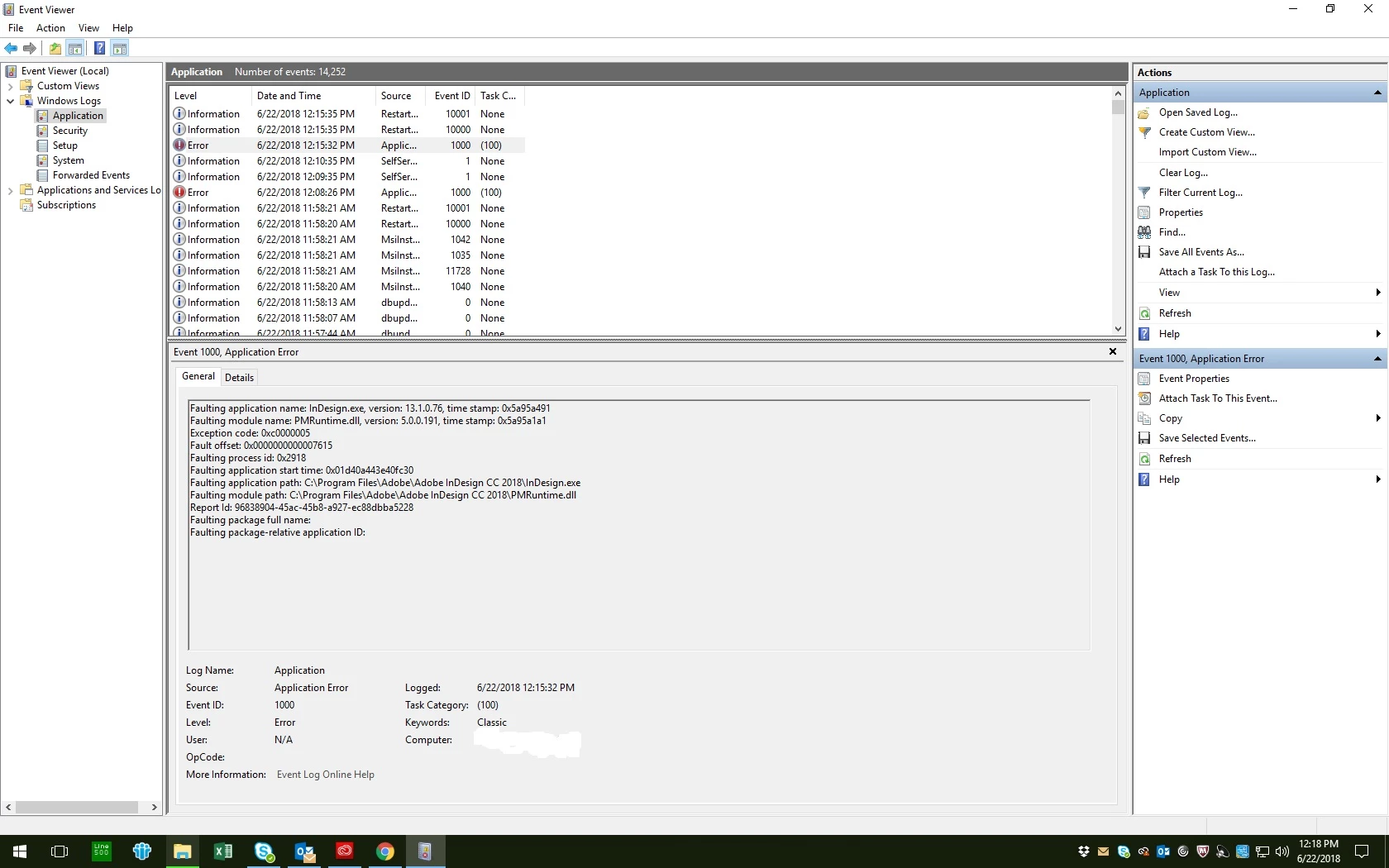
[Moderator: Moved from Adobe Creative Cloud to InDesign ]

This topic has been closed for replies.

2 replies

Srishti Bali
Community Manager
Community Manager
June 25, 2018

Hi Jenn,

We are very sorry for the frustrating experience. This look like a windows error. Please try following steps and share results:

Check for Windows update

Restart System

Reset preferences for InDesign

  • Close all Adobe applications.
  • Go to Locations :
  • C:\Users\user\AppData\Roaming\Adobe
  • C:\Users\user\AppData\Local\Adobe.
  • Delete or Rename InDesign folders.
  • Launch InDesign from CC

If it still does not work please check how the application works in Safe mode: (https://support.microsoft.com/en-in/help/12376/windows-10-start-your-pc-in-safe-mode ) and new user account: ( https://support.microsoft.com/en-in/help/4026923/windows-10-create-a-local-user-or-administrator-account )

Looking forward to your response.

Regards,

Srishti

jenn_whitehead
Participating Frequently
June 27, 2018

Hello Srishti

I did the first part of changing the name of the 2 folders. Still not able to open InDesign from the start menu (same error). However, now when I try to open Creative Cloud from the desktop I am not able to get into that. Get the error that the firewall or virus protection may have blocked it. Trying to find a way to get past this for the time being as our systems are restricted by our company.

Did get onto Adobe Chat earlier today, but he wasn't able to get past the fact we couldn't get into Creative Cloud.

Still working my way through this. Will try to keep this updated as to the status.

Srishti Bali
Community Manager
Community Manager
June 27, 2018

Hi Jenn,

In this case, your IT team has to share Read/Write permissions on all Adobe folders in the following locations and in antivirus preferences and that should solve the issue:

C:\Users\user\AppData\Roaming\

C:\Users\user\AppData\Local\

C:\Program Files

C:\Program Files (x86)

C:\ProgramData

Regards,

Srishti

AxelMatt
Community Expert
Community Expert
June 22, 2018
My System: Intel i7-8700K - 64GB RAM - NVidia Geforce RTX 3060 - Windows 11 Pro 25H2 -- LR-Classic 15 - Photoshop 27 - Nik Collection 8 - PureRAW 5 - Topaz Photo