Vivek12
Community Manager
Community Manager
October 14, 2024
Question

Adobe InDesign MAX Release:- Export InDesign documents to Adobe Express

  • October 14, 2024
  • 14 replies
  • 9194 views

Hello Everyone,

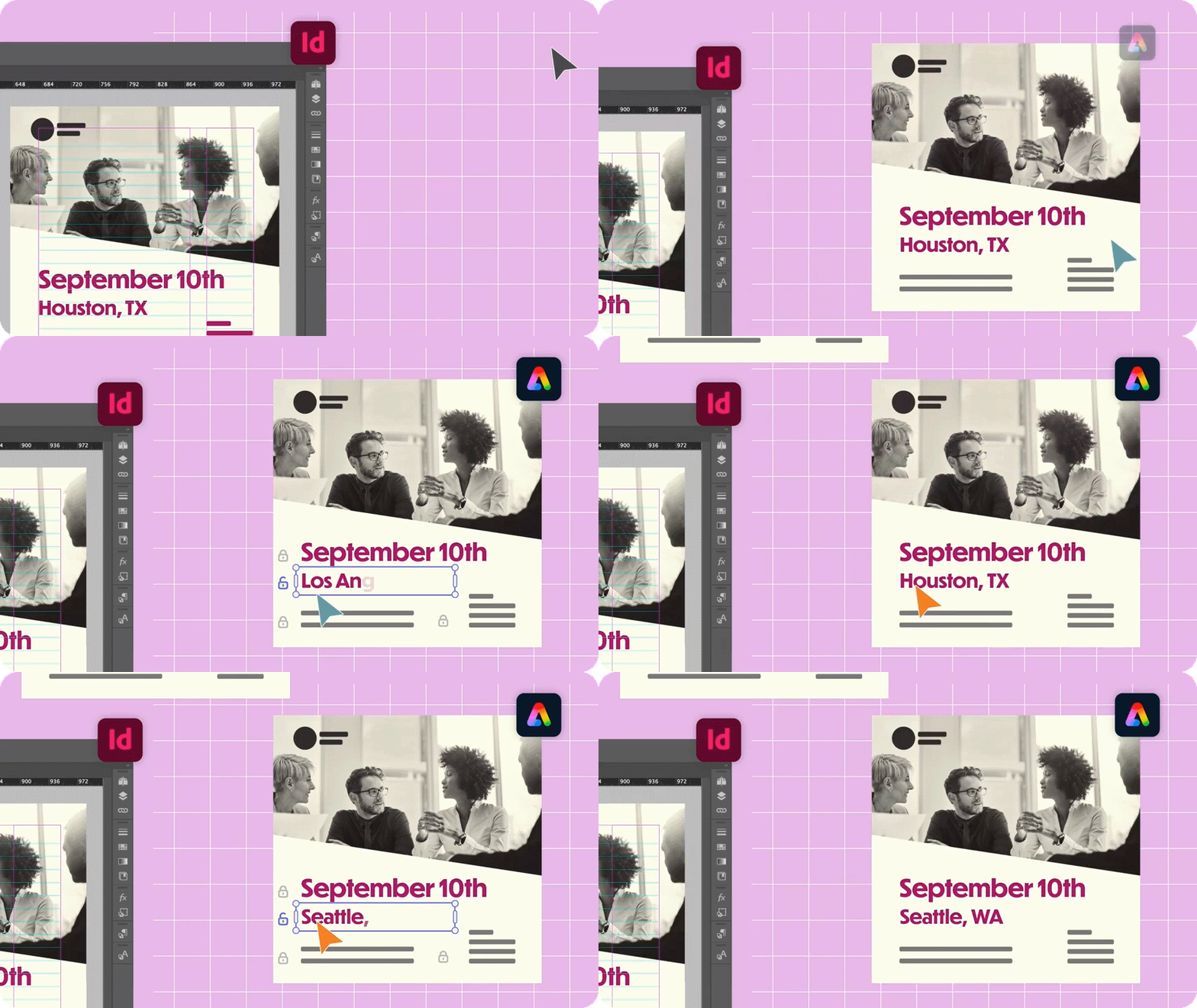
We are excited to introduce the new "Export InDesign documents to Adobe Express" feature in InDesign.
Now, you can export your InDesign documents to Adobe Express for fast and simple online editing. This feature enables Adobe Express users, including skilled communicators and non-professional designers, to modify and personalize InDesign templates. It also allows InDesign documents to open as native, editable files within Adobe Express.


Steps to export InDesign Docs to Adobe Express

  1.  Open an InDesign document.
  2.  Go to File > Export to Adobe Express. You can now easily edit the exported InDesign document in Adobe Express.
  3.  To gain better control, you can lock the elements in Adobe Express .
    4. To share it with others using Adobe Express, select Share, add the names, and specify the access level.


For more details, please click here.  

If this was helpful, please click the Upvote icon in the top left corner of this post. Your feedback helps us improve the experience. Thank you!


Have questions? Click 'Reply' below to ask.

Click 'Follow' below to bookmark this post for easy reference.

14 replies

Community Expert
October 17, 2024

This is a super cool feature. Making things work seamlessly. Love it!

AgenceKIOU
Participating Frequently
October 17, 2024

Hi all


Updated to latest InDesign 2025, but this new function doesn't seem to be working on the French version (iMac + Mac OS Monterey). I get two error messages (see screen captures) with no further indication of what to do - Just to "Close" the window. Doesn't seem to be a language version problem, more a technical one.


After clicking Export to Adobe Express, it goes through the file preparation process but falls over near the end and no files are added to the cloud space. The first error message reads "InDesign couldn't execute this workflow. Try again later".  The second is regarding the conversion of incorporated V4 colour profiles en V2 profiles during the creation of a PDF.


Any ideas. This is a really useful addition to InDesign, it would be a shame if it doesn't work.


Regards

Rob


Participating Frequently
October 17, 2024

Same problem. I hope it resolved in next updates

Participating Frequently
October 23, 2024

Hello @GraphifyPro,


Thank you for your patience. We tested the issue you reported using the file you provided and found that the "Export to Adobe Express" feature worked correctly on our end. Here are some insights based on our investigation:

1. We noticed from the screenshot you shared that the language setting in the PDF export options was set to Arabic. Even though you mentioned using the English version, it's possible that a previous configuration might have caused this setting to default to Arabic.


2. To ensure smooth functionality, I recommend checking your InDesign installation directory:
    Confirm if your InDesign workspace is set to AE (Arabic) or US (English).
    If it is currently set to AE and you prefer using the English version, try uninstalling InDesign, clearing the cache and preferences, and then reinstalling with English settings. Reference: Use the Creative Cloud Cleaner tool to solve installation problems (https://adobe.ly/48gflUS)


3. If the error continues to occur even after verifying that your installation is in English, please let us know. 


I appreciate your cooperation, and please feel free to reach out if you need additional assistance!


Best,
Abhishek Rao


Unfortunately I need to use Indesign support Arabic not English only

Rollan Banez
Community Expert
Community Expert
October 16, 2024

Works great, thank you for opening another possibility to integrate Express.

Creative Community Leader / Educator - Empowering fellow educators with creativity and innovation
Participating Frequently
October 16, 2024

I tried with the English version can't work, I do not know why

Community Expert
October 16, 2024

@GraphifyPro said: "I tried with the English version can't work, I do not know why"


I have no idea why, but could we perhaps interpret the error message "We do not currently support converting content in this language" in the way, that the language formatting or the applied font of text on the page, perhaps (my guess) Chinese, Devanagari, using a "complex script", is something that cannot be handled?


What kind of text is on your page?


Regards,
Uwe Laubender
( Adobe Community Expert )

Participating Frequently
October 16, 2024

I see this error in all file I tried to export, I do not know why

Community Expert
October 16, 2024

Hi @GraphifyPro ,

what's the localized language your InDesign 2025 is installed with? What's your operating system?

Just did a little test with my German InDesign 2025 with "Export to Adobe Express" and cannot see the error.


Tested on InDesign 2025 version 20.0.0.95, macOS 12.7.1 with a MacBook Pro 16" with M1 processor from 2021.


Regards,
Uwe Laubender
( Adobe Community Expert )

Participating Frequently
October 16, 2024

English version on Mac system M1 2021