Vivek-Sharma
Community Manager
Community Manager
October 14, 2024
Question

Adobe InDesign MAX Release:- Export InDesign documents to Adobe Express

  • October 14, 2024
  • 14 replies
  • 9209 views

Hello Everyone,

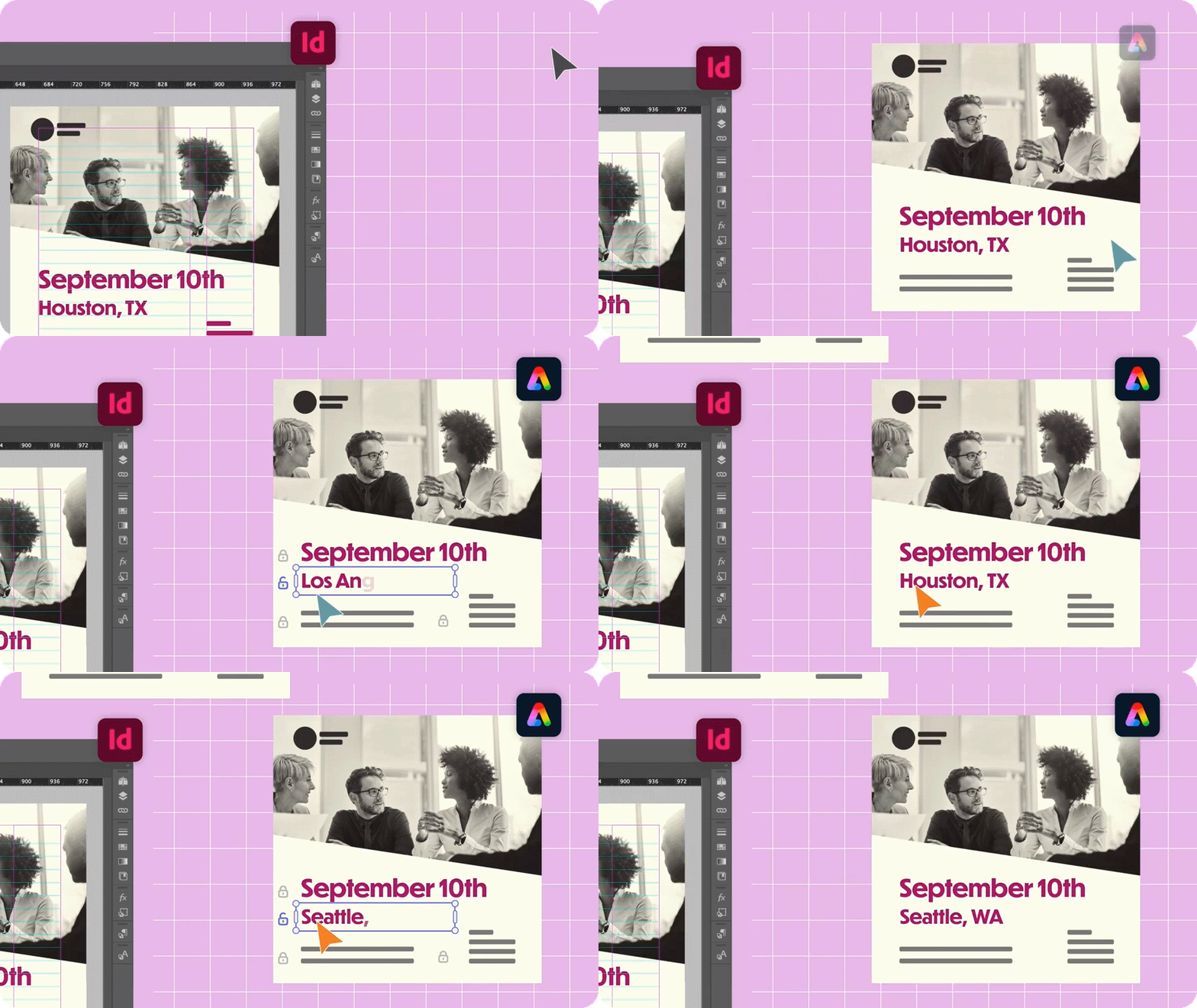
We are excited to introduce the new "Export InDesign documents to Adobe Express" feature in InDesign.
Now, you can export your InDesign documents to Adobe Express for fast and simple online editing. This feature enables Adobe Express users, including skilled communicators and non-professional designers, to modify and personalize InDesign templates. It also allows InDesign documents to open as native, editable files within Adobe Express.


Steps to export InDesign Docs to Adobe Express

  1.  Open an InDesign document.
  2.  Go to File > Export to Adobe Express. You can now easily edit the exported InDesign document in Adobe Express.
  3.  To gain better control, you can lock the elements in Adobe Express .
    4. To share it with others using Adobe Express, select Share, add the names, and specify the access level.


For more details, please click here.  

If this was helpful, please click the Upvote icon in the top left corner of this post. Your feedback helps us improve the experience. Thank you!


Have questions? Click 'Reply' below to ask.

Click 'Follow' below to bookmark this post for easy reference.

14 replies

mazra_8383
Participant
March 12, 2026

It would be helpful to be able to pause the animations - they’re very distracting while trying to read the information, thanks

Participating Frequently
April 23, 2025

Does the resolution specified in the export hold in the Express document? So my 300 dpi images will stay 300dpi throughout the Express process all the way to download? I'm creating templates from my Indesign files for others in my org to modify select areas of text and then print on their end.

Anubhav M
Community Manager
Community Manager
April 23, 2025

Hello @defaultfdqrwhcm2206,

Could you try the suggestions shared in this community post (https://adobe.ly/4lYsAjE) and letting us know if they help?

Looking forward to hearing from you.
Anubhav

Participating Frequently
April 25, 2025

No, the suggestions did not help.  Individual photos uploaded to a page of a project that has been set up with pixels to match the photo resolution are sharp, but that doesn't solve the problem. I don't want to rebuild my finished Indesign file again in Express. I want Indesign and Express to talk to each other like two products within the same suite should.

I tried creating a project the exact resolution of the desired output and importing my high resolution PDF as a page and it didn't work because I can't import a PDF without using your import tool, which requires me to start a separate project for which I cannot choose, in advance, the resolution of that project, so I'm back to square one. I don't want to import it as an image (which may retain resolution--I didn't check because I don't want that), I want to import it with editable text. Exporting from Indesign into Express produces the same result as importing, reducing my 8.5 x 11 file to a third of that size. Can Adobe please answer the question directly: Is there a way to import my high resolution PDF files into Express maintaining original dimensions and photo resolution? If not, what is the exact workaround? If there is a workaround or solution, why is it so hard to find?

I'm a decades-long loyal Adobe customer; I don't want to use Canva and why would Adobe want me to? I want to seamlessly use the Adobe suite to create print-quality, print-ready, properly branded, easy-to-use modifiable templates for non-designer colleagues to modify without asking them to learn Indesign and without needing to buy, learn, and train hundreds of people on a completely different application like Marq. Acrobat is a clunky, impractical, inflexible tool for fillable templates. What exactly is the Adobe solution or if there is no solution, why not?

Participating Frequently
November 20, 2024

hello I love this function! but I have one issue. One thing that happens to some document with alot of text is that the text jumps and not is on the place as it is in indesign. Also texts line spacing and letter spacing dosnt look correct in some places.

Abhishek Rao
Community Manager
Community Manager
November 20, 2024

Hi @default5vcuumy29vdv,


Thank you for sharing your feedback and for using this function! I’m glad to hear you love it.  

Regarding the issue with text jumping and spacing inconsistencies, could you please share a screen recording demonstrating the problem? This will help us understand the behavior more clearly.  

If possible, sharing a sample document where this issue occurs would also be incredibly helpful for troubleshooting.  

Looking forward to your response!  


Best,
Abhishek Rao  

Participating Frequently
November 20, 2024

Hi , thank you can I share by emailing the file?

Participating Frequently
November 3, 2024

Are there any differences between:
1. Export to Adobe Express
and
2. Export to a PDF from InDesign, then import that PDF into Adobe Express?


Also, the docs say 'To gain better control, you can lock the elements in Adobe Express .', but it seems to be the case that whoever you share the design with in Adobe Express can easily unlock those elements.


Auroraron
Participant
November 1, 2024

This is useless. It only exports the first page or spread—no control over what is exported.


Community Expert
October 25, 2024

This is pretty neat. So after you do the edits, if you download the file, can it be reopened and Indesign?

headTrix, Inc. | Adobe Certified Training & Consulting
Participant
October 24, 2024

It would be amazign if you feed edits back into inDesign. For example, letting a client edit all the text and then push it back to inDesign for final export. 

Abhishek Rao
Community Manager
Community Manager
October 24, 2024

Hi @TMarketecture,


Thank you for your suggestion! The idea of feeding edits back into InDesign for final export is indeed a fantastic concept that could enhance collaboration and streamline the editing process. I understand that this functionality is important to you, and I apologize for its unavailability at this time. 

Would you mind creating a UserVoice for this feature request? You can do so here: [Adobe InDesign: Feature Requests: Top (5017 ideas) – Adobe InDesign (https://adobe.ly/3UlVA8S)](https://adobe.ly/3Yjbcef). Adding your comments there will help us prioritize this request, and you'll be notified of any updates.

If you have any more ideas or questions, feel free to reach out! We'd be happy to help.


Best,  
Abhishek


Participant
October 24, 2024

Hi, sure! The Links you sent don't work tho. 

Participant
October 22, 2024

Has anyone else had issues with larger documents (40+ pages) losing elements of the design (eg. background shapes/images) and text box widths changing after exporting from Indesign to express?

@mj
Community Expert
Community Expert
October 18, 2024

I'm trying to understand the scenario where this might make sense.

Could you share your thinking please?

mj

iMSD

Participant
October 18, 2024

How do I remove that blue ball before 'export to Adobe Express' in the file menu?

Participant
October 18, 2024

Never mind, uploaded a blank document and that removes it.