Abhishek Rao
Community Manager
Community Manager
October 14, 2024
Question

Adobe InDesign MAX Release: Generate HTML5 output for the content.
  • October 14, 2024
  • 15 replies
  • 8709 views


Hello Everyone,

We are thrilled to introduce the new Export Content as HTML5 feature in InDesign. With this update, you can now export pages, spreads, or selected objects to HTML5 format with just a few clicks. HTML5 makes your content more accessible and compatible across platforms and boosts both user engagement and SEO! Plus, you have control over how text is exported for optimized web performance.

Please try it and let us know what you think. We can’t wait to see how you use this powerful new feature in your projects.


Quick and easy steps to export content as an HTML5 Package

  1. Go to File > Export.
  2. Choose HTML5 from the Save as type (Windows) or Format (macOS) dropdown.
  3. Choose Use InDesign Document Name as the Output Filename to keep the same file name, then click Save.
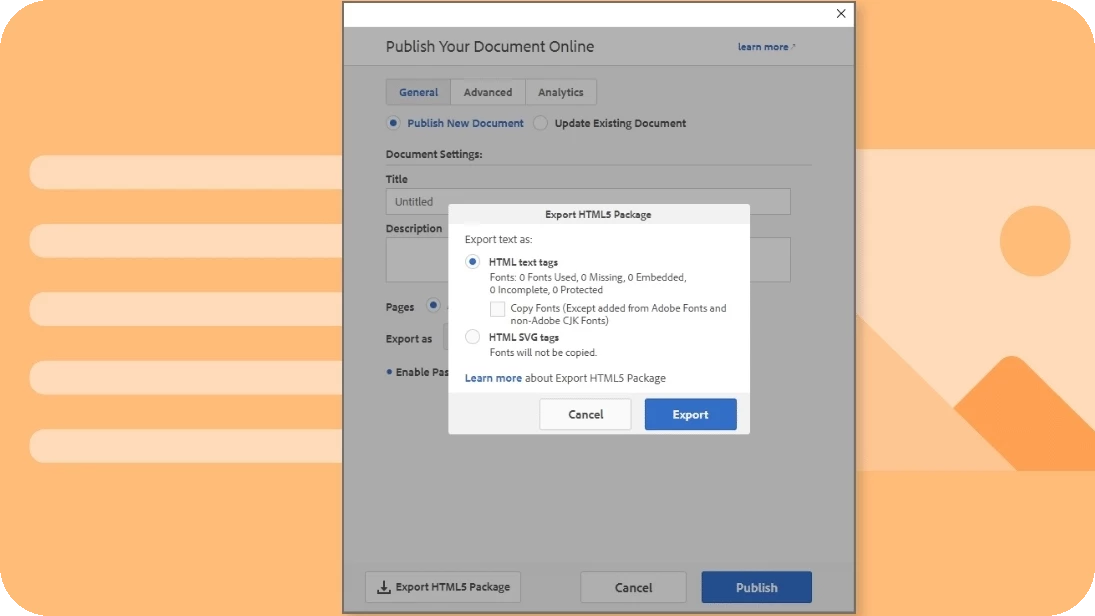
  4. In the Export HTML5 Package dialog, choose HTML text tags or HTML SVG tags.
  5. Click Export. Your document is now an HTML5 package.
 

Key Properties from the Publish Online Dialog

  • Title: Used to name the exported folder.
  • Description: Not exported.
  • Pages: All pages included if exporting directly from File > Export > HTML5.
  • Export as:
    • Single: Each page as an individual HTML file, linked to index.html.
    • Spread: Each spread as a single HTML file, linked to index.html.
  • Cover Thumbnail: Included in the HTML5 package.
  • Image Settings: Applied from the Publish Online dialog.
  • Google Analytics: Tag added to index.html if included in the Publish Online dialog.


For more details, please click here. 

We’d love to hear from you!

Try out the new Export to HTML5 package feature in InDesign 2025 version 20.0, and let us know your thoughts. Feel free to reach out if you have any questions or need more tips!

If this was helpful, please click the Upvote icon in the top left corner of this post. Your feedback helps us improve the experience. Thank you!


Have questions? Click 'Reply' below to ask.

Click 'Follow' below to bookmark this post for easy reference.

15 replies

Participating Frequently
September 23, 2025

This is a fantastic and much-needed feature. Thank you to the InDesign team for introducing HTML5 export support!

Having the ability to export content directly as an HTML5 package, with options like SVG and semantic text tags, is going to be a huge time-saver for digital publishing workflows. The flexibility to export single pages or spreads, while maintaining the document structure, makes it very versatile for responsive design and web deployment.

A couple of quick questions:

  1. Will there be support for custom CSS or external style linking in future updates?

  2. How well does this feature handle complex layouts with interactivity (for example, buttons or animations)?

  3. Can this integrate with existing CMS systems easily, or is the output mainly designed for static HTML use?

Looking forward to using this in our upcoming projects. Great work on bridging print and web design!

Community Manager
September 23, 2025

Hello @Stellar_Wonderland5049,

Thanks for reaching out. Would you mind creating a UserVoice for this feature request (https://adobe.ly/3KhGr6b) and adding your comments there? Doing this will help us prioritize this request, and you will be notified of any updates.


Feel free to reach out if you have more questions or need assistance. We'd be happy to help.


Thanks,

Anubhav

New Participant
March 4, 2025

Hello,

This new Export Content as HTML5 feature in InDesign looks fantastic! Being able to export pages and objects seamlessly to HTML5 will definitely enhance accessibility and compatibility across different platforms. The added control over text export for optimized web performance is a game-changer.

I’ll be testing this out soon—looks like a real time-saver! Thanks for the detailed steps. Anyone else excited to try this? Let’s see what cool projects we can create with it.

Coot out !

Participating Frequently
March 4, 2025

Unfortunately, it could be a game changer, but in practice the HTML5 export option is completely inadequate for more demanding work, at least in comparison to Ajar's In5. And the adobe service cannot understand problems.

New Participant
February 17, 2025

The new Adobe InDesign MAX release is a game changer! Being able to generate HTML5 output directly from InDesign makes it so much easier to create interactive, responsive content for the web. This will save time and allow for seamless integration into digital projects. Excited to explore all the new possibilities! For more insights, check out my latest articles on digital tools and design at my blog. #AdobeInDesign #HTML5 #WebDesign"

@mj
Adobe Expert
February 4, 2025

I reckon you'll need more than InDesign to sell your graphic design @Rev9 Solutions . Design is a holistic solutions-driven career. I can send you a few resources if you'd like. Not wanting to sound condescending at all.

@mj
Adobe Expert
February 14, 2025

I think you're more than capable @Rev9 Solutions! Great conversation. Thank you

@mj

Adobe Community Expert

Institute of Media, Strategy & Design

Author, Adobe InDesign Masterclass

New Participant
December 5, 2024

It would be better if ADOBE just buys AJAR and includes IN5 = Adobe's HTML as is will take another year at least if ever to do what AJAR does quick and easily - it is a strain on the pocketbook for most independent designers and IN5 is a GREAT tool especially if you have a Wordpress website


BobLevine
Adobe Expert
December 5, 2024

No, just no!


While I don't use it a lot anymore, in5 is an absolutely brilliant product with great developer support. The last time I can remember Adobe buying a plugin/addin for InDesign was the Table/Cell style from Teacup Software around 2004. It was great at the time, but it hasn't received any improvements since. And then there's the whole host of 1.0 features that never saw a 2.0 such as all of the animation tools that are stuck in the past and are just one giant kludge. 


Let's just leave this one to Ajar and let them keep supporting it.

Known Participant
January 6, 2025

Hi @BobLevine 

What nonsense do you say to please someone? If the product is to be developed, the first person responsible is Adobe.

New Participant
December 3, 2024

Hi, I tried the latest update, the Indesign 2025 Export HTML5 package [Publishe online], and everything is working fine except for one issue: the MP3 audio file I inserted isn't playing after viewing on the Web browser [Chrome]. Please let me know how to fix this.


Abhishek Rao
Community Manager
Community Manager
December 3, 2024

Hi @Raghavan35840629bdwj,


Thank you for reaching out!


I understand that the MP3 audio file you inserted isn’t playing when viewed in a web browser (Chrome) after exporting the HTML5 package using Publish Online. To help us investigate this further:

  1. Could you please share a screen recording demonstrating the issue? This will help us understand the exact behavior.
  2. If possible, could you also share a sample InDesign file with the MP3 audio included? This will allow us to test the issue on our end and provide a more precise solution.
  3. Don’t forget to share the details of your operating system as well. This information will help us pinpoint the root cause of the problem.

Looking forward to your response!


Best,
Abhishek Rao

@mj
Adobe Expert
January 7, 2025

Hi,

A humble request.

Please fix what is broken before taking on such an ambitious task and doing it in half measure.

For example, the booklet feature and the various limitations in interactive PDF with you guys taking Flash EOL.

Then there's the whole ID to interactive digital publishing tool, shoot I can't remember what you guys called it.

It was built to circumvent the Apple Flash ban.


My tuppence worth.

mj

Participating Frequently
November 18, 2024

Hello, I am pleased with this tool and the layout is transferred perfectly, but the pages are not displayed correctly and tags and thumbnails are not working properly, see:

https://www.1133.at/publish/Buergermeister_1133/

Abhishek Rao
Community Manager
Community Manager
November 18, 2024

Hi @josefh35143105,


Thank you for reaching out! I'm glad to hear that the layout transferred well for you. To better assist with the issue you're experiencing with the pages not displaying correctly, as well as the tags and thumbnails not working, could you kindly provide a bit more information?

1. Could you please share the details of the operating system you're using?
2. Is this issue happening with only the file you’ve linked or does it occur with multiple files as well?
3. If possible, could you provide a screen recording of your workflow from the export process? This will help us understand the issue better and offer more specific guidance.

Looking forward to your reply!


Best,
Abhishek Rao

New Participant
October 30, 2024

that's one of those features I was kind of waiting for

@mj
Adobe Expert
October 30, 2024

Please report back on the quality of the HTML generated. I'll do the same.

mj | imsd | author: InDesign Masterclass

AlanGilbertson
Adobe Expert
October 26, 2024

It works well, but the professional use cases are relatively limited for what is effectively fixed-layout ePub without the Pub. Good for some kiosk set ups, possibly adding live documents to a website, and as an alternative to hosting a document in the Publish Online environment. Overall, the output is quick and accurate in my tests.

Adobe Expert
October 25, 2024

This looks neat. But after you publish the HTML, do you re-edit the HTML, or go back into InDesign for changes?

headTrix, Inc. | Adobe Certified Training & Consulting
BobLevine
Adobe Expert
October 26, 2024

That's up to you.