
Inspiring
August 11, 2022
Answered

Adobe InDesign PDF failure

  • August 11, 2022
  • 4 replies
  • 1243 views

As of today, I cannot use InDesign to Export to PDF using the standard method.


I receive this error message:
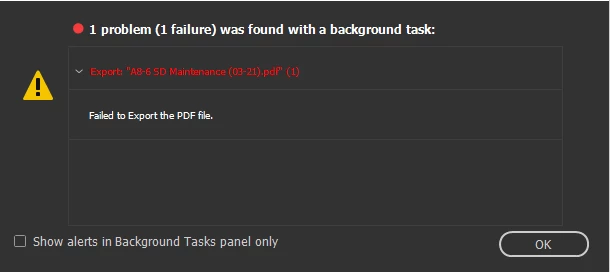
 

Googling the issue gave me this result to what seems to be the same issue: https://helpx.adobe.com/indesign/kb/failed-export-pdf-downsample-large.html


This is my attempt at their hotfix results in this error before continuing to the export screen from the save screen.
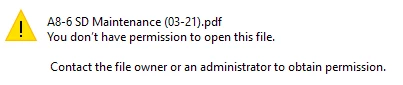
 

I have tried this with multiple files/locations. Occasionally, it will allow me to create a PDF (not by the means in the above explanation), however, the PDF comes out corrupted and is automatically deleted from both our server and my work station's hard drive. No permissions have changed on my end, so this should be directly related to Adobe InDesign/Acrobat.


Thanks!


This topic has been closed for replies.
Correct answer Formost Fuji Corporate

In my experience, IT always says it's an application problem, but they may be correct. Multiple users with similar issues across different applications doesn't sound like it though.

Some things you should try:

Copy everything you need for the project to your local hard drive, update the links to the local versions, and see if it will export to a new location on the local drive. That would really point to a network issue.

Disable any third party plugins and see if it works.

Create a new user account on your PC and log in with that. If it works in the new account it indicastes a problem with the current user info, so see Reset InDesign Preferences and Other Troubleshooting 

Boot in safe mode so nothing unnecessary to running theOS is loading, then see if it works. That indicates a software conflict, which  could be anything from a background task like your antivirus to a banking app to a browser extension.


I found a workaround from the same issue from 5+ years ago on Reddit.

It does appear to be an Adobe issue, as I had to export it to a .idml (markup file). From here, I could export it normally to the location. 


Now that I know this, I have no idea how to get it in front of someone at Adobe anymore (used to know programmers there), as this seems like a rather roundabout way to resolve the problem that doesn't appear intuitive.

4 replies

chrisg11235813
Participating Frequently
August 12, 2022

When I get a Export Error I usually try:

1) Changing the name of the exported file - rule out a file permission issue

2) Exporting to the desktop - rule out the network

3) Save the indd file to desktop and export. -- rule out network again

4) Export only a few pages of the document -- there might be a problem with a specific page, or too much info in the PDF file to save.

5) Delete everything in the document and export a blank file. -- rule out if the indd file is an issue.

     if #5 works, figure out which element is being difficult and troubleshoot from there.


I hope this provides something you haven't aleady thought of!

Rishabh_Tiwari
Community Manager
Community Manager
August 12, 2022

Hi @chrisg11235813 ,


Thanks for reaching out and sharing the troubleshooting steps, I am sure it will help other community members. In addition to these, here is an article with detailed troubleshooting steps for troubleshooting PDF export issues https://helpx.adobe.com/indesign/kb/troubleshoot-printing-pdf-export-indesign.html


Regards

Rishabh

Jumpenjax
Community Expert
Community Expert
August 12, 2022

Have you tried packaging the file. It will tell you of any potential problems. You can fix. It also creates a pdf and you can set the quality of the pdf.

Lee- Graphic Designer, Print Specialist, Photographer
Inspiring
August 12, 2022

Tried. Did not resolve the issue.

Willi Adelberger
Community Expert
Community Expert
August 11, 2022
  1. Where are the files saved, indd and linked asset?
  2. What kind of server?
  3. Is it a cloud server? If so, what cloud server?
Inspiring
August 11, 2022

1. Doesn't matter where or what is/n't linked.

2. Server isn't the issue. It is the same issue, regardless of its involvement

3. No

Peter Spier
Community Expert
Community Expert
August 11, 2022

It sounds like you work in some sort of enterprise network environment, and this sounds a lot more like a permission issue than a problem with memory. Have you talked to your IT people about this?

Inspiring
August 11, 2022

I have, and no permissions have changed.


Acrobat has been having issues recently (simple viewing) but resolved in the last week+.


This is definitely not an issue with memory, but in the conversion between .indd and .pdf during export, which I can't understand how saving/accessing .indd in the same folder as the .pdf would be a networking issue and not program-related.

Peter Spier
Community Expert
Community Expert
August 11, 2022

Since I have no access to your system or network I'm only guessing, but I suspect there's probably a read-only permission of the folder or the PDF itself. Is this a Mac network? Any recent OS updates?

There have been a number of similar discussions involving Macs and it has always been a permissions issue that is easily solved by granting full access to the application.

I'm going to suggest you search for some of these threads, or maybe someone will chime in with the correct settings -- being a PC person I can't remember exactly what needs to be changed.