
Participant
May 15, 2022
Question

Adobe programmes eating al of my HDD-Data

  • May 15, 2022
  • 2 replies
  • 343 views

Help!

Everytime, after about three weeks working with Photoshop, Illustrator and Indesign (all latest versions), solely or together, my HDD-Data is completely filled up, from 1.2 Gb to 980 Gb!

It takes my iMac three days to delete all logs and some Caches before I can start working again. 

My set-up: Late 2013 27 inch iMac with 8 Gb Ram and 1 Tb Rom.

I use one external SSD for saving my work and another one for running my Progammes.

I would like to replace my old iMac for a new one, but I don't trust the Adobe-programms anymore .... 

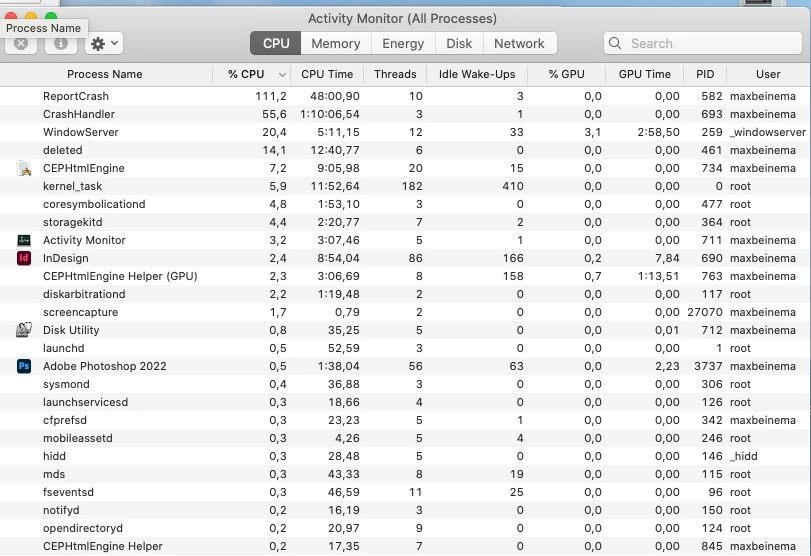
What is causing this very frustrating problem? What you see here in this screenshot is the result of two days work .....


This topic has been closed for replies.

2 replies

Joel Cherney
Community Expert
Community Expert
May 16, 2022

Are you running Monterey? I don't know what is causing your issue but it's not uncommon...


https://discussions.apple.com/thread/252604641

https://www.reddit.com/r/MacOS/comments/sby7bz/okay_what_is_reportcrash_and_why_is_it_using_100/


These are just a few of 'em. The way I'd go about trying to troubleshoot would be to ask you to look at your logs, as is shown in the first link to the Apple discussion forum. If you've just trashed all your logs, it may be harder to figure out what is going on. I suspect that either you have 

1) some problem related to runniing your apps off an external SSD, or

2) some problem related to an install of Acrobat Reader DC, or

3) maybe some combination of problems that causes Adobe apps to react poorly to being run off of external SSD


Is it possible for you to check your logs? And maybe post some bits from them? If ReportCrash is running constantly, that means that probably some Adobe helper-app is constantly trying to run and crashing. You may simply want to try uninstalling and reinstalling your Creative Cloud apps, perhaps using the Creative Cloud Cleaner, but that would be a bit of work, and there isn't really any evidence yet to support that as your next troubleshooting step. 

Participant
May 16, 2022

Thank you for your reply. I'm running Catalina.

Brad @ Roaring Mouse
Community Expert
Community Expert
May 17, 2022

You know, I think that probably this is an issue resulting from you installing your apps off of an external drive. The InDesign system requirements state overtly that you can't use an installation on an "external flash storage device". I don't know if that applies directly to you, but sadly it kinda sounds like it does. 


Yes, unless you are BOOTING from the same external drive which has your applications, I don't think it's a good idea to run Apps from a separate drive from System. It can be done, but because the apps need ceratin support folders to reside on the System drive, I don't see the benefit of splitting resources around like that.


As far as rhe disk space issue, the only thing that would fill a drive like this is excessive Scratch Disk use.


Frans v.d. Geest
Community Expert
Community Expert
May 15, 2022

Your screenshot does not show hd space, it show cpu/gpu...