Exit
  • Global community
    • Language:
      • Deutsch
      • English
      • Español
      • Français
      • Português
  • 日本語コミュニティ
  • 한국 커뮤니티
0

alert the story

Explorer ,
Mar 30, 2023 Mar 30, 2023

Hello all,

        I have a doubt.

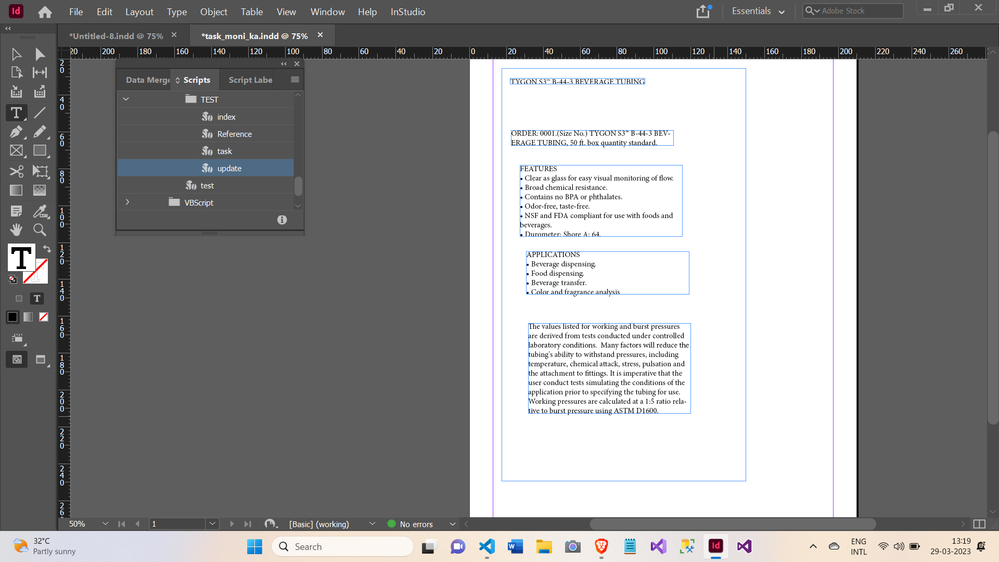
        I have 5 different texframes with some text on it.

        How to alert the stories one by one using java script?


  Thanks in advance!


TOPICS
Scripting
896
Translate
Report
Community guidelines
Be kind and respectful, give credit to the original source of content, and search for duplicates before posting. Learn more
community guidelines

correct answers 2 Correct answers

People's Champ , Mar 31, 2023 Mar 31, 2023
var myStories = document.stories;
for (var i = 0; i < myStories.length; i++){
    alert(myStories[i].contents);
}
Translate
Community Expert , Apr 01, 2023 Apr 01, 2023

Hi @John_devs ,

how about using a Story Editor window?

Select the frames and just hit Cmd + y (Mac) or Ctrl + y (Windows) on the keyboard.

You would be able to see overset text as well.


From my German InDesign:

230401-2-StoryEditor-Window-Example.PNG


Regards,
Uwe Laubender
( Adobe Community Expert )

Translate
Explorer ,
Mar 30, 2023 Mar 30, 2023

Would you post your script?

Translate
Report
Community guidelines
Be kind and respectful, give credit to the original source of content, and search for duplicates before posting. Learn more
community guidelines
Explorer ,
Mar 30, 2023 Mar 30, 2023
myDoc = app.activeDocument;

myStory = myDoc.stories.everyItem().contents;

for (var i =0; i<myStory.length ;i++)
{
    alert(myStory);  Screenshot (63).png
}
if i run this, i can not get the text inside the textframes instead of  i only get the [stories object] could  you guide me !
Translate
Report
Community guidelines
Be kind and respectful, give credit to the original source of content, and search for duplicates before posting. Learn more
community guidelines
People's Champ ,
Mar 31, 2023 Mar 31, 2023
var myStories = document.stories;
for (var i = 0; i < myStories.length; i++){
    alert(myStories[i].contents);
}
Translate
Report
Community guidelines
Be kind and respectful, give credit to the original source of content, and search for duplicates before posting. Learn more
community guidelines
Explorer ,
Mar 31, 2023 Mar 31, 2023

It worked, thanks buddy!

Translate
Report
Community guidelines
Be kind and respectful, give credit to the original source of content, and search for duplicates before posting. Learn more
community guidelines
Community Expert ,
Apr 01, 2023 Apr 01, 2023

Hi @John_devs ,

how about using a Story Editor window?

Select the frames and just hit Cmd + y (Mac) or Ctrl + y (Windows) on the keyboard.

You would be able to see overset text as well.


From my German InDesign:
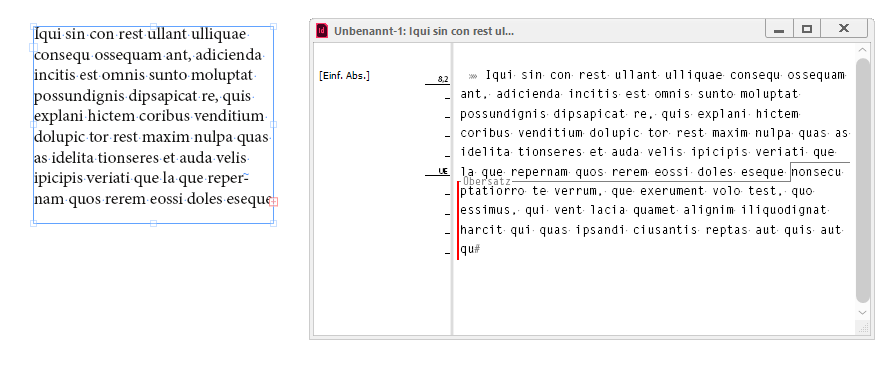
230401-2-StoryEditor-Window-Example.PNG


Regards,
Uwe Laubender
( Adobe Community Expert )

Translate
Report
Community guidelines
Be kind and respectful, give credit to the original source of content, and search for duplicates before posting. Learn more
community guidelines
Explorer ,
Apr 02, 2023 Apr 02, 2023
LATEST

thanks for the effort @Laubender ..., It helped.

Translate
Report
Community guidelines
Be kind and respectful, give credit to the original source of content, and search for duplicates before posting. Learn more
community guidelines