Inspiring
July 8, 2024
Question

Align numbers in a numbered list (was "numbers alinged")
  • July 8, 2024
  • 4 replies
  • 1112 views

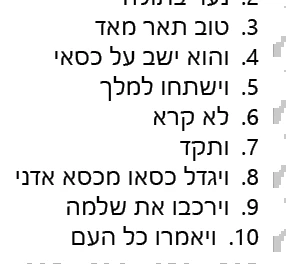
how can I get the words after '10' aligned?

This topic has been closed for replies.

4 replies

Barb Binder
Community Expert
Community Expert
July 8, 2024

Well, I'm a menace behind a keyboard pre-coffee. I first expained how to do it in FrameMaker (leading tab), and then posted the link to handle it in InDesign.  


Joel, is there a R-to-L equivalent of this process in InDesign?


~Barb

~Barb at Rocky Mountain Training
James Gifford—NitroPress
Legend
July 8, 2024

Ha! Well, I question your posts only with the greatest caution, but I've tripped over that "use two tabs" advice in too many places where the posters didn't seem to realize it doesn't work (in ID).


So, there does seem to be a solution in RTL, but in LTR, any numbered list that crosses from 9 to 10 needs some kind of manually-adjusted workaround, multiple styles, or borderline hack to work — right? I'm not missing anything here?


And while Joel seems to have gotten good results from the positioning option, I find it so awkward (in LTR, at least) that I can't quite figure out what it's supposed to be doing, in any useful sense.


All so weird. Most shortcomings in ID are sort of obvious as to cause or functional choice or limitation; this glitch just seems to have fallen through a very big crack in operational concept.

Barb Binder
Community Expert
Community Expert
July 8, 2024

In L-to-R text, we put a tab on both sides of the auto-number, and then set two tab stops: the first is decimal- or right-aligned, the second is left aligned. I haven't had my coffee yet, so can't quite articulate this for R-to-Left text, but it will be the same concept. 😉 I'll get my coffee and swing back in case you need clarification. 


See https://www.rockymountaintraining.com/adobe-indesign-aligning-punctuation-in-numbered-lists/.


~Barb

~Barb at Rocky Mountain Training
Joel Cherney
Community Expert
Community Expert
July 8, 2024

I'm pretty sure, Barb, that you can just swap the terms:

[...] the first is decimal- or left-aligned, the second is right aligned.


As far as the "Number or Bullet Position" dropdown in the parastyle, I find it much more useful than James. I wonder if this is another area, like alignment around text variables, where the World-Ready Composer handles stuff much differently than the Adobe Paragraph Composer. This doesn't look halfway aligned to me: 


Joel Cherney
Community Expert
Community Expert
July 8, 2024

None of the built-in options that should do this simple alignment seem to work, to the point where even the Creative site has several wonky workarounds. (All of the features seem to sort of "work halfway" as in my example.)


I feel that I'm missing something, or perhaps that something has changed, but it's a real PITA to just line up numbering when the number of digits varies, when it should be all but default/automatic.


I was going to disagree with you until I realized that my technique includes the step "Now use the tab ruler to move the margin to which the numerals are aligned towards the body text, so that the numbering is entirely outside the margin as definied in the Paragraph panel."  I guess that fits under the "wonky" heading just fine, when I think about it. 


(This kind of thing is one of the reasons that I occasionally advise my clients "Just leave it in Word/Framemaker/Arbortext/etc; the advantages of moving this project into InDesign are outweighed by the multi-level auto-numbering hassles we'd encounter". )


Inspiring
July 8, 2024

yes.

pixxxelschubser
Community Expert
Community Expert
July 8, 2024

Which settings?

pixxxelschubser
Community Expert
Community Expert
July 8, 2024

Are you already using a tab in the numbering section of your paragraph style?