
Exit
  • Global community
    • Language:
      • Deutsch
      • English
      • Español
      • Français
      • Português
  • 日本語コミュニティ
  • 한국 커뮤니티
0

Align right edge with left edge of objects

New Here ,
Feb 11, 2018 Feb 11, 2018

I know you are able to align the left edges of objects and align right edges of objects, but is there a shortcut to align the right edge of one object to the left edge of another object? I want to make sure that the two objects are perfectly next to each other.
7.6K
Translate
Report
Community guidelines
Be kind and respectful, give credit to the original source of content, and search for duplicates before posting. Learn more
community guidelines

correct answers 1 Correct answer

Community Expert , Feb 11, 2018 Feb 11, 2018

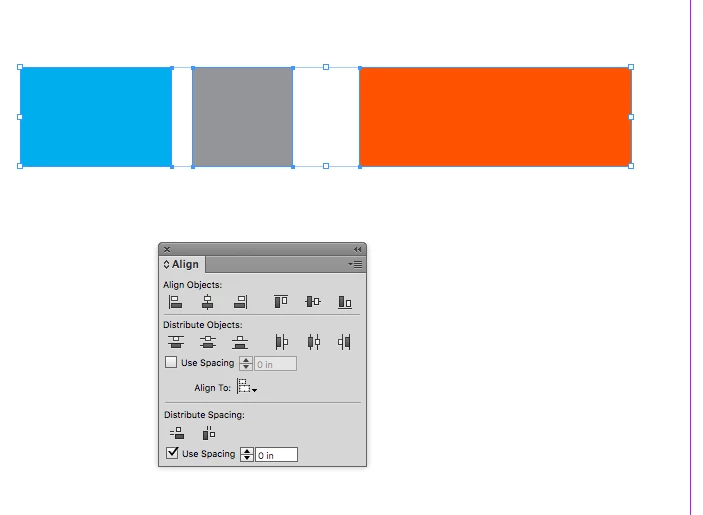
There's also the Distribute Horizontal Space button in the Align panel. Check Use Spacing and set the space to 0

Screen Shot 5.png

snap3.png

Translate
Community Expert ,
Feb 11, 2018 Feb 11, 2018

That’s where smart guides come in handy. Use them. Smart guides will help, too.

Translate
Report
Community guidelines
Be kind and respectful, give credit to the original source of content, and search for duplicates before posting. Learn more
community guidelines
Community Expert ,
Feb 11, 2018 Feb 11, 2018

There's also the Distribute Horizontal Space button in the Align panel. Check Use Spacing and set the space to 0

Screen Shot 5.png

snap3.png

Translate
Report
Community guidelines
Be kind and respectful, give credit to the original source of content, and search for duplicates before posting. Learn more
community guidelines
Enthusiast ,
Feb 11, 2018 Feb 11, 2018

Align To Key Object

Tutorial: https://indesignsecrets.com/align-to-key-object.php

Graphic Designer Educator / PrePress Consultant
Translate
Report
Community guidelines
Be kind and respectful, give credit to the original source of content, and search for duplicates before posting. Learn more
community guidelines
Participant ,
Oct 20, 2020 Oct 20, 2020
LATEST

This is very clever and solves my issue ! thanks so much !

Translate
Report
Community guidelines
Be kind and respectful, give credit to the original source of content, and search for duplicates before posting. Learn more
community guidelines
Community Expert ,
Feb 12, 2018 Feb 12, 2018

bv69  wrote

I know you are able to align the left edges of objects and align right edges of objects, but is there a shortcut to align the right edge of one object to the left edge of another object? I want to make sure that the two objects are perfectly next to each other.

Hi bv69 ,

If you have two or more objects to align will the before/after situation below describe what you want?

Note the object directly below the yellow key object!

Before aligning to the right edge of the key object:

AlignToRightOfKeyObject-Before.png

After alignment:

AlignToRightOfKeyObject-After.png

I think, that the above can only be done by scripting.

Regards,
Uwe

Translate
Report
Community guidelines
Be kind and respectful, give credit to the original source of content, and search for duplicates before posting. Learn more
community guidelines
New Here ,
Apr 23, 2019 Apr 23, 2019

Although the question is more than an year old but let me answer it.

Before there was option of 'pixel perfect' I didn't bother much to find the answer to this conundrum.

But now I do precise drafting using illustrator and thus have to keep an eye on X and Y coordinates. You might have gotten the answer through this reference by now

Just find the coordinates of X by aligning the Reference Point to the right edge and position other objects X coordinate to this point by aligning the Reference Point to the Left edge.

Translate
Report
Community guidelines
Be kind and respectful, give credit to the original source of content, and search for duplicates before posting. Learn more
community guidelines
Participant ,
Oct 19, 2020 Oct 19, 2020

Often to make complexe shape symetrical it is nice to do one half then Oject > Transform > Reflect and copy. Any simpler way to exactly align the left and right halves ?

Translate
Report
Community guidelines
Be kind and respectful, give credit to the original source of content, and search for duplicates before posting. Learn more
community guidelines