parcea
Inspiring
March 12, 2019
Resuelto

Align text: Left, Center, Right

  • March 12, 2019
  • 4 respuestas
  • 1302 visualizaciones

I am working on a directory and would like to align the text, but not sure how to do it. I know how to left, center, right, but  this is a little different.

Here is what I am looking for:

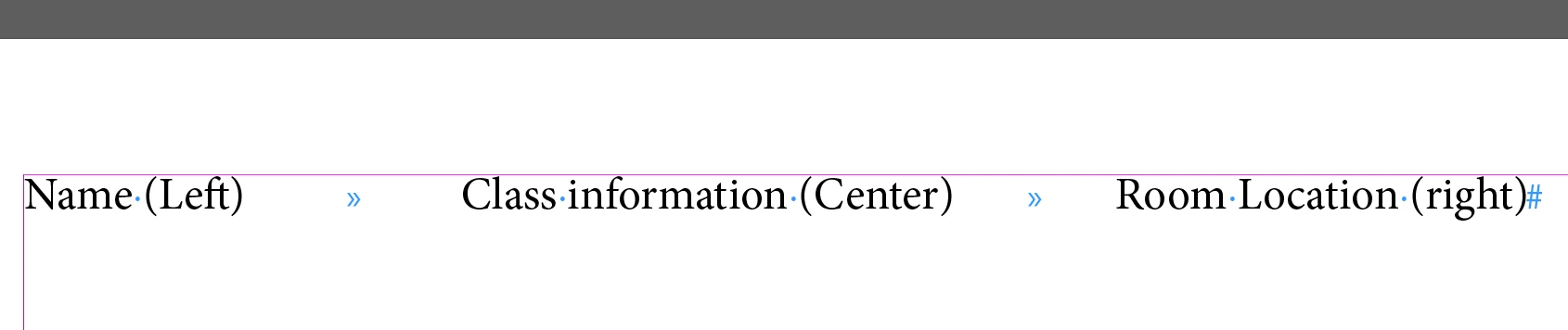
Name (Left)                    Class information (Center)                    Room Location (right)

    Este tema ha sido cerrado para respuestas.
    Mejor respuesta de Barb Binder

    Hi Parcea:

    One way to do this is to add one tab character between each column and then set a center and right align tab.

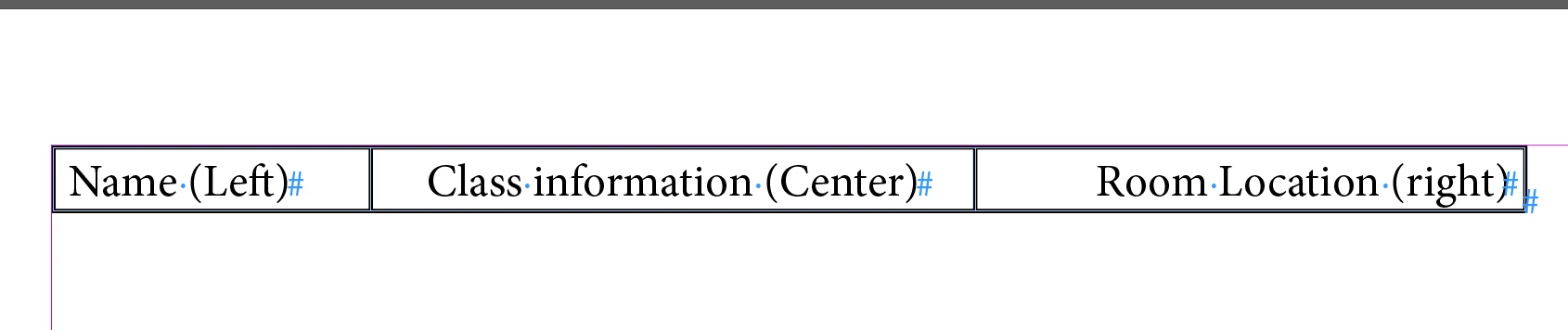
    An alternative is to convert the tab text to a table and then set the alignment within the cells:

    ~Barb

    4 respuestas

    parcea
    parceaAutor
    Inspiring
    March 12, 2019

    Thank you!

    Legend
    March 12, 2019

    Set this up with tabs. Type a tab character between name and class info, type a right-aligned tab (Shirt-tab) between the class info and the room location.

    Place a centering tab in the middle of the line.

    parcea
    parceaAutor
    Inspiring
    March 12, 2019

    Thank you!

    Barb Binder
    Community Expert
    Barb BinderCommunity ExpertRespuesta
    Community Expert
    March 12, 2019

    Hi Parcea:

    One way to do this is to add one tab character between each column and then set a center and right align tab.

    An alternative is to convert the tab text to a table and then set the alignment within the cells:

    ~Barb

    ~Barb at Rocky Mountain Training
    Doug A Roberts
    Community Expert
    Community Expert
    March 12, 2019

    You'd use a paragraph style with three tabs: a left-aligned, centre, and right-aligned one positioned as required relative to your text frame. But depending on your requirements you might be better off with tables.