

melissapiccone
Community Expert
Community Expert
June 22, 2020
Answered

All text red squiggle underlines

  • June 22, 2020
  • 9 replies
  • 9855 views

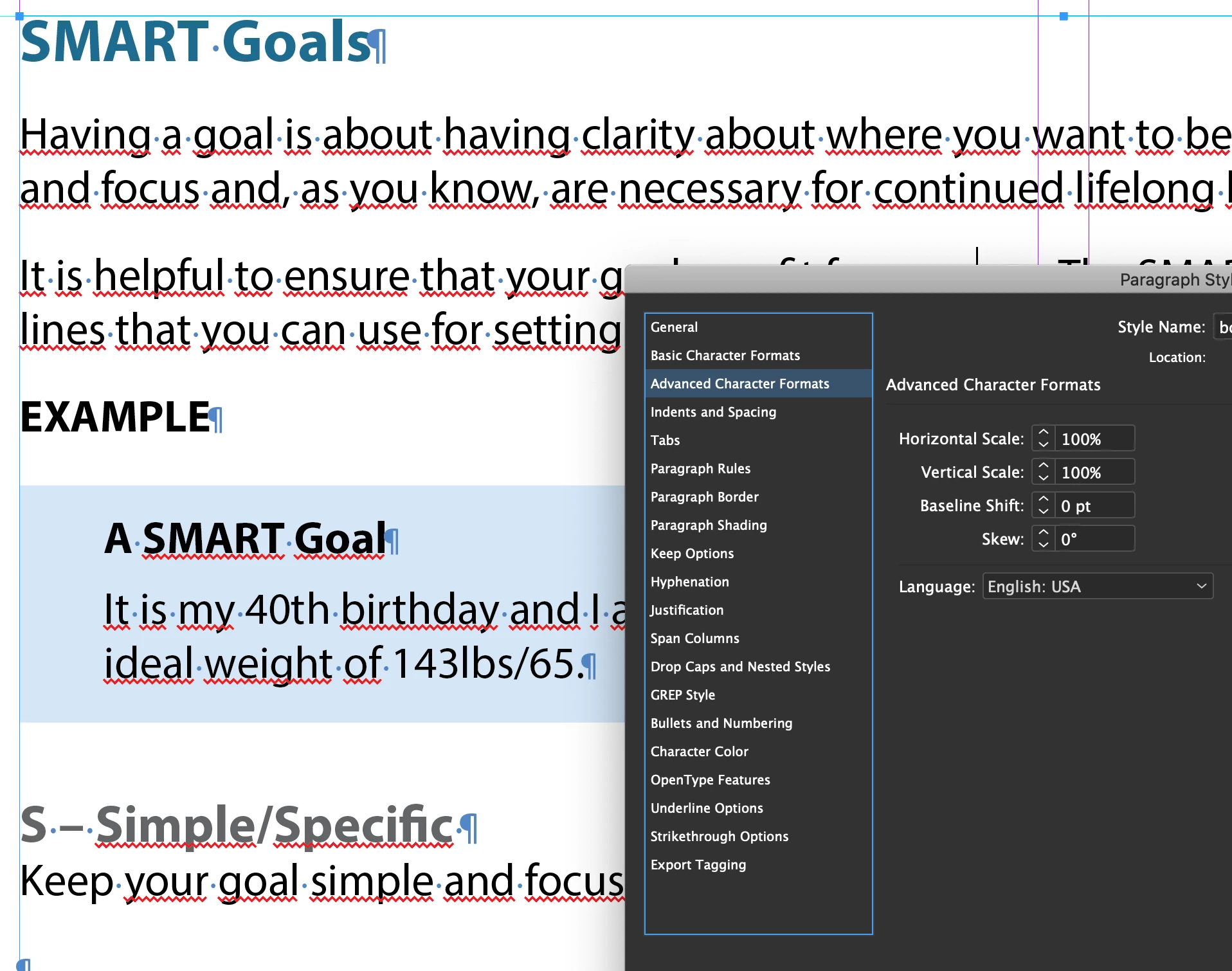
I'm working on a long document that I brought in from Word. I just placed it. Most of the text has the red squiggles. If I retype the text, it goes away. Makes it impossible to find real errors. Everything is set to English - I did have one paragraph style oddly set to Arabic, but I fixed it. I tried another suggestion of saving as a .idml but that didn't work. Any ideas?
Correct answer Barb Binder

Hey Melissa:


I looked at the file and it's definitely an overrides issues. For example, all of the styles on page 22 are using multiple overrides, including Arabic for the language.


You will need to update one paragraph, redefine the style, then select all and use the clear overrides button to remove the overrides on the other paragraphs. Note that on page 22 the style is called Body (it seems like those paragraphs are labels or heads) so pay attention to what else changes when you redefine style/clear overrides if Body is in use on the other pages.


~Barb 

9 replies

Barb Binder
Community Expert
Barb BinderCommunity ExpertCorrect answer
Community Expert
June 24, 2020

Hey Melissa:


I looked at the file and it's definitely an overrides issues. For example, all of the styles on page 22 are using multiple overrides, including Arabic for the language.


You will need to update one paragraph, redefine the style, then select all and use the clear overrides button to remove the overrides on the other paragraphs. Note that on page 22 the style is called Body (it seems like those paragraphs are labels or heads) so pay attention to what else changes when you redefine style/clear overrides if Body is in use on the other pages.


~Barb 

~Barb at Rocky Mountain Training
melissapiccone
Community Expert
Community Expert
June 24, 2020

Whew... that was a challenge. So I selected all, cleared overrides. These overides were not showing up in the paragraph panel. That fixed about 70% of it. Then I had to go in and break link to style and reselect the style. That fixed the rest of them. And some, like Barb said, I had the wrong styles applied but it looked correct. I literally applied all styles by hand, one page at a time so not sure how that happened. I finished this project and I'm hoping there will never be changes or updates because fixing everything adjusted the layout which will take a while to fix. Thanks all for your help. 

Melissa Piccone | Adobe Trainer | Online Courses Author | Fine Artist
Participant
August 22, 2022

Two years too late, but had the same issue today and I found that under conditional text Indicators was turned on to show. The squiggles went away when I changed to hide. That might not have fixed this but for anyone else looking that could be the issue. 

Barb Binder
Community Expert
Community Expert
June 23, 2020

Melissa, you can email me the file.


~Barb

~Barb at Rocky Mountain Training
Scott Falkner
Community Expert
Community Expert
June 23, 2020

The language of your text is not English. Language is used to determine the correct hyphenation dictionary and spelling dictionary. Incorrectly spelled words are highlighted. Your English language words are not words in the selected language. Check the Language section in the Character panel. If you are using Paragraph Styles make sure the language is English (and the correct English).

A. Reese
Participant
May 14, 2024

Thank You! I have no idea how mine went from English to German, I never noticed that drop down!.

Community Expert
June 23, 2020

If the styles are set correct and the final language set is English then i suspect the document is corrupted. If IDML export is also not correcting it, things may be risky. Did you try to copy over the content from this document on to a new one and then see if the problem still persists. If it does then it should be something in the settings, if it does not then maybe the corruption theory is right. Anyways if you could share the document, we could brainstorm more on that


-Manan

-Manan
vladan saveljic
Inspiring
June 23, 2020

Can you share one page of your indesign file, with a couple of paragraphs, as in your screenshot, with us?

Frans v.d. Geest
Community Expert
Community Expert
June 22, 2020

Could be a Character Style that has a different language that is applied together with the Paragraph style. Set the cursor in the text, then holding down Alt and Shift click on the correct style name in the Paragraph styles panel to delete all overrides and character styles. Does that fix things?

melissapiccone
Community Expert
Community Expert
June 22, 2020

Nope. No character styles applied, either. The original document is a mess in Word. I don't know how to use word very well. 

Melissa Piccone | Adobe Trainer | Online Courses Author | Fine Artist
vladan saveljic
Inspiring
June 22, 2020

I think if you select your paragraph that is still arabic language applied in language menu

vladan saveljic
Inspiring
June 22, 2020

"...when I try and replace with an ' apostrophe, it literally just types the > character again..."

Check out the paragraph overrides

melissapiccone
Community Expert
Community Expert
June 22, 2020

Yeah, something really weird happening there. I'm working on it, think I solved it. Now for the dynamic spelling issue...

Melissa Piccone | Adobe Trainer | Online Courses Author | Fine Artist
Community Expert
June 22, 2020

Seems like spell check. Try Edit>Spelling>Dynamic Spelling and disable it


-Manan

-Manan
melissapiccone
Community Expert
Community Expert
June 22, 2020

Yes, it's spell check but why is it doing this? I don't want to just disable it, it's wrong, I want it to work correctly. There is something else that happend that is totally bizarre - I can't type an apostrophe. Throughout the text there are quotes, but no apostrophes. They are all represented with > but not really, it's like a special character that is not quite > and when I try and replace with an ' apostrophe, it literally just types the > character again. I am losing my mind with this project and it's a trade - not getting paid.

Melissa Piccone | Adobe Trainer | Online Courses Author | Fine Artist