
SuzzyFlamingo
Inspiring
May 12, 2025
Answered

Altering the Workspace

  • May 12, 2025
  • 2 replies
  • 335 views

Hi, Dear Friends!

I want to close the two panels with the arrows in the current workspace. I want only the page and styles panels in my workspace.
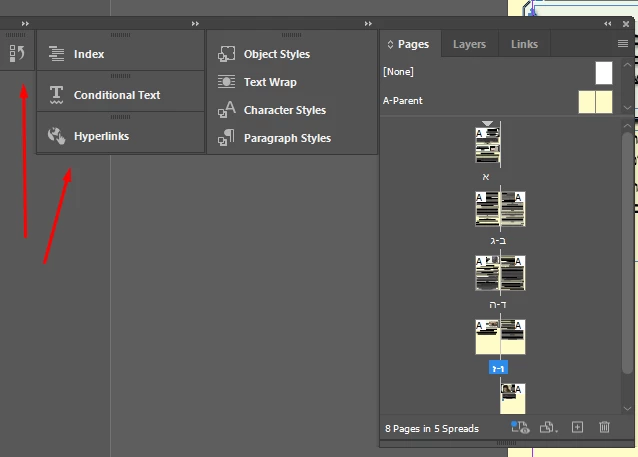
I can't seem to separate these:

Correct answer SuzzyFlamingo

>>you'll need to drag each one out of the group first. Just click and drag the tab (like 'Index' or 'Conditional Text') away from the group, so it floats on its own

Wherever I drag it it refuses to "disconnect"....

Ahhhh, now I see I was dragging by the frame, you have to drag by a little below that

2 replies

Robert at ID-Tasker
Legend
May 12, 2025

@SuzzyFlamingo


You need to drag&drop by the title bar.


When you want to have them back together - watch for the blue bar - it will show you were they'll land - side-by-side or above / below. 


Abhishek Rao
Community Manager
Community Manager
May 12, 2025

Hi @SuzzyFlamingo,


Thanks for sharing the screenshot. You can definitely simplify your workspace. To close those specific panels with the arrows, you'll need to drag each one out of the group first. Just click and drag the tab (like 'Index' or 'Conditional Text') away from the group, so it floats on its own, and then you can close it individually by right-clicking and then closing.

If you only want to keep the Pages and Styles panels, you can also drag them out of the group and dock them separately wherever it's most comfortable for you. Want to bring back Character or Paragraph Styles later? You can always find them under Window > Styles.


Let me know how that works out for you!

Abhishek 

SuzzyFlamingo
SuzzyFlamingoAuthorCorrect answer
Inspiring
May 12, 2025

>>you'll need to drag each one out of the group first. Just click and drag the tab (like 'Index' or 'Conditional Text') away from the group, so it floats on its own

Wherever I drag it it refuses to "disconnect"....

Ahhhh, now I see I was dragging by the frame, you have to drag by a little below that
