
Participant
June 20, 2022
Answered

Arabic Period in the wrong spot

  • June 20, 2022
  • 1 reply
  • 333 views

Hello,


I am using Adobe idesign cc 2022. When pasting the arabic text, the text is formated correctly, but the periods are in the wrong spot (in the opposite direction). How can I solve this issue? Any ideas?


I have looked online, and found that the solution is to press this button (image below) but I cant find this button for some reason, it is just not there.
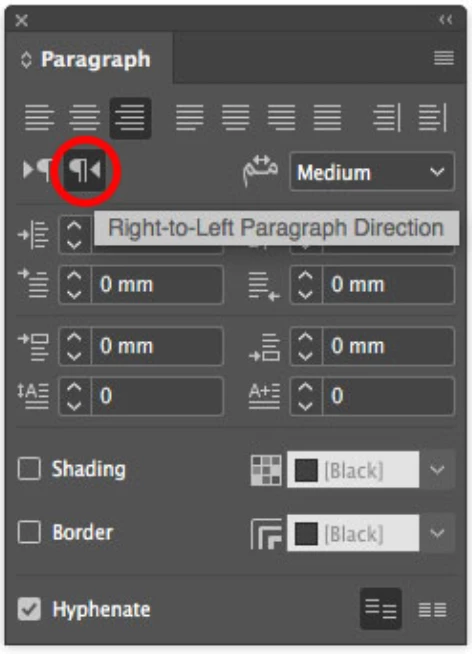
This topic has been closed for replies.
Correct answer Willi Adelberger

You need to install Adobe InDesign Arabic enbled version.

You need not to uninstall anything.

  1. Go to the CC Desktop Application
  2. In the Preferences go to Applications
  3. Scroll down where the Applications end.
  4. Change to standard installation language to Arabic enabled.
  5. After installing you can change to your primary language to get the UI you want to use.

1 reply

Willi Adelberger
Community Expert
Willi AdelbergerCommunity ExpertCorrect answer
Community Expert
June 20, 2022

You need to install Adobe InDesign Arabic enbled version.

You need not to uninstall anything.

  1. Go to the CC Desktop Application
  2. In the Preferences go to Applications
  3. Scroll down where the Applications end.
  4. Change to standard installation language to Arabic enabled.
  5. After installing you can change to your primary language to get the UI you want to use.