


- Startseite
- InDesign
- Diskussionen
- Are Automatic Blind Endnotes Possible in ID?
- Are Automatic Blind Endnotes Possible in ID?

Link in Zwischenablage kopieren
Kopiert
I have a book project that has copious amounts of blind endnotes, which look like the sample below (page number of endnote, phrase on that page associated with the endnote, and text of the endnote). Can these be done automatically in ID or is it limited to just endnote number followed by endnote text?



 1 richtige Antwort

No need sound and more comments!
[if curious, pm me!]
(^/)
PS: Watching the video, I note I forgot to "remove the end notes numbering"! [simple to do!]

 9
Antworten
9
9
Antworten
9



Link in Zwischenablage kopieren
Kopiert
I don't see a way to include the page number in the Endnote.
You might be able to do it with cross-references. There's a bunch of scripts here that might help
https://creativepro.com/files/kahrel/indesign/footnotes.html
Link in Zwischenablage kopieren
Kopiert
Well, almost. But not quite what I need. Thanks for the link, though. A few of those may come in handy in the future!

Link in Zwischenablage kopieren
Kopiert
Hi @Richard Groff:
Without scripting, I agree with the @Eugene Tyson's x-ref recommendation. The x-ref can definitely pull in the page number followed by a tab but it can't pull in part of a paragraph (to grab the phrase associated with the endnote). It's all or nothing.
You could get this far with the x-ref, but then will need top copy/paste the phrase and the note text. The page number will update after edits when the text reflows, so that's a good start.
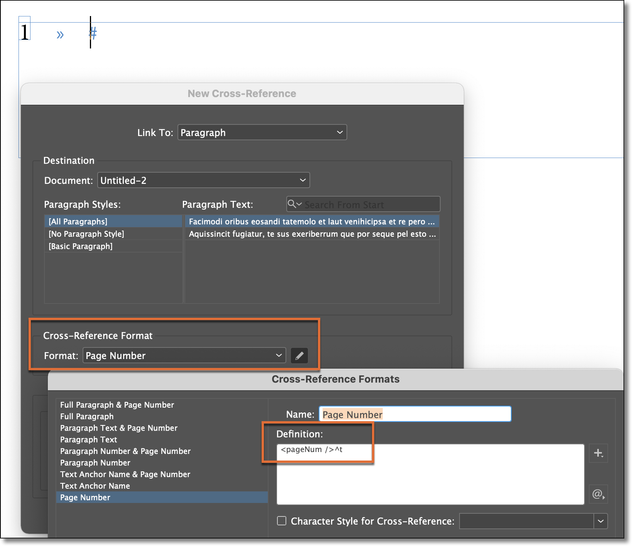
~Barb
Link in Zwischenablage kopieren
Kopiert
Script!?… Cross-Ref.!?… Hmm!
Are your endnotes "true" ID endnotes?
If not, I suppose you have this "endnotes" text to be pasted in your doc?!
(^/) The Jedi
Link in Zwischenablage kopieren
Kopiert
Alas, it still can't insert the associated phrase automatically. Thanks for the suggestion though!
Link in Zwischenablage kopieren
Kopiert
No, they were done manually, but the publisher is looking for a way to automate them in the future. I don't see any way to do that. I didn't think it was possible, but thought I'd check anyway. Thanks!
Link in Zwischenablage kopieren
Kopiert
If you create true endnotes and indicate with a condition each piece of text that will need to be included in the corresponding endnote, you will just need 1 click to finish: include the page number and the piece of texte in the endnote! … and "Cerise sur le gâteau": the name of the "Chapter number(s) + Chapter title(s)" too! 😉
By Script of course!
(^/)
Link in Zwischenablage kopieren
Kopiert
That's intriguing! I'll have to look into that a little more. If I can figure it out, quelle cerise indeed! Merci!
Link in Zwischenablage kopieren
Kopiert
No need sound and more comments!
[if curious, pm me!]
(^/)
PS: Watching the video, I note I forgot to "remove the end notes numbering"! [simple to do!]


Machen Sie sich bereit! Im Januar erwartet Sie ein verbessertes Adobe Community-Erlebnis.
Mehr erfahren
 AdChoices