
Arrow sizes wrong for lines at small point sizes
I'm using InDesign CC 13.0.1, on macOS 10.13.3. When I create lines and add arrows, the arrows on the smallest lines cannot be sized properly. See this example:
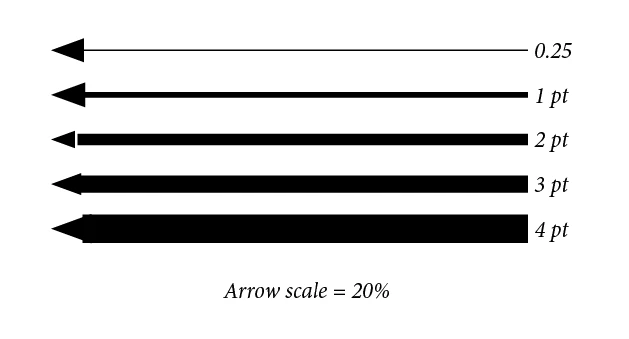
This is obviously enlarged. But at 1 point size and smaller, the arrows are actually larger than at greater point sizes, and cannot be reduced in size beyond the sizes shown. Thus, making a fine point arrow on a 1 point or smaller line seems impossible. An arrow at 20% size gets progressively smaller as the line weight is dropped from 4 points, to 3, to 2, but then gets bigger at 1 point and smaller.
There is also an anomaly where the arrow separates from the line at certain sizes (2 pt in this example), or is overtaken by the stroke (see 4 pt example). This is probably specific to the arrow scale, in this case 20%.
This is probably an edge case. It came to my attention when I had a situation where I had to create type at a specific point size (12 points), and then had to create fine lines no more than 12 points in length. It wasn't possible to make good-looking arrows for my lines, so I had to create them the hard way with shapes.
It would be helpful to know if anyone else can replicate this, just to be sure it is not a glitch with my install.
 AdChoices