
Juan Cano
Inspiring
November 8, 2021
Question

Arrows switched around on toolbar?

  • November 8, 2021
  • 10 replies
  • 6458 views

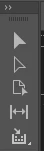
Usually the top arrow is solid black, for grabbing and moving, and the second arrow is white for grabbing and moving photos inside a picture box for example. Did they get switched around in 2022 InDesign? Now the grab arrow is white, and the move objects inside is black? Am I nuts?
 

This topic has been closed for replies.

10 replies

Participating Frequently
April 4, 2022

HA! They changed it back!

Participant
January 27, 2022

What's amazing to me is the amount of people defending Adobe as if its the right thing to do to have In Design, Photoshop and Illustrator be different for the primary control function. It's a simple overs sight and mistake that needs to be addressed. There was zero reason to change it in the first place since it benefits no one.

Community Expert
January 27, 2022

Hi Kmsmolk,

my first reaction was: the switch of the icons ( no switch of functionality! ) must be a bug.

But then I changed my mind. After someone noted that the core idea behind the icons is "filled" vs "hollow" and not "black" vs "white". I have no issue at all with that decision. Only hope, that Illustrator and PhotoShop will follow suit soon.


Regards,
Uwe Laubender

( ACP )

Participant
January 16, 2022

You're not crazy. I noticed that too. Automatically I select the solid black arrow (with kind of an outline) as the selection tool. I find it annoying to have to get used to this change now. Just checked it in Illustrator and there it's still ''the old'' way.

Community Expert
November 24, 2021

"but are you guys not talking to each other?"

We guys here are no Adobe employees. Just users.


I would write a bug report at Illustrator UserVoice for changing the icons in Illustrator as well:

https://illustrator.uservoice.com/forums/601447-illustrator-desktop-bugs?category_id=209095


With PhotoShop I'd do the same, but this is a bit odd. PhotoShop is not listed here:

https://helpx.adobe.com/de/x-productkb/global/how-to-user-voice.html


When I go to:

https://photoshop.uservoice.com/

I get an error:

Error 404: Account has been deleted
"This UserVoice instance is no longer available."


Ah, found it, bug reporting for PhotoShop can be done here:

https://community.adobe.com/t5/photoshop-ecosystem/ct-p/ct-photoshop?page=1&sort=latest_replies&filter=all&tabid=bugs


Regards,
Uwe Laubender

( ACP )

Participating Frequently
November 25, 2021

Apologies Uwe, I was addressing Adobe and you answered. So https://uservoice.com is the way to go to address these issues to the developers?

Community Expert
November 24, 2021

Hi Farm402,

there is nothing broken here. There is one issue fixed with this change: now we have consistency with other tools in InDesign. That Illustrator and PhotoShop did not follow is a different thing.


Top row is InDesign 2021, bottom one is InDesign 2022:


Have an eye on the Page Tool that did not change between the two versions. Especially look at the little arrow inside the Page Tool. The big brothers "Selection" and consequently "Direct Selection" now follow the same scheme "solid" and "hollow".


Regards,
Uwe Laubender

( ACP )

Participating Frequently
November 24, 2021

I get your point, but the consistency within the Adobe family is an important part. With all due respect but are you guys not talking to each other? You are selling the apps as a bundle, so there should be a smooth workflow using them at the same time.

Participating Frequently
November 24, 2021

Adobe please fix this. Lots of designers work with Illustrator and InDesign at the same time, this is very confusing!

Known Participant
November 9, 2021

Honestly, it wouldn't be a big deal if Illustrator was the same way... they really should match each other

Juan Cano
Juan CanoAuthor
Inspiring
November 9, 2021

I hear the dark vs light, but I simply think it's a mistake from Adobe on the interface. The messed up. 


Here is the Illustrator toolbar for 2022:


And InDesign:


Illustrator works as usual, Forst arrow (black) for moving, second arrow (white) for moving the nodes of objects. In Design is now opposite. Turns out I am not nuts!

Dan Rodney
Community Expert
Community Expert
November 9, 2021

You're not crazy, it's just a challenging icon design for the dark UI. Maybe the thinking is that the lighter arrow stands out more in the darker toolbar, but you're right that it doesn't match the actual cursor.

— Adobe Certified Expert & Instructor at Noble Desktop | Web Developer, Designer, InDesign Scriptor
Juan Cano
Juan CanoAuthor
Inspiring
November 9, 2021

No, I have been using the dark interface for a couple of years. It's not that.

Participating Frequently
February 3, 2022

There are three basic ways to switch between the Selection tool and the Direct Selection tool:

  1. Keyboard shortcuts (v and a, respectively; think "moVe" and "Art-editing")
  2. Position of the tools--the Sel. tool has always been the top tool; the Direct Sel. tool below. (Top left and top right respectively if using a two-column toolbar.)
  3. The "color" of the tools--technically, these are solid and hollow--not "black" and "white". That is the [new] consistency in InDesign. The logical reason for this is how the tools appear with the color themes. Having a black arrow with a dark theme doesn't make much sense. 


  • Method 1 is the most efficient since you can use your other hand to switch tools (unless you have your morning coffee in it...)
  • Method 2 is okay since it relies on muscle memory to get the mouse to the proper position. However, if you have a large monitor, this can waste time and could contribute to carpal tunnel syndrome over time.
  • Method 3 is the least efficient and slowest method since you are having to look at the tool bar and visually guide your mouse. Plus this has the same problems as method 2.


I use the shortcuts a/v, still I don’t think it’s a good user experience that you have to click on a white arrow in order to get the dark arrow (Selection Tool) and to click on a dark arrow to get a white one (Direct Selection Tool).


I do understand the argument that the Direct Selection Tool isn’t actually dark but hollow, still than Adobe has to change it throughout the Creative Cloud apps. I’m not sure what you do professionally but as a graphic designer I can tell you that many people use Photoshop, Illustrator and InDesign at the same time.

Mike Witherell
Community Expert
Community Expert
November 8, 2021

Edit > Preferences > Interface > Appearance > choose the light gray appearance.

I cannot answer your second question. Insufficient data.

Mike Witherell
Dave Creamer of IDEAS
Community Expert
Community Expert
November 8, 2021

The Selection tool (the top arrow) is now always the solid arrow; the Direct Selection tool is now always the hollow arrow.

David Creamer: Community Expert (ACI and ACE 1995-2023)
Juan Cano
Juan CanoAuthor
Inspiring
November 9, 2021

But not in Illustrator? They switched it in InDesign but not in their sister software?