
Known Participant
July 6, 2024
Answered

Auto subheader style script help request

  • July 6, 2024
  • 1 reply
  • 1212 views

I have made a script which a user can design a range of consecutive subheaders and the script will apply the styles for all instances of subheaders 


see screenshots for example 


As you can see there are 4 subheaders each with text settiings and then other entries with similar subheaders - rather than having to eyedrop all of them you can run the script and all subheaders will be styles - see the second screenshot 
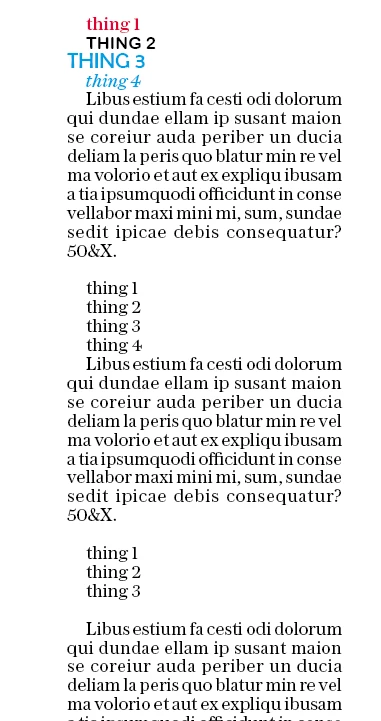


As you can see each subhead has adopted the respective subhead.


The problem I have is if each subheader has a return after it the script does not see them as consecutive. 

Screenshot below shows the issue 

The same subheads but now with returns 


as you can see once the script has been run they all adopt the frust subheader 

Any advice on this would be most appreciated! 


This should be a useful script when complete and it feels like it is the final hurdle.


Many thanks 


Smyth


function findAndApplyTextSettings() {
    // Ensure that there's an active document open
    if (app.documents.length > 0) {
        var doc = app.activeDocument;
        var selection = app.selection;

        // Ensure there's a valid selection
        if (selection.length > 0 && (selection[0] instanceof TextFrame || selection[0].hasOwnProperty('insertionPoints'))) {
            var selectedTextFrames = [];
            if (selection[0] instanceof TextFrame) {
                selectedTextFrames.push(selection[0]);
            } else if (selection[0].hasOwnProperty('insertionPoints')) {
                selectedTextFrames.push(selection[0].parentTextFrames[0]);
            }

            var foundTargetParagraph = false;
            var targetTextSettingsList = [];

            // Iterate over each selected text frame
            for (var j = 0; j < selectedTextFrames.length; j++) {
                var paragraphs = selectedTextFrames[j].parentStory.paragraphs.everyItem().getElements();

                // Find the first suitable paragraph and all consecutive ones
                for (var i = 0; i < paragraphs.length; i++) {
                    var consecutiveParagraphs = [];
                    var allConsecutiveSettings = [];

                    for (var k = i; k < paragraphs.length; k++) {
                        var para = paragraphs[k];
                        var words = para.words.length;
                        var paragraphText = para.contents;

                        // Check criteria: 1 to 10 words and no full stop
                        if (words > 0 && words <= 10 && paragraphText.indexOf('.') === -1) {
                            consecutiveParagraphs.push(para);
                            allConsecutiveSettings.push(getTextSettings(para));
                        } else {
                            break; // Stop checking if the paragraph doesn't meet criteria
                        }
                    }

                    if (consecutiveParagraphs.length > 0) {
                        targetTextSettingsList = allConsecutiveSettings;
                        foundTargetParagraph = true;
                        break; // Exit loop once found
                    }
                }

                if (foundTargetParagraph) {
                    // Apply text settings to similar paragraphs within an undoable action
                    app.doScript(function() {
                        var currentConsecutiveIndex = 0;
                        for (var i = 0; i < paragraphs.length; i++) {
                            var para = paragraphs[i];
                            var words = para.words.length;
                            var paragraphText = para.contents;

                            // Apply text settings if it's a similar paragraph
                            if (words > 0 && words <= 10 && paragraphText.indexOf('.') === -1) {
                                if (currentConsecutiveIndex < targetTextSettingsList.length) {
                                    applyTextSettings(para, targetTextSettingsList[currentConsecutiveIndex]);
                                    currentConsecutiveIndex++;
                                }
                            } else {
                                currentConsecutiveIndex = 0; // Reset if paragraph does not meet criteria
                            }
                        }
                    }, ScriptLanguage.JAVASCRIPT, [], UndoModes.ENTIRE_SCRIPT, "Apply Text Settings");
                } else {
                    alert("No suitable paragraphs found in the selected text frame.");
                }
            }
        } else {
            alert("Please select a text frame or place the cursor inside a text frame.");
        }
    } else {
        alert("No active document found.");
    }
}

// Function to get text settings from a paragraph
function getTextSettings(paragraph) {
    return {
        appliedFont: paragraph.appliedFont,
        pointSize: paragraph.pointSize,
        fillColor: paragraph.fillColor,
        fillTint: paragraph.fillTint,
        justification: paragraph.justification,
        leading: paragraph.leading,
        firstLineIndent: paragraph.firstLineIndent,
        baselineShift: paragraph.baselineShift,
        tracking: paragraph.tracking,
        capitalization: getCapitalization(paragraph.capitalization),
        alignToBaseline: paragraph.alignToBaseline,
        ruleAbove: paragraph.ruleAbove === true,
        ruleBelow: paragraph.ruleBelow === true,
        ruleAboveColor: paragraph.ruleAboveColor,
        ruleAboveGapColor: paragraph.ruleAboveGapColor,
        ruleAboveGapOverprint: paragraph.ruleAboveGapOverprint === true,
        ruleAboveGapTint: paragraph.ruleAboveGapTint,
        ruleAboveLeftIndent: paragraph.ruleAboveLeftIndent,
        ruleAboveLineWeight: paragraph.ruleAboveLineWeight,
        ruleAboveOffset: paragraph.ruleAboveOffset,
        ruleAboveOverprint: paragraph.ruleAboveOverprint === true,
        ruleAboveRightIndent: paragraph.ruleAboveRightIndent,
        ruleAboveTint: paragraph.ruleAboveTint,
        ruleAboveType: paragraph.ruleAboveType,
        ruleAboveWidth: paragraph.ruleAboveWidth,
        ruleBelowColor: paragraph.ruleBelowColor,
        ruleBelowGapColor: paragraph.ruleBelowGapColor,
        ruleBelowGapOverprint: paragraph.ruleBelowGapOverprint === true,
        ruleBelowGapTint: paragraph.ruleBelowGapTint,
        ruleBelowLeftIndent: paragraph.ruleBelowLeftIndent,
        ruleBelowLineWeight: paragraph.ruleBelowLineWeight,
        ruleBelowOffset: paragraph.ruleBelowOffset,
        ruleBelowOverprint: paragraph.ruleBelowOverprint === true,
        ruleBelowRightIndent: paragraph.ruleBelowRightIndent,
        ruleBelowTint: paragraph.ruleBelowTint,
        ruleBelowType: paragraph.ruleBelowType,
        ruleBelowWidth: paragraph.ruleBelowWidth
        // Add more text attributes as needed
    };
}

// Function to apply text settings to a paragraph
function applyTextSettings(paragraph, settings) {
    paragraph.appliedFont = settings.appliedFont;
    paragraph.pointSize = settings.pointSize;
    paragraph.fillColor = settings.fillColor;
    paragraph.fillTint = settings.fillTint;
    paragraph.leading = settings.leading;
    paragraph.firstLineIndent = settings.firstLineIndent;
    paragraph.justification = settings.justification;
    paragraph.ruleAbove = settings.ruleAbove;
    paragraph.ruleAboveColor = settings.ruleAboveColor;
    paragraph.ruleAboveGapColor = settings.ruleAboveGapColor;
    paragraph.ruleAboveGapOverprint = settings.ruleAboveGapOverprint;
    paragraph.ruleAboveGapTint = settings.ruleAboveGapTint;
    paragraph.ruleAboveLeftIndent = settings.ruleAboveLeftIndent;
    paragraph.ruleAboveLineWeight = settings.ruleAboveLineWeight;
    paragraph.ruleAboveOffset = settings.ruleAboveOffset;
    paragraph.ruleAboveOverprint = settings.ruleAboveOverprint;
    paragraph.ruleAboveRightIndent = settings.ruleAboveRightIndent;
    paragraph.ruleAboveTint = settings.ruleAboveTint;
    paragraph.ruleAboveType = settings.ruleAboveType;
    paragraph.ruleAboveWidth = settings.ruleAboveWidth;
    paragraph.ruleBelow = settings.ruleBelow;
    paragraph.ruleBelowColor = settings.ruleBelowColor;
    paragraph.ruleBelowGapColor = settings.ruleBelowGapColor;
    paragraph.ruleBelowGapOverprint = settings.ruleBelowGapOverprint;
    paragraph.ruleBelowGapTint = settings.ruleBelowGapTint;
    paragraph.ruleBelowLeftIndent = settings.ruleBelowLeftIndent;
    paragraph.ruleBelowLineWeight = settings.ruleBelowLineWeight;
    paragraph.ruleBelowOffset = settings.ruleBelowOffset;
    paragraph.ruleBelowOverprint = settings.ruleBelowOverprint;
    paragraph.ruleBelowRightIndent = settings.ruleBelowRightIndent;
    paragraph.ruleBelowTint = settings.ruleBelowTint;
    paragraph.ruleBelowType = settings.ruleBelowType;
    paragraph.ruleBelowWidth = settings.ruleBelowWidth;

    // Apply word-level settings to each word in the paragraph
    var paraWords = paragraph.words.everyItem().getElements();
    for (var k = 0; k < paraWords.length; k++) {
        paraWords[k].appliedFont = settings.appliedFont;
        paraWords[k].pointSize = settings.pointSize;
        paraWords[k].fillColor = settings.fillColor;
        paraWords[k].fillTint = settings.fillTint;
        paraWords[k].leading = settings.leading;
        paraWords[k].baselineShift = settings.baselineShift;
        paraWords[k].tracking = settings.tracking;
        paraWords[k].capitalization = settings.capitalization;
        paraWords[k].alignToBaseline = settings.alignToBaseline;
        // Apply other text attributes as needed
    }
}

// Helper function to map capitalization constants to InDesign values
function getCapitalization(constantValue) {
    switch (constantValue) {
        case 1634493296:
            return Capitalization.ALL_CAPS;
        case 1664250723:
            return Capitalization.CAP_TO_SMALL_CAP;
        case 1852797549:
            return Capitalization.NORMAL;
        case 1936548720:
            return Capitalization.SMALL_CAPS;
        case 1919251315:
            return true; // For ruleAbove
        case 1919251316:
            return true; // For ruleBelow
        default:
            return Capitalization.NORMAL; // Default to normal capitalization
    }
}

// Run the function
findAndApplyTextSettings();


This topic has been closed for replies.
Correct answer gregory109
quote

I have made a script which a user can design a range of consecutive subheaders and the script will apply the styles for all instances of subheaders 


see screenshots for example 


As you can see there are 4 subheaders each with text settiings and then other entries with similar subheaders - rather than having to eyedrop all of them you can run the script and all subheaders will be styles - see the second screenshot 
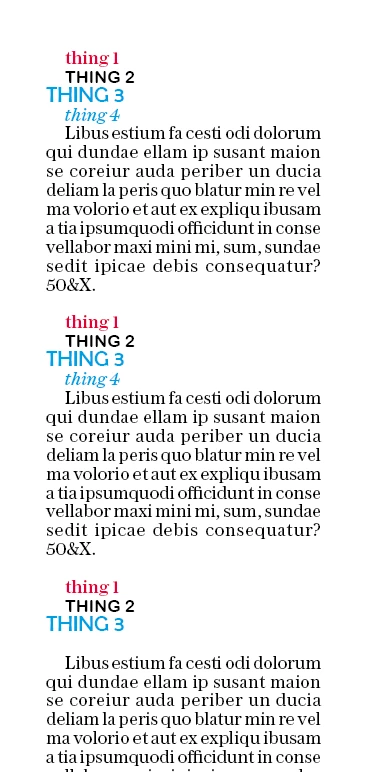


As you can see each subhead has adopted the respective subhead.


The problem I have is if each subheader has a return after it the script does not see them as consecutive. 

Screenshot below shows the issue 

The same subheads but now with returns 
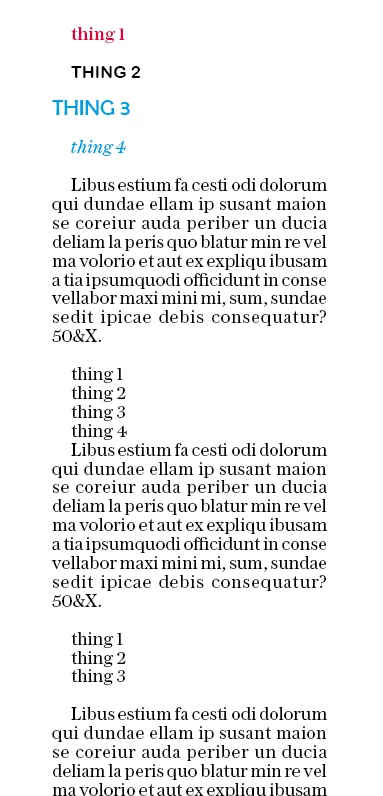
 

as you can see once the script has been run they all adopt the frust subheader 
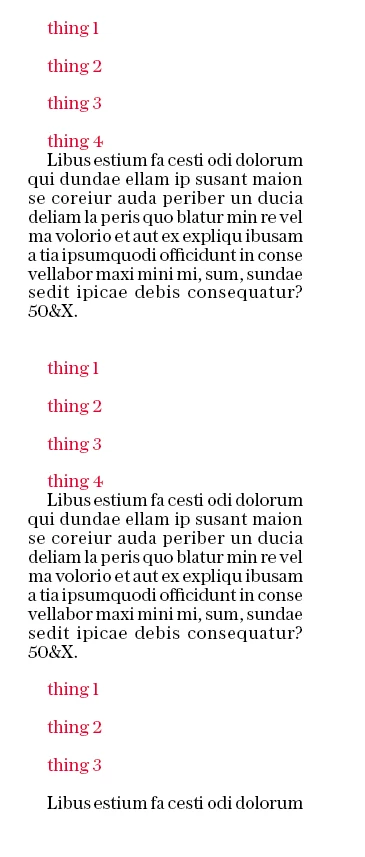
Any advice on this would be most appreciated! 


This should be a useful script when complete and it feels like it is the final hurdle.


Many thanks 


Smyth

By @SmythWharfADPWorkforceNow

Hello, @SmythWharfADPWorkforceNow 


It’s great to see you working on this script to streamline subheader styling. Let’s tackle that final hurdle together!


From your description and the screenshots, it seems like you’ve made significant progress. However, handling consecutive subheaders with returns can indeed be tricky. I’ll provide some guidance to address this issue.

Identifying Consecutive Subheaders:
You’ve already defined the criteria for identifying subheaders: at least two hard enter returns (paragraph breaks), followed by a short string (up to 6 words) without a full stop.
The challenge lies in ensuring that these subheaders are recognized even when they have returns after them.
Script Enhancement:
To handle consecutive subheaders with returns, consider modifying your script as follows:
Instead of looking for a single instance of the word “test” (as in your initial working script), look for the subheader pattern.
Use regular expressions (regex) to match the specific criteria for subheaders.
Iterate through the paragraphs and apply the desired text settings to each identified subheader.
Sample Approach:
Here’s a high-level idea of how your script could be enhanced:
Define a regex pattern that matches your subheader criteria (e.g., two or more hard returns followed by a short string without a full stop).
Loop through the paragraphs in the text frame.
For each paragraph, check if it matches the subheader pattern.
If it does, apply the desired text settings to that paragraph.
Example (Pseudo-Code):

// Define your regex pattern for subheaders
var subheaderRegex = /(\r\n){2,}[^.]{1,6}$/;

// Loop through paragraphs
for (var i = 0; i < paragraphs.length; i++) {
var para = paragraphs[i];
if (subheaderRegex.test(para.contents)) {
// Apply text settings to identified subheader
// ...
}
}


Testing and Refining:
Test this enhanced script with various scenarios (including subheaders with returns) to ensure it correctly identifies and styles them.
Adjust the regex pattern or other conditions as needed based on real-world examples.


Remember, scripting is like solving a puzzle—sometimes it takes a few iterations to get it just right.


I hope this info is helpful to you.


Best Regard,
Gregory Chavez

1 reply

gregory109Correct answer
Participating Frequently
July 13, 2024
quote

I have made a script which a user can design a range of consecutive subheaders and the script will apply the styles for all instances of subheaders 


see screenshots for example 


As you can see there are 4 subheaders each with text settiings and then other entries with similar subheaders - rather than having to eyedrop all of them you can run the script and all subheaders will be styles - see the second screenshot 


As you can see each subhead has adopted the respective subhead.


The problem I have is if each subheader has a return after it the script does not see them as consecutive. 

Screenshot below shows the issue 

The same subheads but now with returns 


as you can see once the script has been run they all adopt the frust subheader 

Any advice on this would be most appreciated! 


This should be a useful script when complete and it feels like it is the final hurdle.


Many thanks 


Smyth

By @SmythWharfADPWorkforceNow

Hello, @SmythWharfADPWorkforceNow 


It’s great to see you working on this script to streamline subheader styling. Let’s tackle that final hurdle together!


From your description and the screenshots, it seems like you’ve made significant progress. However, handling consecutive subheaders with returns can indeed be tricky. I’ll provide some guidance to address this issue.

Identifying Consecutive Subheaders:
You’ve already defined the criteria for identifying subheaders: at least two hard enter returns (paragraph breaks), followed by a short string (up to 6 words) without a full stop.
The challenge lies in ensuring that these subheaders are recognized even when they have returns after them.
Script Enhancement:
To handle consecutive subheaders with returns, consider modifying your script as follows:
Instead of looking for a single instance of the word “test” (as in your initial working script), look for the subheader pattern.
Use regular expressions (regex) to match the specific criteria for subheaders.
Iterate through the paragraphs and apply the desired text settings to each identified subheader.
Sample Approach:
Here’s a high-level idea of how your script could be enhanced:
Define a regex pattern that matches your subheader criteria (e.g., two or more hard returns followed by a short string without a full stop).
Loop through the paragraphs in the text frame.
For each paragraph, check if it matches the subheader pattern.
If it does, apply the desired text settings to that paragraph.
Example (Pseudo-Code):

// Define your regex pattern for subheaders
var subheaderRegex = /(\r\n){2,}[^.]{1,6}$/;

// Loop through paragraphs
for (var i = 0; i < paragraphs.length; i++) {
var para = paragraphs[i];
if (subheaderRegex.test(para.contents)) {
// Apply text settings to identified subheader
// ...
}
}


Testing and Refining:
Test this enhanced script with various scenarios (including subheaders with returns) to ensure it correctly identifies and styles them.
Adjust the regex pattern or other conditions as needed based on real-world examples.


Remember, scripting is like solving a puzzle—sometimes it takes a few iterations to get it just right.


I hope this info is helpful to you.


Best Regard,
Gregory Chavez

Known Participant
July 29, 2024

Hello, 


managed to get a fix quite some time ago 


try this 


// Main function to find and apply text settings to consecutive paragraphs
function findAndApplyTextSettings() {
    // Check if there's an active document open
    if (app.documents.length > 0) {
        var doc = app.activeDocument;
        var selection = app.selection;

        // Ensure there's a valid selection
        if (selection.length > 0 && (selection[0] instanceof TextFrame || selection[0].hasOwnProperty('insertionPoints'))) {
            var selectedTextFrames = [];
            if (selection[0] instanceof TextFrame) {
                selectedTextFrames.push(selection[0]);
            } else if (selection[0].hasOwnProperty('insertionPoints')) {
                selectedTextFrames.push(selection[0].parentTextFrames[0]);
            }

            var foundTargetParagraph = false;
            var targetTextSettingsList = [];

            // Iterate over each selected text frame
            for (var j = 0; j < selectedTextFrames.length; j++) {
                var textFrame = selectedTextFrames[j];
                var paragraphs = textFrame.parentStory.paragraphs.everyItem().getElements();

                var consecutiveCount = 0;
                var consecutiveParagraphs = [];
                var allConsecutiveSettings = [];

                // Loop through each paragraph
                for (var i = 0; i < paragraphs.length; i++) {
                    var paragraph = paragraphs[i];

                    // Check if the paragraph is empty
                    if (paragraph.contents.replace(/^\s+|\s+$/g, '').length === 0) {
                        continue; // Skip empty paragraphs without resetting the count
                    }

                    // Check if the paragraph meets the criteria
                    if (isValidParagraph(paragraph)) {
                        consecutiveCount++;
                        consecutiveParagraphs.push(paragraph);
                        allConsecutiveSettings.push(getTextSettings(paragraph));
                    } else {
                        // If consecutiveCount is greater than 0, process the consecutive paragraphs found
                        if (consecutiveCount > 0) {
                            if (!foundTargetParagraph) {
                                targetTextSettingsList = allConsecutiveSettings;
                                foundTargetParagraph = true;
                            }
                            applyTextSettingsToConsecutive(consecutiveParagraphs, targetTextSettingsList);
                            consecutiveCount = 0; // Reset consecutive count
                            consecutiveParagraphs = [];
                            allConsecutiveSettings = [];
                        } else {
                            consecutiveCount = 0; // Reset consecutive count
                            consecutiveParagraphs = [];
                            allConsecutiveSettings = [];
                        }
                    }
                }

                // After the loop, apply settings if found
                if (foundTargetParagraph) {
                    break; // Exit loop over selected text frames once settings applied
                } else {
                    alert("No subheaders found with corresponding paragraphs. \nPlease use the list script instead.");
                }
            }
        } else {
            alert("Please select a text frame or place the cursor inside a text frame.");
        }
    } else {
        alert("No active document found.");
    }
}

// Function to check if a paragraph meets the criteria
function isValidParagraph(paragraph) {
    // Ignore empty paragraphs (no characters)
    if (paragraph.contents.replace(/^\s+|\s+$/g, '').length === 0) {
        return false;
    }

    // Split the paragraph into words
    var words = paragraph.words;

    // Check number of words and absence of period
    if (words.length > 0 && words.length <= 10) {
        // Access the last word in the collection
        var lastWord = words.lastItem();

        // Check if last word ends with a period
        if (lastWord.contents.charAt(lastWord.contents.length - 1) === ".") {
            return false;
        }

        // All conditions met
        return true;
    }

    return false;
}

// Function to get text settings from a paragraph
function getTextSettings(paragraph) {
    return {
        appliedFont: paragraph.appliedFont,
        pointSize: paragraph.pointSize,
        fillColor: paragraph.fillColor,
        fillTint: paragraph.fillTint,
        justification: paragraph.justification,
        leading: paragraph.leading,
        firstLineIndent: paragraph.firstLineIndent,
        baselineShift: paragraph.baselineShift,
        tracking: paragraph.tracking,
        capitalization: getCapitalization(paragraph.capitalization),
        alignToBaseline: paragraph.alignToBaseline,
        ruleAbove: paragraph.ruleAbove === true,
        ruleBelow: paragraph.ruleBelow === true,
        ruleAboveColor: paragraph.ruleAboveColor,
        ruleAboveGapColor: paragraph.ruleAboveGapColor,
        ruleAboveGapOverprint: paragraph.ruleAboveGapOverprint === true,
        ruleAboveGapTint: paragraph.ruleAboveGapTint,
        ruleAboveLeftIndent: paragraph.ruleAboveLeftIndent,
        ruleAboveLineWeight: paragraph.ruleAboveLineWeight,
        ruleAboveOffset: paragraph.ruleAboveOffset,
        ruleAboveOverprint: paragraph.ruleAboveOverprint === true,
        ruleAboveRightIndent: paragraph.ruleAboveRightIndent,
        ruleAboveTint: paragraph.ruleAboveTint,
        ruleAboveType: paragraph.ruleAboveType,
        ruleAboveWidth: paragraph.ruleAboveWidth,
        ruleBelowColor: paragraph.ruleBelowColor,
        ruleBelowGapColor: paragraph.ruleBelowGapColor,
        ruleBelowGapOverprint: paragraph.ruleBelowGapOverprint === true,
        ruleBelowGapTint: paragraph.ruleBelowGapTint,
        ruleBelowLeftIndent: paragraph.ruleBelowLeftIndent,
        ruleBelowLineWeight: paragraph.ruleBelowLineWeight,
        ruleBelowOffset: paragraph.ruleBelowOffset,
        ruleBelowOverprint: paragraph.ruleBelowOverprint === true,
        ruleBelowRightIndent: paragraph.ruleBelowRightIndent,
        ruleBelowTint: paragraph.ruleBelowTint,
        ruleBelowType: paragraph.ruleBelowType,
        ruleBelowWidth: paragraph.ruleBelowWidth,
        spaceBefore: paragraph.spaceBefore, // Add spaceBefore attribute
        spaceAfter: paragraph.spaceAfter // Add spaceAfter attribute
        // Add more text attributes as needed
    };
}

// Function to apply text settings to a paragraph
function applyTextSettings(paragraph, settings) {
    paragraph.appliedFont = settings.appliedFont;
    paragraph.pointSize = settings.pointSize;
    paragraph.fillColor = settings.fillColor;
    paragraph.fillTint = settings.fillTint;
    paragraph.leading = settings.leading;
    paragraph.firstLineIndent = settings.firstLineIndent;
    paragraph.justification = settings.justification;
    paragraph.ruleAbove = settings.ruleAbove;
    paragraph.ruleAboveColor = settings.ruleAboveColor;
    paragraph.ruleAboveGapColor = settings.ruleAboveGapColor;
    paragraph.ruleAboveGapOverprint = settings.ruleAboveGapOverprint;
    paragraph.ruleAboveGapTint = settings.ruleAboveGapTint;
    paragraph.ruleAboveLeftIndent = settings.ruleAboveLeftIndent;
    paragraph.ruleAboveLineWeight = settings.ruleAboveLineWeight;
    paragraph.ruleAboveOffset = settings.ruleAboveOffset;
    paragraph.ruleAboveOverprint = settings.ruleAboveOverprint;
    paragraph.ruleAboveRightIndent = settings.ruleAboveRightIndent;
    paragraph.ruleAboveTint = settings.ruleAboveTint;
    paragraph.ruleAboveType = settings.ruleAboveType;
    paragraph.ruleAboveWidth = settings.ruleAboveWidth;
    paragraph.ruleBelow = settings.ruleBelow;
    paragraph.ruleBelowColor = settings.ruleBelowColor;
    paragraph.ruleBelowGapColor = settings.ruleBelowGapColor;
    paragraph.ruleBelowGapOverprint = settings.ruleBelowGapOverprint;
    paragraph.ruleBelowGapTint = settings.ruleBelowGapTint;
    paragraph.ruleBelowLeftIndent = settings.ruleBelowLeftIndent;
    paragraph.ruleBelowLineWeight = settings.ruleBelowLineWeight;
    paragraph.ruleBelowOffset = settings.ruleBelowOffset;
    paragraph.ruleBelowOverprint = settings.ruleBelowOverprint;
    paragraph.ruleBelowRightIndent = settings.ruleBelowRightIndent;
    paragraph.ruleBelowTint = settings.ruleBelowTint;
    paragraph.ruleBelowType = settings.ruleBelowType;
    paragraph.ruleBelowWidth = settings.ruleBelowWidth;
    paragraph.spaceBefore = settings.spaceBefore; // Apply spaceBefore
    paragraph.spaceAfter = settings.spaceAfter; // Apply spaceAfter

    // Apply word-level settings to each word in the paragraph
    var paraWords = paragraph.words.everyItem().getElements();
    for (var k = 0; k < paraWords.length; k++) {
        paraWords[k].appliedFont = settings.appliedFont;
        paraWords[k].pointSize = settings.pointSize;
        paraWords[k].fillColor = settings.fillColor;
        paraWords[k].fillTint = settings.fillTint;
        paraWords[k].leading = settings.leading;
        paraWords[k].baselineShift = settings.baselineShift;
        paraWords[k].tracking = settings.tracking;
        paraWords[k].capitalization = settings.capitalization;
        paraWords[k].alignToBaseline = settings.alignToBaseline;
        // Apply other text attributes as needed
    }
}

// Function to apply text settings to consecutive paragraphs
function applyTextSettingsToConsecutive(paragraphs, settingsList) {
    app.doScript(function() {
        var currentConsecutiveIndex = 0;
        for (var i = 0; i < paragraphs.length; i++) {
            var para = paragraphs[i];
            var words = para.words.length;
            var paragraphText = para.contents;

            // Apply text settings if it's a similar paragraph
            if (words > 0 && words <= 10 && paragraphText.indexOf('.') === -1) {
                if (currentConsecutiveIndex < settingsList.length) {
                    applyTextSettings(para, settingsList[currentConsecutiveIndex]);
                    currentConsecutiveIndex++;
                }
            } else {
                currentConsecutiveIndex = 0; // Reset if paragraph does not meet criteria
            }
        }
    }, ScriptLanguage.JAVASCRIPT, [], UndoModes.ENTIRE_SCRIPT, "Apply Text Settings");
}

// Helper function to map capitalization constants to InDesign values
function getCapitalization(constantValue) {
    switch (constantValue) {
        case 1634493296:
            return Capitalization.ALL_CAPS;
        case 1664250723:
            return Capitalization.CAP_TO_SMALL_CAP;
        case 1852797549:
            return Capitalization.NORMAL;
        case 1936548720:
            return Capitalization.SMALL_CAPS;
        case 1919251315:
            return true; // For ruleAbove
        case 1919251316:
            return true; // For ruleBelow
        default:
            return Capitalization.NORMAL; // Default to normal capitalization
    }
}

// Run the function to find and apply text settings
app.doScript(function() {
    findAndApplyTextSettings();
}, ScriptLanguage.JAVASCRIPT, [], UndoModes.ENTIRE_SCRIPT, "Find and Apply Text Settings");
Robert at ID-Tasker
Legend
July 29, 2024

@SmythWharf


You don't need this part of the code:

    // Apply word-level settings to each word in the paragraph
    var paraWords = paragraph.words.everyItem().getElements();
    for (var k = 0; k < paraWords.length; k++) {
...
};


You can just apply your settings to the whole Paragraph - otherwise you'll end up with a lot of TextStyleRanges and spaces with possibly undetermined formatting. 


And it will work faster.