Exit
  • Global community
    • Language:
      • Deutsch
      • English
      • Español
      • Français
      • Português
  • 日本語コミュニティ
  • 한국 커뮤니티
0

Automatic Chapter Numbering and Running Headers using the Book Feature

Engaged ,
Jun 21, 2018 Jun 21, 2018

I'm getting to know the Book Feature. My project will have 15-20 chapters, each numbered and named. How do I get the numbering to happen automatically, and the name to appear in a running header?

2.7K
Translate
Report
Community guidelines
Be kind and respectful, give credit to the original source of content, and search for duplicates before posting. Learn more
community guidelines

correct answers 1 Correct answer

Mentor , Jun 21, 2018 Jun 21, 2018

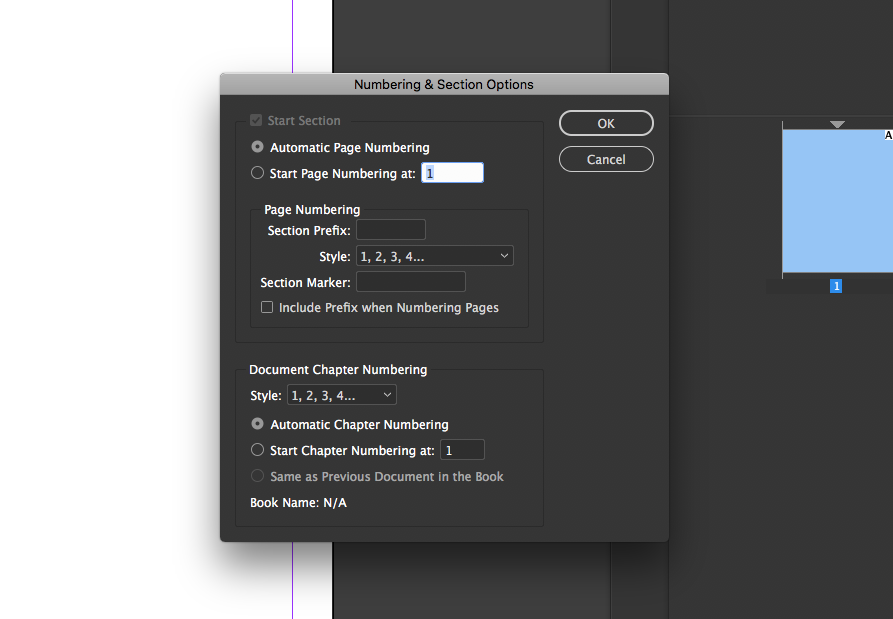
sounds like you want to use the Numbering and section options. see below. If you leave it in the default of "automatic page number" it will renumber things for you once in the book panel.

double click the triangle over the page thumbnail ( in my screenshot below) to access this panel.

Screen Shot 2018-06-21 at 3.21.22 PM.png

If you have Lynda.com you can watched a detail description of this panel here:

Using section markers

Translate
Mentor ,
Jun 21, 2018 Jun 21, 2018

sounds like you want to use the Numbering and section options. see below. If you leave it in the default of "automatic page number" it will renumber things for you once in the book panel.

double click the triangle over the page thumbnail ( in my screenshot below) to access this panel.

Screen Shot 2018-06-21 at 3.21.22 PM.png

If you have Lynda.com you can watched a detail description of this panel here:

Using section markers

Translate
Report
Community guidelines
Be kind and respectful, give credit to the original source of content, and search for duplicates before posting. Learn more
community guidelines
Community Expert ,
Jun 21, 2018 Jun 21, 2018

I'm not clear from your question, Marie, if you are inquiring about page numbers (which Jonathan addressed above) or chapter numbers. I'm thinking chapter numbers, but both are covered here:

Learn how to number pages, chapters, and sections in InDesign

Work through it and let us know if you have any questions.

As for putting the title in the running head, if you mean the chapter titles (and not the book title), be sure to create a paragraph style for the chapter titles and then you can call them into the headers for each chapter by adding a Running Header (Paragraph Style) variable to the master pages. Details here:

Learn how to number pages, chapters, and sections in InDesign—scroll down to "Create variables for running headers and footers".

Work through it and let us know if you have any questions.

~Barb

Translate
Report
Community guidelines
Be kind and respectful, give credit to the original source of content, and search for duplicates before posting. Learn more
community guidelines
Adobe Employee ,
Jun 25, 2018 Jun 25, 2018
LATEST

Hi Marie,

I would like to know if the steps suggested above worked for you, or the issue still persists.

Kindly update the discussion if you need further assistance with it.

Thanks,

Srishti

Translate
Report
Community guidelines
Be kind and respectful, give credit to the original source of content, and search for duplicates before posting. Learn more
community guidelines